AI FinOps · Explainer
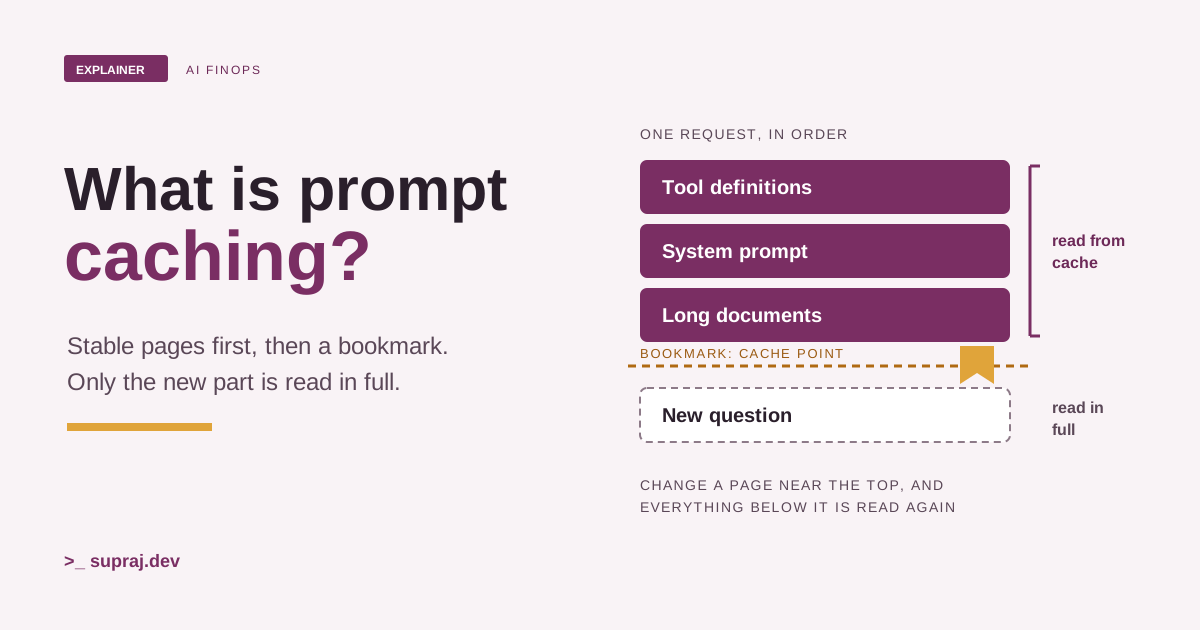
What is prompt caching?Think of a bookmark.
Much of what you send a model is the same on every call. Prompt caching lets the provider skip that part, and charge you less for it.
In Where do your AI tokens go?, we found that much of an AI bill is text you never typed. The system prompt, the tool definitions, the documents and the whole conversation so far go out again with every call. That article ended with a list of levers, and called caching one of the lowest-risk ones, because it doesn't change what the model is asked.
This article is that lever, in full. What gets cached, why the order of your prompt decides whether it works, how to read hits and misses in the usage object, how long a cache lives, what writes and reads cost, and when caching doesn't help at all.
I'll use one picture all the way through: a book with a bookmark. Every fact about the providers here comes from their own documentation, read on 18 November 2026. These pages change often, so check them before you rely on a number.
01 / What gets reused
What does prompt caching actually reuse?
Start with the book. Imagine that every time you ask a reader a question, you have to hand over the whole book, with your question written on the last page. The reader starts at page 1 and reads to the end before answering. Tomorrow you hand over the same book with a new last page, and the reader starts at page 1 again.
That's how a model API works. Each call sends the full context, and the model processes it from the first token. Prompt caching is the bookmark. If the opening pages are the same as a book the reader saw a few minutes ago, the reader opens at the bookmark and reads only the new pages.
OpenAI's docs describe it in one line: prompt caching reuses work when requests share the same prompt prefix. [2] A prefix is the unchanged tokens at the beginning of a prompt. [2] Anthropic describes it as letting the API resume from specific prefixes in your prompts. [1]
So what can sit in that prefix? The docs list the same kinds of content.
-
Tool definitions. Anthropic lists the
toolsarray, and OpenAI lists tool definitions. [1] [2] -
The system prompt. Anthropic's
systemblocks, and OpenAI's developer messages. [1] [2] - Long documents and images. Both list images and documents in the conversation. [1] [2]
- Earlier turns. User and assistant messages, tool calls and tool results. [1] [2]
One thing it never stores is the answer. Anthropic says the response you receive is identical to what you would get without prompt caching. [1] OpenAI says caching doesn't change how the model generates output, and identical requests aren't guaranteed identical outputs. [2] The model still writes a fresh reply every time.
- In the book
- You hand over the whole book each time. The bookmark lets the reader skip the pages they read a few minutes ago.
- In the system
- Each call resends the whole prompt. Caching lets the provider skip the prefix it processed recently.
02 / Why order matters
Why does the order of your prompt matter?
Because a prefix has to match exactly, from the very first token. Anthropic says cache hits require 100 percent identical prompt segments, including all text and images up to the cache point. [1] OpenAI says the entire rendered prefix has to match. [2]
Back to the book. Change one word on page 3, and the reader can't trust a bookmark on
page 80. Everything from page 3 onward is now a different book. The same happens in a
prompt. Anthropic builds the prefix in a fixed order: tools, then
system, then messages. A change at one level invalidates that
level and every level after it. [1] So editing a tool
definition invalidates the entire cache. [1]
That gives you the one rule that matters most: stable content first, changing content last. All three providers say a version of it.
- Anthropic: put static content (tool definitions, system instructions, context, examples) at the beginning of your prompt. [1]
- OpenAI: put stable developer instructions and shared reference material first, and move timestamps or user-specific content to the end. [2]
- Google: try putting large and common contents at the beginning of your prompt. [3]
The classic mistake is a timestamp at the top. Anthropic's docs walk through it: a large static system prompt, then a block with the current time and the user's message, with the cache point on that changing block. The time differs on every request, so the prefix never matches. You pay for a fresh cache write on every request and never get a read. [1] Figure 1 in the next chapter lets you try it.
Some changes are less obvious. These can also break the cache:
-
On Anthropic, changing
tool_choice, adding or removing images, or changing the thinking settings. [1] -
On OpenAI, changing the model, the tools, or settings such as
reasoning.effort. [2] - Tool-call JSON whose key order shifts between calls. Anthropic warns that some languages, such as Swift and Go, randomise key order when converting to JSON. [1]
Conversations follow the same rule. OpenAI's advice is to append new messages rather than rewrite earlier turns, because summarising, compacting or truncating the history changes the prefix and resets cache reuse. [2] That's a real trade-off with the "trim the context" lever from the last article. OpenAI's own answer is to compare total input cost before and after, because fewer input tokens can still save money even when the cache-hit rate falls. [2]
- In the book
- Change a word on page 3 and the bookmark on page 80 is useless. The reader starts again from page 3.
- In the system
- Change one token near the start and everything after it is a miss, however much of it stayed the same.
03 / Hits and misses
How do you know you got a cache hit?
Anthropic's docs describe the check in three steps. The system looks for the prompt prefix, up to the cache point, in the cache from a recent request. If it finds it, it uses the cached version, which cuts processing time and cost. If not, it processes the full prompt and caches the prefix once the response starts. [1] The first case is a cache hit. The second is a cache miss, and it ends in a cache write.
You don't have to guess which one you got. It's on the meter, in the usage object from the last article. On Anthropic's Messages API there are three input fields. [1]
cache_read_input_tokens: tokens read from the cache. That's the hit.cache_creation_input_tokens: tokens written to the cache on this call.input_tokens: tokens after the last cache point, which aren't cached.
The total input is the sum of all three. [1] If both cache fields are 0, the prompt wasn't cached. [1]
OpenAI reports it differently. Reads are in
usage.input_tokens_details.cached_tokens and writes are in
usage.input_tokens_details.cache_write_tokens.
[2] In the docs' example, input_tokens is
12,000, with 4,000 cached and 7,000 written, which leaves 1,000 ordinary input tokens. So
here the cache counts sit inside input_tokens.
[2] On Gemini's generateContent API, the
number of tokens that were cache hits is in the response's
usage_metadata. [3]
The number to watch over time is the cache-hit rate. OpenAI defines the token cache-hit rate as total cached tokens divided by total input tokens, grouped by user, workspace, day or whatever helps. [2] Anthropic's advice is to analyse cache hit rates regularly and adjust. [1]
Figure 1 / One request, part by part
Send the same request a few times, then break it.
The bookmark sits after the reference document. Everything before it is the stable prefix.
- cache_read_input_tokens
- 0
- cache_creation_input_tokens
- 0
- input_tokens
- 0
- Total input
- 0
Nothing sent yet. Press "Send request 1" to see the first call.
- In the book
- The reader tells you how many pages they skipped, how many they bookmarked, and how many they read in full.
- In the system
- The usage object reports cache reads, cache writes and ordinary input on every response.
04 / How long it lasts
How long does a cache last?
Not long, by default. Bookmarks that nobody uses get pulled out. The time a cache entry lives is its TTL, short for time to live. [3] Here's what each provider's page says as of 18 November 2026.
- Anthropic. The default lifetime is 5 minutes, and it's refreshed at no extra cost each time the cached content is used. A 1-hour lifetime is available at extra cost. [1]
-
OpenAI, GPT-5.6 and later. In the Responses API,
prompt_cache_options.ttlsets a minimum lifetime of"30m"(the default) or"12h". A read refreshes coverage to at least 30 minutes after it. [2] Earlier models useprompt_cache_retentioninstead. [2] - Google Gemini. With explicit caching, you choose the TTL. If you don't set one, it defaults to 1 hour, and you can update it later. [3] For implicit caching, Google's advice is to send requests with a similar prefix in a short amount of time. [3]
One detail on Anthropic catches people out. The lifetime counts from the start of the request that writes or reads the entry, not from the end of its response. If a response takes 4 minutes to stream, the follow-up has about 1 minute left to reuse the 5-minute cache. [1]
A longer lifetime isn't always better, because it costs more to write (next chapter). Anthropic's guidance: if you send a prompt more often than every 5 minutes, stay on the 5-minute cache, since every use refreshes it for free. Use the 1-hour cache for prompts that come back less often than every 5 minutes but more often than every hour. [1]
Neither Anthropic nor OpenAI lets you clear the cache by hand. Entries expire on their own. [1] [2] Gemini's explicit caches can be deleted. [3]
- In the book
- An unused bookmark is pulled out after a while. Each time someone opens the book at it, the clock starts again.
- In the system
- An entry expires after its lifetime. A cache read refreshes it, at no extra cost on Anthropic.
05 / Writes and reads
What does a cache write cost, and what does a read save?
Putting a bookmark in takes a moment longer than just reading. Opening at it saves most of the reading. Prompt caching is priced the same way: a write costs a little more than normal input, and a read costs far less. All prices below are as of 18 November 2026, as multiples of the model's normal input price.
| Provider | Cache write | Cache read |
|---|---|---|
| Anthropic [1] | 1.25× for the 5-minute lifetime, 2× for 1 hour | 0.1× on most models. 0.05× on Claude Opus 5.5 and Sonnet 5.5. 0.025× on Claude Fable 5.2, Mythos 5.2, Fable 5.1 and Mythos 5.1. |
| OpenAI, GPT-5.6 and later [2] | 1.25× for 30 minutes, 2.5× for 12 hours (Responses API) | 0.1× on most of these models. 0.05× on GPT-6.2 Astra, GPT-6.2 Sol, GPT-6.1 Sol and GPT-6.1 Terra. |
| OpenAI, earlier models [2] | No additional cache-write charge | A model-dependent cached-input rate |
Two details from the docs. On OpenAI, these are total rates, not surcharges: each input token is billed at the uncached, cached or cache-write rate. [2] On Anthropic, the cache points themselves are free, and the caching multipliers stack with other discounts such as the Batch API. [1]
Gemini prices it another way. Implicit caching passes on savings automatically, but with no cost-saving guarantee. Explicit caching does guarantee savings. [3] An explicit cache is billed on two things: the cached tokens, at a reduced rate each time a prompt uses them, and storage time, based on the TTL. [3] For example, Gemini 3.8 Flash's paid tier lists $0.75 per million input tokens, $0.075 per million for context caching, and $0.50 per million tokens per hour of storage, through 31 December 2026. [4]
What does that add up to? OpenAI's docs do the sum. At a 0.1× read rate with 30-minute writes, writing a prefix once and reusing it once costs 1.35× its normal input cost, instead of 2× without caching. Over ten requests, one write and nine reads cost 2.15×, instead of 10×. [2] Try other counts in Figure 2.
Figure 2 / Write once, read many
How many requests share the prefix?
Without caching10.00×
With caching2.15×
Ten requests: one write and nine reads cost 2.15× the prefix's normal input price, instead of 10×.
Now drag the slider to 1. With a single request, caching costs 1.25× instead of 1×. You paid for the write and never used it. That's the whole trade: caching rewards prefixes that really come back.
- In the book
- A bookmark costs a moment to place and saves most of the reading every time you come back to it.
- In the system
- A write costs a little more than normal input. A read costs a small fraction of it.
06 / Switching it on
Do you have to switch it on?
It depends on the provider. Some readers place the bookmark for you. With others, you tell them where it goes. The marker you place is called a cache breakpoint: it marks the end of a prefix that can be saved and reused. [2]
Anthropic: you opt in
On the Messages API, you opt in with cache_control. There are two ways.
[1]
-
Automatic caching. Add one
cache_controlfield at the top level of the request. The system puts the cache point on the last cacheable block and moves it forward as the conversation grows. [1] -
Explicit cache breakpoints. Put
cache_controlon individual content blocks, up to 4 of them, to control exactly what is cached. [1]
This is the automatic version, from Anthropic's docs:
"cache_control": {"type": "ephemeral"}Automatic caching has a catch. It puts the cache point on the last block. If that block changes on every request, such as the incoming message with a timestamp, Anthropic says to use an explicit breakpoint on the last block that stays the same instead. [1] On Anthropic's Managed Agents product, caching is always on. [1]
OpenAI: on by default
Prompt caching is enabled by default for supported OpenAI models. [2] On GPT-5.6 and later you can also choose the mode. [2]
- Implicit mode. OpenAI places a breakpoint at the end of the latest eligible message, such as a user message. [2]
-
Explicit mode. Set
prompt_cache_options.modetoexplicitand mark each breakpoint withprompt_cache_breakpoint: { "mode": "explicit" }. Each request can create up to four cache writes. [2]
OpenAI's docs list the same trap. If each request is a fixed developer message followed by a changing user message, implicit mode writes through the changing part, and the next request can't reuse it. The fix is an explicit breakpoint after the fixed part. [2]
Google Gemini: implicit by default, explicit as an object
Implicit caching is on by default for Gemini 2.5 and newer models, with nothing to
configure. [3] Explicit caching works differently from the
other two. You create a cache object holding your content, with a TTL, and then point
later requests at it by name. [3] As of 18 November 2026,
explicit caching is in beta, available under v1beta, and not supported for
Gemini 4 models. [3] When a request uses an explicit cache,
implicit caching doesn't apply to it. [3]
- In the book
- Some readers bookmark for you. Others wait for you to say where. Either way, the bookmark belongs at the end of the pages that never change.
- In the system
-
OpenAI and Gemini cache by default. Anthropic needs
cache_control. All three offer an explicit option on supported models.
07 / The KV cache link
Isn't this just the KV cache?
Nearly, and the names make it easy to mix them up. In KV Cache Explained, the model keeps notes for every token it has read, a key and a value at every layer, so it doesn't work out earlier tokens again for each new word. Those notes live inside one request.
OpenAI's caching page makes the link directly. When a model processes input tokens, it calculates intermediate states called key-value (KV) states. Prompt caching keeps that state for a reusable prefix, so a later request with the same prefix can reuse it instead of processing those tokens again. The cache stores KV tensors, not the tokens themselves. [2] Anthropic's data retention section says the same kind of thing: KV cache representations and cryptographic hashes of cached content are held in memory only. [1]
So the KV cache is the notes. Prompt caching is keeping those notes after the request ends, so the next request with the same opening can start from them. If you run your own model server, this is the idea behind prefix caching, which I covered in PagedAttention Explained.
| KV cache | Prompt caching | |
|---|---|---|
| What it is | The model's notes on each token, while it works on a request | Those notes for a prefix, kept for later requests |
| Where you see it | Inside the model server | In prices, lifetimes and usage fields |
| Shared with | One request | Later requests in the same organisation, with an identical prefix |
That last row matters. Caches aren't shared across organisations, even for identical prompts. [1] [2] On the Claude API, Anthropic also isolates caches by workspace. [1] And because the notes are physical data on real machines, OpenAI points out that a request can reuse a cached prefix only if it reaches a machine holding a matching entry. [2]
- In the book
- The reader's margin notes are the KV cache. Prompt caching keeps the notes with the bookmark for the next copy.
- In the system
- The provider keeps the KV state of your prefix, so a later identical prefix doesn't have to be processed again.
08 / When it doesn't help
When doesn't prompt caching help?
A bookmark is no use in a thin leaflet, in a book whose first pages change every time, or in a book nobody opens again until next week. Here are the same cases in API terms.
- The prefix is too short. Every provider has a minimum. On the Claude API, it's 512 tokens for models including Claude Opus 5.5, Sonnet 5.5 and Haiku 5.5, and up to 4,096 for some older models. Shorter prompts are processed without caching, with no error. [1] On OpenAI's GPT-5.6 and later, it's 1,024 tokens. [2] Gemini's implicit caching table lists 4,096 tokens for the Gemini 4 and Gemini 3.x models on it, and 2,048 for Gemini 2.5. [3] All as of 18 November 2026.
- The start keeps changing. A timestamp, a user's name or a shuffled tool list near the top means every request is a miss. That's chapter 2.
- Traffic doesn't repeat in time. If the same prefix comes back after the lifetime has run out, every call pays for a new write.
- Requests arrive all at once. On Anthropic, a cache entry is only available after the first response starts. For hits on parallel requests, wait for the first response before sending the rest. [1]
- The bill is mostly output. Caching changes the price of input tokens. On OpenAI, input tokens are billed at the uncached, cached or cache-write rate. [2] Anthropic's caching price table has cache write and hit prices for input, and a single output price for each model. [1] If your requests are short and your answers are long, look at the output levers first.
- Small turns in agent loops on Gemini 4. Gemini caches the full previous request only if the new request adds at least 2,050 tokens. For smaller additions, it re-processes the last 2,050 tokens of the previous request at the standard input rate. [3]
Rate limits are worth a line too, because the providers say different things. OpenAI says cached input tokens still count toward tokens-per-minute limits. [2] Anthropic says cache hits are not deducted against your rate limit. [1] Check your own provider's page before you plan capacity around caching.
And one case where "short" isn't the end of the story. OpenAI's docs describe a minimum length cost trap: if a shared prefix is just below the minimum, adding useful, stable instructions or examples to reach it can cost less overall, because the reads are so cheap. They also say to measure it and check that behaviour stays stable. [2] Anthropic makes the same suggestion for prompts just short of the minimum. [1]
- In the book
- Bookmarks help with long books that you reopen soon, at the same opening pages.
- In the system
- Caching helps long, stable prefixes that repeat within the lifetime. It does nothing for output.
09 / A checklist
So where do you start?
If you run an AI feature with a long system prompt, tools or documents, here is a short checklist built from everything above.
- Measure first. Log the cache fields from every response with the feature label from the last article, and compute the cache-hit rate per feature.
- Reorder the prompt. Tools, then the system prompt, then documents, then the conversation. Move dates, user names and anything per-request to the end.
- Place the cache point. On Anthropic, Anthropic's advice is to start with automatic caching for multi-turn conversations, and use explicit breakpoints when parts change at different rates. [1] On any provider, if the last block changes every time, mark the end of the stable part yourself.
- Match the lifetime to your traffic. Pay for the longer lifetime only when the same prefix comes back after the default one has run out.
- Check the hit rate again. If it doesn't move, the prefix is changing somewhere. Anthropic's cache diagnostics compare consecutive requests and report where the prefix diverged. [1] OpenAI has a Prompt Cache Diagnostics tool for diagnosing cache misses. [2]
The last article called caching one of the lowest-risk levers, because it doesn't change what the model is asked. As you've seen, most of the work is putting things in the right order.
- In the book
- Put the pages that never change at the front, and the bookmark right after them.
- In the system
- Order the prompt from stable to changing, mark the end of the stable part, and measure.
Keep these names
A small glossary
- Prompt prefix
- The unchanged tokens at the beginning of a prompt. [2]
- Prompt caching
- Reusing the work on a prefix that a recent request already processed, at a lower input price. [1] [2]
- Cache hit
- A request whose prefix matches a cached entry, so the cached version is used. [1]
- Cache miss
- A request with no matching entry. The full prompt is processed, and the prefix is written to the cache. [1]
- Cache write
- Saving a prefix to the cache. Priced above normal input on Anthropic and on OpenAI's GPT-5.6 and later. [1] [2]
- Cache read
- Using a cached prefix. Priced at a fraction of normal input. [1] [2]
- Cache breakpoint
-
A marker at the end of a prefix that can be saved and reused.
[2] On Anthropic, set with
cache_control. [1] - TTL (time to live)
- How long a cache entry lasts before it's deleted. [3]
- Implicit caching
- Caching the provider does without you marking anything, such as Gemini 2.5 and newer. [3]
- Explicit caching
- Caching where you choose what's cached: breakpoints on Anthropic and OpenAI, a cache object on Gemini. [1] [2] [3]
- KV cache
- The key-value states a model computes for the tokens it has processed. Prompt caching keeps them for a prefix. [2]
- Cache-hit rate
- Total cached tokens divided by total input tokens. [2]
Check the concept
Can you explain it back?
1. Does prompt caching store the model's answer and send it back next time?
No. It reuses the work on the start of the prompt. The model writes a fresh answer every time.
2. Your system prompt starts with today's date and time. What happens?
The prefix is different on every request, so it never matches. You pay for a cache write each time and never get a read. Move the date to the end.
3. On Anthropic, both cache_read_input_tokens and
cache_creation_input_tokens are 0. What does that tell you?
The prompt wasn't cached. A common reason is that it's below the model's minimum cacheable length.
4. You write a prefix to the cache and never reuse it. Did you save money?
No. A write costs more than normal input, such as 1.25× for Anthropic's 5-minute cache. Caching only saves money once the prefix is read again.
5. How is prompt caching related to the KV cache?
The KV cache is the model's notes on each token during a request. Prompt caching keeps those notes for a prefix, so a later request with the same prefix can reuse them.
Continue the thread
Where to go next.
Start with the meter in Where do your AI tokens go?, if you haven't read it. To see what is being cached under the hood, read KV Cache Explained, then PagedAttention Explained for how a server shares identical prefixes between users. For the bigger picture of serving, there's the Inference Engineering Masterclass.
Read further
Sources
All sources accessed 18 November 2026. Prices, minimum lengths, lifetimes and field names are as those pages showed them that day.
- Anthropic: Prompt caching. The old docs.anthropic.com address redirects here.
- OpenAI: Prompt caching. The platform.openai.com address redirects here.
-
Google AI for Developers: Context caching
(the
generateContentview of the page). - Google AI for Developers: Gemini Developer API pricing.