Cloud and DevOps · Explainer
Backups are not disaster recoveryDesign restores you can prove, then drill them.
"We have backups" answers one question: does a copy exist? Disaster recovery answers a harder one. How fast can the business run again, from what point in time, if the account that holds the copies is gone too?
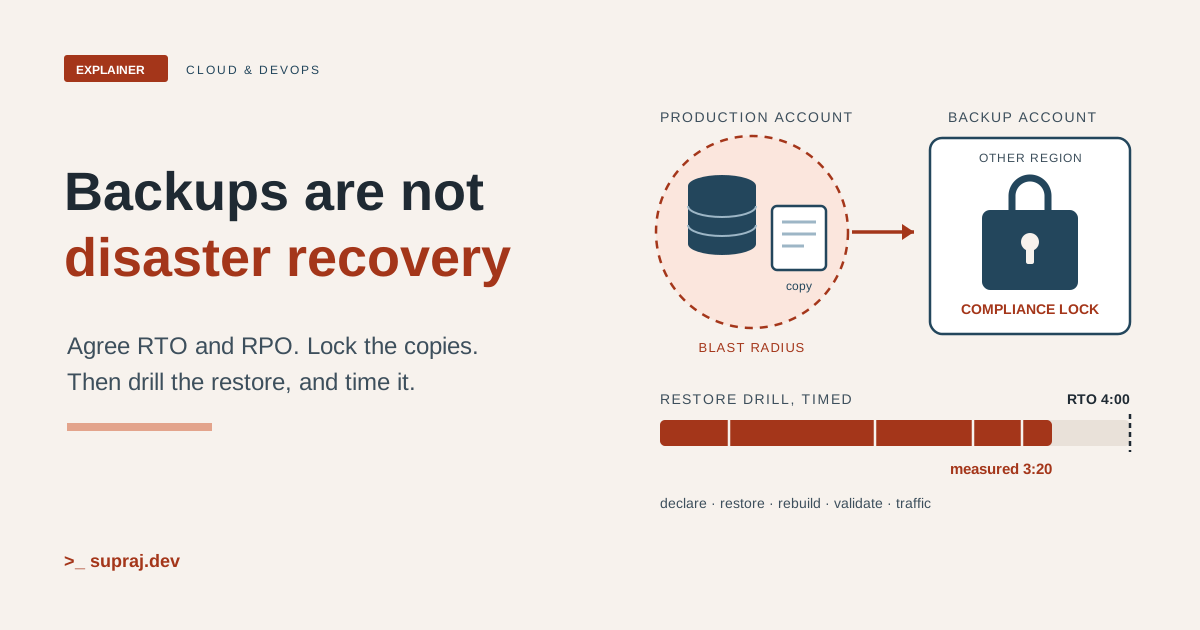
Picture a company that has backed up its databases every night for years. The dashboard is green. Then two things happen in the same quarter. An auditor asks for evidence that the main customer system can be restored, and how long that takes. And a ransomware scare makes the security team ask a worse question: if an attacker got admin rights in the production account, could they delete the backups too?
Nobody can answer either question, because nobody has ever restored the whole system. This article is the path from there to an answer you can show: targets agreed with the business, a strategy that meets them, copies that can't be deleted, and drills that measure the real time.
We'll carry one picture through it. A family keeps copies of its important papers. A fire is the disaster. The question isn't whether the copies exist. It's whether the family can be living normally again, somewhere, by Monday.
01 / The gap
Why isn't "we have backups" an answer?
A backup is a copy. Recovery is a working system, with its data, serving users again. The gap between the two is everything a restore needs that the copy doesn't contain, plus every assumption nobody has checked.
AWS's Well-Architected guidance says it plainly: backups "can be incomplete, corrupted, or slower to restore than your recovery targets allow, and you may only find out when you try to restore the backup." [8] Its list of common mistakes reads like our company. Teams restore a backup but never query the data. They assume a backup exists without checking. They assume restore time fits the target without measuring it. [8]
The ransomware question opens a second gap. The same guidance warns that a ransomware or destructive event "can breach the production environment or its identities and then delete or tamper with the backup copies you rely on to recover." [9] A backup that stolen admin credentials can delete is not a recovery plan.
It also isn't only an IT question. AWS's disaster recovery whitepaper says the DR plan should be a subset of the business continuity plan, "not a standalone document". [1] And it sums up the whole problem in one line: "the only error recovery that works is the path you test frequently." [4]
- In the house
- A drawer full of photocopies. Nobody has checked they're readable, and the drawer is in the same house that might burn.
- In the system
- Nightly snapshots in the production account, never restored end to end, and deletable by anyone with admin rights there.
02 / The targets
What are RTO and RPO, and who chooses them?
Two numbers set the target. The recovery time objective (RTO) is "the maximum acceptable delay between the interruption of service and restoration of service". The recovery point objective (RPO) is "the maximum acceptable amount of time since the last data recovery point". [1] In plain words: how long you can be down, and how much recent data you can afford to lose. Google Cloud's planning guide uses the same two metrics, and notes that RPO is only a length of time: "it doesn't address the amount or quality of the data that's lost." [23]
The two are independent. "A workload can tolerate a long RTO but a short RPO, or the reverse," so an architecture that meets one doesn't automatically meet the other. [5] An internal reporting tool might be fine offline for a day. A payments ledger might cope with an hour offline but almost no lost transactions.
The business chooses them, with engineering. AWS's steps split the work: the business side supplies the impact data, the technical side supplies what's feasible, and "both must agree on the final objectives". Group systems into tiers such as critical, high, medium and low, give each tier a target RTO and RPO, then place every system in a tier. [5]
Three traps catch teams here.
- Zero isn't free. Targets of zero downtime or zero data loss "are often unachievable and always expensive". [5]
- Dependencies cap you. "A workload cannot recover faster than the downstream dependencies it relies on." [5] If the identity service takes four hours to come back, the app that needs it can't promise one hour.
- The clock starts before you act. With a one-hour RTO, the whitepaper says you must detect the incident, notify people, escalate, declare a disaster and recover, all within that hour. [3]
Impact can also depend on the calendar. The whitepaper's example is payroll: very high impact just before payday, low just after. And if recovery would cost more than the failure, it says not to build it, unless something like regulation requires it. [1]
- In the house
- How long can the family live in a hotel? How many weeks of receipts can it afford to lose? Only the family can answer, though the builder can say what's possible.
- In the system
- Each workload gets a tier, with an RTO and RPO agreed by its business owner and its engineering team, and written down.
03 / The options
Which recovery strategy fits each system?
AWS groups disaster recovery into four strategies. The Well-Architected Framework lists them "in increasing order of cost and decreasing order of RTO and RPO". [6]
| Strategy | What runs in the recovery site | RPO | RTO |
|---|---|---|---|
| Backup and restore | Copies of data and applications. You rebuild on demand. | Hours | Up to a day |
| Pilot light | Data replicated and live. Compute stays dormant until needed. | Minutes | Tens of minutes |
| Warm standby | A scaled-down but fully working copy, scaled up on failover. | Seconds | Minutes |
| Multi-site active/active | Live traffic served from more than one Region. | Toward zero | Toward zero |
The difference between the middle two is readiness. Pilot light "cannot process requests without additional action taken first, whereas warm standby can handle traffic (at reduced capacity levels) immediately." Active/active is "the most complex and costly approach". [2]
Two rules apply to every row.
Replication is not a backup. "Continuous replication copies corruption and deletion to the recovery site as faithfully as it copies good data," so every strategy also needs point-in-time backups or versioning. [6] That's why even active/active can't promise zero against a data disaster: recovery from corruption or deletion "will always be greater than zero", and the recovery point will be from before the problem was discovered. [2]
You may need less than you think. For a well-architected workload where the disaster is the loss of a data centre, backup and restore may be enough. A multi-AZ design in one Region "may already meet much of your risk mitigation needs", and for less critical workloads, having no DR at all can be a valid, informed choice. [1] [2] The rule is to choose "the least costly one that satisfies both" targets. [6]
Figure 1 · Pick the cheapest strategy that meets both targets
- Backup and restoreRPO hours · RTO up to a day
- Pilot lightRPO minutes · RTO tens of min
- Warm standbyRPO seconds · RTO minutes
- Active/activeRPO and RTO toward zero
Filled: the cheapest fit. Shaded: also meets the targets, at higher cost. Dashed: too slow for at least one target.
Backup and restore meets an RTO of up to a day and an RPO of hours. It's the cheapest fit. Keep point-in-time copies whatever you choose.
Google Cloud's guide frames the same idea with three patterns, cold, warm and hot, which "indicate how readily the system can recover when something goes wrong." [23]
- In the house
- Papers in a bank box and a plan to rent later; a spare flat where the post arrives but the beds aren't made; a small flat you could sleep in tonight; or two homes lived in all the time.
- In the system
- Backup and restore, pilot light, warm standby and active/active, in rising order of cost and falling RTO and RPO.
04 / The failure modes
Why do backups fail when you need them?
Four reasons come up again and again in the guidance.
They were never tested
An untested restore time is a guess. The same goes for the recovery site: its capacity "might no longer be able to tolerate the load", or its service quotas "might not be sufficient". [4]
They sit inside the blast radius
If the copies live in the production account, whoever controls production controls the copies. For pilot light, AWS recommends a different account per Region "to provide the highest level of resource and security isolation (in the case compromised credentials are part of your disaster recovery plans as well)". Its cross-account backup "helps protect from disaster events that include insider threats or account compromise." [2] The same logic applies to Regions: a copy in the Region that failed can't help you recover from that Region's failure.
The wrong people can delete them
Well-Architected names this anti-pattern directly: managing backup governance "with the same identities that administer production, leaving no trust boundary between them." It adds a subtler one: relying on snapshots that can't be modified, without deletion protection, because they "can still be removed". [9]
The data restores, but the system doesn't
Data is only part of a system. "In addition to data, you must redeploy the infrastructure, configuration, and application code in the recovery Region," and you should back up code and configuration too, including the AMIs you launch from. [2] The failures that bite are the things nobody thought of as data:
- Infrastructure and configuration. Without infrastructure as code, a restore in the recovery Region "may be complex", which can push you past your RTO. [2] Drift makes it worse: changes land on the primary but not the recovery site, and drift "occurs without notifications or alarms". [26]
- Quotas and capacity. They "are set per Region and do not replicate automatically." [26]
- Keys and roles. AWS Backup's restore testing troubleshooting lists failures like "Access denied to KMS key" and "IAM Role cannot be assumed by AWS Backup". [14] For most resource types, a copy to another account needs a customer managed key shared with that account, because AWS managed key policies can't be shared across accounts. [12]
- Metadata that stays at home. AWS Backup records an EC2 instance's type, VPC, security group and IAM role, but that metadata "is only used when restoring the EC2 backup to the same AWS Region." [2]
- Traffic and people. Traffic has to move, for example with Route 53 or Global Accelerator. [2] People have to get in: Google Cloud's guide says not to wait for a disaster to check users can sign in to the DR environment. [23]
- Secrets. After a cyber event, Well-Architected says to rotate "all credentials that were active during the event window before the environment returns to production." [9] So the way you recover and rotate secrets belongs in the plan, not in someone's memory.
- In the house
- The copies were in the same house. The burglar had the bank box key. You saved the deeds but not the alarm code, the utility accounts or the spare keys.
- In the system
- Copies in the production account and Region, deletable by production admins, with no code, keys, quotas, roles or DNS plan ready in the recovery site.
05 / Isolation
How do you keep copies an attacker can't delete?
Well-Architected's cyber resilience practice defines three properties. Deletion protection: "No principal can remove recovery points or shorten retention within the protection period." Logical isolation: "A breached production administrator account cannot reach or govern the backup storage." And validated safety, which Chapter 6 covers. [9] AWS gives you four tools for the first two.
Vault Lock: governance or compliance mode
An AWS Backup vault can have one vault lock. In governance mode, users
with enough IAM permissions can remove the lock. In compliance mode,
once a grace time ends, "the vault and its lock are immutable and cannot be changed or
deleted by any user or by AWS" while it holds recovery points. The grace time must be at
least 3 days. In the API it's ChangeableForDays, from 3 to 36,500, and
including it is what makes the lock compliance mode. In a locked vault, if any user,
including the root user, tries to delete a backup or change its lifecycle, AWS Backup
denies it. [11]
# In the backup account: compliance-mode lock with a 3-day grace time.
aws backup put-backup-vault-lock-configuration \
  --backup-vault-name prod-copies \
  --changeable-for-days 3 \
  --min-retention-days 35 \
  --max-retention-days 400

# Check it: look for "Locked": true and the LockDate when the grace time ends.
aws backup describe-backup-vault --backup-vault-name prod-copies
The retention values here are examples. With them set, new backup and copy jobs fail if their retention falls outside the range. Recovery points already in the vault keep their old lifecycle. [11] Use the grace time to check everything, because after it there's no undo. Three cautions from the same page: [11]
- A compliance lock makes cost permanent too. A recovery point with retention set to "Always" will be "retained forever".
-
Vault Lock governs actions through AWS Backup, not Amazon EC2 APIs. EBS snapshot
recovery points can still be shared with
ModifySnapshotAttribute. Denyec2:ModifySnapshotAttributeandec2:ModifySnapshotTierwith IAM policies or SCPs, and exempt the roles your backup plans use. - If the account is closed, AWS suspends it for 90 days, then deletes the vault contents "even if AWS Backup Vault Lock was in place."
Copies in another account and Region
A copy action in the backup plan sends each new recovery point to a vault in a separate
backup account. Both accounts must be in the same AWS Organization, cross-account backup
must be enabled from the management account, and the destination vault's access policy
must allow backup:CopyIntoBackupVault. The destination can't be the default
vault. [12] The plan format follows the AWS Backup CLI
example. [20]
# plan.json, in the production account. 444455556666 is the backup account.
{
  "BackupPlan": {
    "BackupPlanName": "critical-tier",
    "Rules": [
      {
        "RuleName": "nightly",
        "TargetBackupVaultName": "prod-local",
        "ScheduleExpression": "cron(0 5 ? * * *)",
        "StartWindowMinutes": 480,
        "Lifecycle": { "DeleteAfterDays": 35 },
        "CopyActions": [
          {
            "DestinationBackupVaultArn": "arn:aws:backup:eu-west-1:444455556666:backup-vault:prod-copies",
            "Lifecycle": { "DeleteAfterDays": 90 }
          }
        ]
      }
    ]
  }
}

aws backup create-backup-plan --cli-input-json file://plan.json
Two details matter during an incident. AWS Backup doesn't restore directly from one
account into another: you copy the backup into the target account, then restore it
there. And if the destination account later leaves the organization, it keeps the
backups, so AWS suggests an SCP that denies organizations:LeaveOrganization
on it. [12]
Logically air-gapped vaults
A logically air-gapped vault always has a compliance-mode vault lock, and it stores its backups in an AWS Backup service-owned account. You can share it with other accounts through AWS RAM, including accounts in other organizations, and integrate it with multi-party approval so backups can be recovered even if the vault-owning account is inaccessible. Its minimum retention must be at least 7 days. [13]
aws backup create-logically-air-gapped-backup-vault \
  --region us-east-1 \
  --backup-vault-name prod-airgap \
  --min-retention-days 7 \
  --max-retention-days 35
Coverage has gaps. For example, cross-Region copy to or from one isn't currently available for backups that contain Amazon RDS DB instances, and the vault type isn't available in the China or GovCloud (US) Regions. [13] Check the feature availability table for each resource type before you design around it.
S3 Object Lock
For data in S3, Object Lock stores object versions write-once-read-many. In compliance
mode, "a protected object version can't be overwritten or deleted by any user, including
the root user". Governance mode can be overridden by users
who have the s3:BypassGovernanceRetention permission and send the bypass
header. [21] It needs
versioning, and once you enable Object Lock on a bucket you can't disable it or suspend
versioning. [22]
aws s3api put-object-lock-configuration \
  --bucket amzn-s3-demo-bucket \
  --object-lock-configuration '{ "ObjectLockEnabled": "Enabled", "Rule": { "DefaultRetention": { "Mode": "COMPLIANCE", "Days": 50 }}}'
How long to keep them, and which tool first
Set retention to "exceed how long a threat could realistically persist before your organization detects it", not just what compliance requires. Then map each data source to the strongest tool it supports, in this order: "a logically air-gapped vault, then Vault Lock with a cross-account copy, then Amazon S3 Object Lock." [9]
On Google Cloud, the Backup and DR service's backup vault does a similar job with enforced retention. Once its lock's effective date passes, "no one (not even a Project Owner) can decrease the retention period." [24]
- In the house
- A bank box in another town with a time lock that even the family can't open early, rather than one the manager can open on request.
- In the system
- A compliance-mode lock on a vault in a separate account and Region, or a logically air-gapped vault, with retention longer than an attacker could hide.
06 / Proof, on a schedule
How do you prove a restore actually works?
Start with small, automatic restores, then add full drills (Chapter 7). AWS Backup's restore testing "provides automated and periodic evaluation of restore viability, as well as the ability to monitor restore job duration times." You create a plan with a frequency and start time, choose source vaults and a window of eligible recovery points, and pick the latest or a random one. Then you assign resource types. On schedule, AWS Backup restores, records how long it took, and deletes the restored resources after an optional validation window. [14]
It covers Aurora, Amazon DocumentDB, DynamoDB, EBS, EC2, EFS, Amazon FSx, Neptune, RDS,
Redshift and S3. AWS recommends a dedicated account for restore tests, and notes a cost
per restore test, plus the cost of the restore jobs themselves.
[14] Running it in the backup account tests the isolated copy
itself, which is the copy you'd use after an attack. The fields below are from the CLI
reference, and the schedule uses AWS cron syntax, where SUN is a valid
day-of-week. [18] [25]
# In the backup account: weekly test of a random copy from the last 14 days.
aws backup create-restore-testing-plan --restore-testing-plan '{
  "RestoreTestingPlanName": "critical_weekly",
  "ScheduleExpression": "cron(0 3 ? * SUN *)",
  "StartWindowHours": 8,
  "RecoveryPointSelection": {
    "Algorithm": "RANDOM_WITHIN_WINDOW",
    "IncludeVaults": ["arn:aws:backup:eu-west-1:444455556666:backup-vault:prod-copies"],
    "RecoveryPointTypes": ["SNAPSHOT"],
    "SelectionWindowDays": 14
  }
}'

aws backup create-restore-testing-selection \
  --restore-testing-plan-name critical_weekly \
  --restore-testing-selection '{
  "RestoreTestingSelectionName": "rds_critical",
  "ProtectedResourceType": "RDS",
  "IamRoleArn": "arn:aws:iam::444455556666:role/restore-test-role",
  "ProtectedResourceArns": ["*"],
  "RestoreMetadataOverrides": { "DBSubnetGroupName": "restore-test-subnets" },
  "ValidationWindowHours": 4
}'
A few details from the docs. Choosing a random point helps "gauge the general health of
recovery points" in case you ever need an older one. Set
SelectionWindowDays greater than your backup interval plus
StartWindowHours, or edge cases can skip recovery points. The restore role
needs the permissions in AWSBackupServiceRolePolicyForRestores, must be
assumable by AWS Backup, and needs access to the KMS keys. The subnet override is there
because RDS restore tests can fail with "No default subnet detected in VPC" until you
name a subnet group.
[14] [19]
A finished restore is not a usable restore
Add a check that reads the data. AWS's pattern is an EventBridge rule on the completed
restore job, a function that validates the resource, and a call to
PutRestoreValidationResult. The result shows in the console, and "once a
validation status is set, it cannot be changed." [15]
{
  "source": ["aws.backup"],
  "detail-type": ["Restore Job State Change"],
  "detail": {
    "restoreTestingPlanArn": ["..."],
    "status": ["COMPLETED"]
  }
}
What should the check do? Compare checksums with the source at backup time, check row counts and record formats, and look for the most recent transaction. [8] For ransomware, go one step further. Well-Architected says to validate "backup safety, not only recoverability", and to choose recovery points against an event timeline built from CloudTrail, VPC Flow Logs and GuardDuty findings, rather than defaulting to the newest backup. GuardDuty Malware Protection for AWS Backup can scan supported resource types, but scanning alone isn't enough, because data can be corrupted or encrypted in ways that match no malware signature. [9]
For the auditor, restore testing integrates with AWS Backup Audit Manager, which can check whether restored resources completed within your target restore time. [14]
- In the house
- Every week, the bank pulls one random paper from the box, and you check you can read it and that it's the latest version.
- In the system
- A restore testing plan restores a random recent copy in the backup account, a function checks the data, and the result and duration are recorded.
07 / The drill
What does a full recovery drill look like?
Restore tests prove pieces. A drill proves the whole system and the team. Well-Architected defines a game day as "a scheduled exercise where your team responds to a simulated failure in a production-like environment, using the same people and procedures you would use for a real event." It says to include business decision-makers, tell stakeholders the date and scenarios in advance, keep the review blameless, and feed what you learn back into runbooks. [10]
The runbook should be commands, not intentions. Google Cloud's guide gives the test: "Run the restore script" is too general, while "Open a shell and run /home/example/restore.sh" is precise. [23] Here's the shape of a ransomware drill, where the scenario is that the production account can't be trusted.
Figure 2 · A timed drill against a 4-hour RTO
Toy numbers · RTO target 4:00 · measured 3:20 · each bar runs from the step's start to its end; the time is when it ended
- 1. The scenario starts at 0:00, the simulated moment of the incident, not when the team starts typing. Detection, paging and the decision to invoke DR all count. Production credentials are treated as compromised and not used.
- 2. Don't just take the newest backup. Check candidate points against a timeline from CloudTrail, VPC Flow Logs and GuardDuty, and pick one from before the attacker was active. That choice sets the RPO you actually achieve.
- 3. From the locked vault in the backup account, copy the recovery point into the recovery account if needed, then restore it there. This is usually the longest step, and it grows with data size.
- 4. Deploy networking, compute, IAM roles, KMS keys, secrets and configuration from infrastructure as code. Check quotas in the recovery Region. Anything not in code is found here, the hard way.
- 5. Run the same validation as the restore tests: checksums, row counts, the latest record. Have real users sign in. A system nobody can log in to isn't recovered.
- 6. Switch traffic with a pre-built, scripted step, such as DNS failover. Prefer a manually started but automated switch, using data plane operations.
- 7. Stop the clock when users are served. Record measured RTO and achieved RPO, list everything that broke, and fix the runbook. Before going back to normal, rotate the credentials that were active in the event window, and plan the failback.
- The whole drill: 3 hours 20 minutes against a 4-hour target, measured from the simulated incident. The numbers are invented for illustration. Yours come from your own drill, and the list of what broke matters more than the total.
Measure honestly. AWS suggests comparing elapsed time with the RTO, using CloudTrail timestamps for when the restore started and your validation logic for when it finished. AWS Backup jobs also carry timestamps. [8] But since detection and declaration sit inside the RTO, start the drill clock at the simulated incident. [3]
Where should drills run? Run restore tests in an isolated environment "so a drill never affects production". [8] For failover, Well-Architected says to test complex or critical paths in production, because a lower environment "does not reproduce the scale, traffic, and dependency behavior that break recovery." [7] A sensible order is isolated drills first, then production failovers once the runbook holds.
And plan the way home. Failback is its own risk: the recovery site now holds the current data, so resynchronize the primary from it before switching back. [6]
- In the house
- A practice weekend. Everyone leaves with nothing, collects the box from the bank and lives in the spare flat until Sunday, with a stopwatch running from the moment the alarm went off.
- In the system
- A scheduled game day that restores from the isolated copy, rebuilds from code, validates, moves traffic, and records measured RTO and RPO.
08 / Every day
What should you watch between drills?
AWS Backup publishes metrics to the AWS/Backup namespace in CloudWatch every
5 minutes. [16] It also sends job events to EventBridge on a
best-effort basis every 5 minutes. [17] These are the
signals worth an alert.
| Signal | Where it comes from | Alert when |
|---|---|---|
| Backup jobs | NumberOfBackupJobsFailed, NumberOfBackupJobsExpired; event "Backup Job State Change" |
Any failure, or a job that never started |
| Copy jobs | NumberOfCopyJobsFailed; event "Copy Job State Change" |
Any failure |
| Copy freshness | No built-in metric. A daily check on the newest copies in the isolated vault. | A critical resource has no copy newer than its RPO allows |
| Restore tests | NumberOfRestoreJobsFailed; validation status; Audit Manager restore-time control |
Any failure, failed validation or missed target time |
| Recovery points | NumberOfRecoveryPointsPartial, NumberOfRecoveryPointsExpired |
Nonzero. Expired here means AWS Backup couldn't delete it, and you're still billed. |
| Replication lag | For pilot light and above: S3 Replication Time Control, Aurora global database RPO lag [2] | Lag beyond the RPO |
One EventBridge rule can catch failed backup and copy jobs:
{
  "source": ["aws.backup"],
  "detail-type": ["Backup Job State Change", "Copy Job State Change"],
  "detail": { "state": ["FAILED", "ABORTED", "EXPIRED"] }
}
Watch the field names. Backup and copy job events use state, while restore
job events use status. The console's "Completed with issues" status can't
be tracked in CloudWatch; in EventBridge, watch for COMPLETED backup jobs that
carry a status message. [17]
[16]
Copy freshness matters because failures aren't the only problem. A copy rule that was deleted or never applied to a new database produces no failed jobs at all. A daily query like this, in the backup account, shows what actually arrived:
aws backup list-recovery-points-by-backup-vault \
  --backup-vault-name prod-copies \
  --by-created-after 2026-11-19T00:00:00Z \
  --query 'RecoveryPoints[?Status==`COMPLETED`].[ResourceArn,CreationDate]' \
  --output table
Compare the list with your inventory of critical resources. Two more signals come from the guidance: alert on drift and on "any data replication lag or interruption" [26], and alert when a deletion pipeline shows unexpected spikes. [23]
- In the house
- A weekly look: did this week's copies reach the bank, and did last week's spot check pass?
- In the system
- Alarms on failed backup, copy and restore jobs, a freshness check on the isolated vault, and restore test validation results.
09 / In production
What mistakes keep showing up?
| Mistake | Fix |
|---|---|
| Copies only in the production account and Region | Copy to a locked vault in a separate account and Region (Chapter 5). |
| Production admins can manage the backup vault | Separate backup governance, and use SCPs to control who can change vaults. [9] |
| Restores counted as successful without reading the data | Validate checksums, counts and the latest record. [8] |
| Restoring the newest backup after an attack | Pick a recovery point against an event timeline. [9] |
| Retention set only by compliance rules | Keep copies longer than an attacker could stay hidden. [9] |
| Recovery site drifts from production | Deploy both through the same pipeline, and detect drift. [26] |
| Targets of zero RTO and RPO for everything | Tier workloads, and match the strategy to each tier. [5] |
| Testing compliance-mode settings on a real vault | Check them during the grace time, because afterwards they're permanent. [11] |
- Agree tiers, RTOs and RPOs for your most critical systems with their business owners, and write them down.
- Create a separate backup account. Copy critical backups into a compliance-locked vault there, in another Region, or into a logically air-gapped vault where the resource type is supported.
- Turn on restore testing for that tier, with a validation function that reads the data.
- Alarm on failed backup, copy and restore jobs, and run the copy freshness check daily.
- Run one full, timed drill on the most critical system before you answer the auditor. Hand over the measured numbers and the fixed runbook, not the backup dashboard.
If you only do one thing this month, do the second and fourth steps together: an isolated, locked copy, restored once and timed.
Keep these names
A small glossary
- RTO (recovery time objective)
- The longest acceptable time between the interruption and restored service.
- RPO (recovery point objective)
- The longest acceptable time since the last recovery point, so the most data you can lose.
- Business continuity plan (BCP)
- The wider plan for keeping the business running. The DR plan is part of it.
- Blast radius
- Everything one failure or one compromised identity can reach.
- Recovery point
- One backup in AWS Backup, from which a resource can be restored.
- Vault Lock (governance or compliance)
- A lock on a backup vault. Governance can be removed by users with enough permissions. Compliance can't be changed by anyone, including AWS, after its grace time.
- Logically air-gapped vault
- An AWS Backup vault, always compliance-locked, whose backups sit in a service-owned account.
- S3 Object Lock
- Write-once-read-many protection for S3 object versions, in governance or compliance mode.
- Restore testing
- Scheduled AWS Backup restores that check a backup can be restored and time it.
- Game day
- A scheduled drill where the real team responds to a simulated failure.
- Failback
- Returning service to the primary site after a recovery.
- Configuration drift
- The gap that grows between two environments that started identical.
Check the concept
Can you explain it back?
1. A system can be offline for a day but must lose no more than 5 minutes of data. Which number is strict?
The RPO. The RTO is loose. The two are independent, so the strategy has to meet the stricter one, here by protecting data far more often than you'd rebuild compute.
2. You replicate every write to another Region. Why do you still need backups?
Replication copies corruption and deletion as faithfully as good data. Only point-in-time backups or versioning let you go back to before the damage.
3. What's the practical difference between governance and compliance mode in Vault Lock?
Users with enough IAM permissions can remove a governance lock. After the grace time, nobody, including the root user and AWS, can change or remove a compliance lock while the vault holds recovery points.
4. A restore job finished with status COMPLETED. Is the backup good?
Not yet. You've shown it restores, not that the data is complete, current and clean. Validate checksums, counts and the latest record, and after an attack, check the point against an event timeline.
5. Your RTO is one hour and the restore takes 50 minutes. Are you inside the target?
Probably not. Detection, notification, escalation and declaring a disaster all happen inside the RTO, so time the drill from the simulated incident.
6. No backup job has failed all month. What could still be wrong?
Copies could have stopped arriving without any failure, for example a new database that no backup plan covers. That's why you check copy freshness against an inventory.
Continue the thread
Related reading
- Least-privilege AWS IAM with an AI agent: the permissions side of keeping production admins away from your backups.
- CI/CD and why environments exist: the pipeline that should deploy to your recovery site too.
- Kubernetes observability in 2026: building the alerting that tells you when something quietly stops.
Read further
Sources
All accessed 20 November 2026.
- AWS whitepaper, Disaster Recovery of Workloads on AWS: Business Continuity Plan (BCP)
- AWS whitepaper, Disaster Recovery of Workloads on AWS: Disaster recovery options in the cloud
- AWS whitepaper, Disaster Recovery of Workloads on AWS: Detection
- AWS whitepaper, Disaster Recovery of Workloads on AWS: Testing disaster recovery
- AWS Well-Architected Framework: REL13-BP01 Define recovery objectives for downtime and data loss
- AWS Well-Architected Framework: REL13-BP02 Use defined recovery strategies to meet the recovery objectives
- AWS Well-Architected Framework: REL13-BP03 Test disaster recovery implementation to validate the implementation
- AWS Well-Architected Framework: REL09-BP04 Perform periodic recovery of the data to verify backup integrity and processes
- AWS Well-Architected Framework: REL09-BP05 Implement cyber resilience for backup data
- AWS Well-Architected Framework: REL12-BP05 Conduct game days regularly
- AWS Backup Developer Guide: AWS Backup Vault Lock
- AWS Backup Developer Guide: Creating backup copies across AWS accounts
- AWS Backup Developer Guide: Logically air-gapped vault
- AWS Backup Developer Guide: Restore testing
- AWS Backup Developer Guide: Restore testing validation
- AWS Backup Developer Guide: AWS Backup metrics with Amazon CloudWatch
- AWS Backup Developer Guide: Monitoring AWS Backup events using Amazon EventBridge
- AWS CLI Command Reference: backup create-restore-testing-plan
- AWS CLI Command Reference: backup create-restore-testing-selection
- AWS Backup Developer Guide: Creating a backup plan (and the create-backup-plan CLI reference)
- Amazon S3 User Guide: Locking objects with Object Lock
- Amazon S3 User Guide: Configuring S3 Object Lock
- Google Cloud Architecture Center: Disaster recovery planning guide
- Google Cloud Backup and DR: Set up a backup vault
- Amazon EventBridge User Guide: Cron and rate expressions
- AWS Well-Architected Framework: REL13-BP04 Manage configuration drift at the DR site or Region
Written with AI assistance. Every technical claim was checked against the original sources listed above.