Explainer · Supply chain security
Prove what runs in your clusterSigning images, SBOMs and provenance, then checking them at the door.
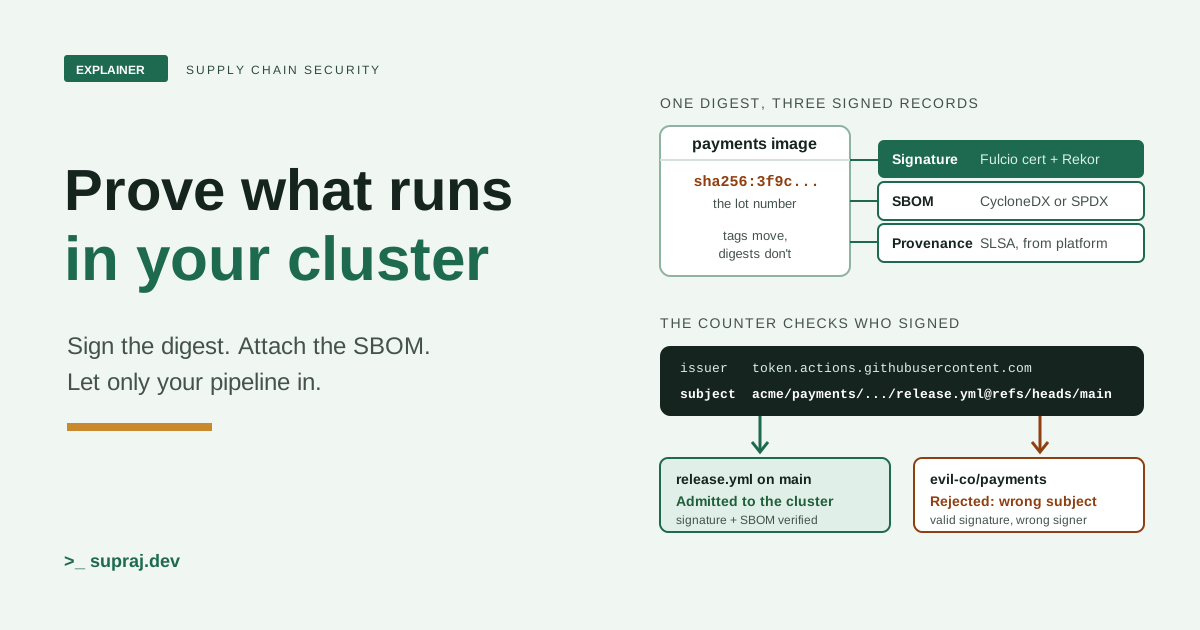
Your security lead asks: can you prove every image in production was built by our pipeline from our source, and list what is inside it? Here is how to make the answer yes, with Sigstore, SBOMs, SLSA provenance and an admission policy that refuses anything else.
:v1.4.2.
Picture a hospital pharmacy. Boxes of medicine arrive every day. Each box carries a lot number, an ingredients leaflet, a batch record from the factory, and a tamper seal. The pharmacist doesn't take any of that on trust. At the counter, they check that the seal belongs to the right factory before a single box goes on the shelf.
Most Kubernetes clusters have no counter. Images arrive from a registry, and the cluster runs whatever the tag points to. That works until a security lead, reading about the latest supply chain attack, asks the platform team a short question: can you prove every image running in production was built by our pipeline, from our source, and list what is inside it? This article builds the counter. The lot number is the image digest, the seal is a Sigstore signature, the leaflet is an SBOM, the batch record is SLSA provenance, and the counter is an admission policy.
01 / The situation
Why can't the platform team answer the question?
Because nothing in a normal pipeline records the answer in a form anyone can check. The registry knows which bytes it holds. It doesn't know who built them, from which commit, or whether someone with push access swapped them later.
SLSA, a supply chain security specification now at version 1.2, maps where attacks happen. [1] Three of its examples match the security lead's worry. An attacker compromised the SolarWinds build platform and injected malicious behaviour "during each build". Codecov's attacker "used leaked credentials to upload a malicious artifact" to a storage bucket that users downloaded from. And in a typosquatting attack, someone uploaded a malicious package "with a similar name as the original". [1]
That's a tampered build, a tampered artifact after the build, and the wrong artifact chosen by mistake. Sigstore's overview lists similar risks for unsigned software, including "tampering after being published". [7] SLSA is honest that it doesn't fix everything. For typosquatting it says it "does not directly address this threat", though provenance linking back to source can help other defences. [1]
- In the pharmacy
- Boxes go straight from the delivery van to the shelf. Nobody checks the seal, so a swapped or look-alike box is shelved like any other.
- In the cluster
- Pods pull whatever the registry returns for a tag. Nothing ties the image to your pipeline, your commit or a list of its contents.
02 / The lot number
Why isn't a tag enough?
A tag is a label that can move. A digest is the identity of the content. The Kubernetes
docs put it directly: digests "are hashes of the image's content, and are immutable.
Tags can be moved to point to different images, but digests are fixed."
[6] A digest looks like sha256: followed by the
hash. If an image reference has both a tag and a digest, Kubernetes says "only the
digest will be used for pulling". [6]
That matters for proof. If you deploy by tag and the registry's tag changes, the docs warn you "might end up with a mix of Pods running the old and new code". Pinning by digest means "a change at the registry cannot lead to that mix of versions". [6] The same docs mention third-party admission controllers that rewrite pods to use digests. The policy in chapter 7 does exactly that.
Signatures depend on this too. Cosign's signature payload includes "the digest of the
container image they are attached to", and by default cosign verify
checks that the digest matches. [14] So you sign the
digest, never the tag. Sigstore's CI example builds the reference as
tag@digest before signing for this reason. [13]
- In the pharmacy
- "Paracetamol 500" is a shelf label. The lot number printed on the box is what the batch record and the recall notice refer to.
- In the cluster
-
:v1.4.2is a movable tag.@sha256:...is the content itself, and it's what signatures and attestations point at.
03 / The seal
How does keyless signing work?
Classic signing means guarding a private key for years, and revoking it if it leaks. [7] Sigstore swaps the long-lived key for an identity. Your artifact is "signed" by a client such as Cosign, "associated" with an identity through the Fulcio certificate authority, and "witnessed" in the Rekor transparency log. [7]
Here's the flow when a CI job runs cosign sign with no key.
Figure 1 · One keyless signature, step by step
- 1. Key in memoryCosign makes a fresh key pair that never leaves the job.
- 2. Identity tokenThe CI provider issues an OIDC token with aud sigstore.
- 3. Fulcio certificateFulcio checks the token and binds the identity to the public key.
- 4. Sign the digestThe image digest is signed. The private key is thrown away.
- 5. Rekor entryThe signing event goes into a public, append-only log.
- 6. VerifyCheck the signature, the identity, the issuer and the log entry.
Six steps, and no long-lived key anywhere. Step through to see what each one proves.
The details matter. Cosign creates "an in-memory public/private keypair".
[8] The identity token must include an audience of
sigstore. [12] Fulcio "signs X.509
certificates valid for 10 minutes". [9] The private key "is
discarded after a single signing", and Sigstore services "never obtain your private
key". [7] Rekor is "an immutable, tamper-resistant ledger";
the public instance at rekor.sigstore.dev has a 99.5% availability SLO.
[10]
A ten-minute certificate sounds fragile. It isn't, because verifiers don't ask whether the certificate is valid now. They ask whether the artifact was signed while it was valid, and the Rekor entry's signed timestamp answers that. [11] Fulcio was "designed to avoid revocation" this way. [11]
What identity ends up in the certificate?
For a GitHub Actions job, Fulcio takes the token's job_workflow_ref claim
and writes it as a URI: https://github.com/{job_workflow_ref}.
[12] Sigstore's docs give the values to expect when
verifying. [12]
certificate-oidc-issuer: https://token.actions.githubusercontent.com
certificate-identity:    https://github.com/USERNAME/REPOSITORY_NAME/.github/workflows/WORKFLOW_NAME@refs/heads/BRANCH_NAME
That string is the heart of the whole system. It names a repository, a workflow file and a branch. "Signed" on its own means very little, since anyone with a GitHub or Google account can get a certificate. Verification has to ask: signed by which identity? Sigstore says verifying "requires the user of your software to have prior knowledge of the identity of the signer". [33]
- In the pharmacy
- The factory's packer shows staff ID at a licensing office and gets a stamp that works for ten minutes. Every stamping is written in a public register.
- In the cluster
- The CI job shows an OIDC token to Fulcio, gets a ten-minute certificate for a one-time key, signs the digest, and the event lands in Rekor.
04 / The leaflet
What is an SBOM, and should it be SPDX or CycloneDX?
A software bill of materials lists what an artifact contains: packages, versions, licences and their dependencies. It answers the second half of the security lead's question. When the next vulnerable library makes the news, you search SBOMs instead of guessing.
There are two widely used formats, and Cosign supports both. [19]
| Question | SPDX | CycloneDX |
|---|---|---|
| Standard | ISO/IEC 5962:2021. Version 3.0.0 released April 2024. [20] | ECMA-424, driven by OWASP and Ecma TC54. [21] |
| Roots | Started in 2010 at the Linux Foundation; 3.0 added Security, Build, Dataset and AI profiles. [20] | Built for supply chain risk; also covers services, VEX, hardware and ML BOMs. [21] |
| Attestation predicate type | https://spdx.dev/Document from cosign attest --type spdxjson. [34] |
https://cyclonedx.org/bom, which OWASP names "the official predicate type". [21] |
Either is fine. Pick the one your scanners and auditors already read. If nobody has a preference, CycloneDX JSON is a practical default here, because it's the format the Kyverno documentation's worked SBOM checks use. [27]
A loose file isn't proof. Attach it as an attestation.
An SBOM sitting in a bucket can be swapped like any other file. So you wrap it in a
signed attestation: an in-toto statement whose subject is
the image digest and whose predicate is the SBOM.
[15] Cosign signs these payloads with the DSSE signing
spec and stores them next to the image. [15] Its
--type flag accepts spdx, spdxjson,
cyclonedx, slsaprovenance1 and others.
[17]
Generate the SBOM from the built image, not from a lockfile, so it reflects what
shipped. Syft does this and writes both formats, for example
syft <image> -o cyclonedx-json=./cdx.json.
[22]
- In the pharmacy
- The ingredients leaflet is printed inside the sealed box, so nobody can swap it without breaking the seal.
- In the cluster
- The SBOM is the predicate of a signed attestation whose subject is the image digest. Change either and verification fails.
05 / The batch record
What does SLSA provenance add on top of a signature?
A signature says who signed. Provenance says how the artifact was made. SLSA defines it
as an attestation "that a particular build platform produced a set of software
artifacts", with the predicate type https://slsa.dev/provenance/v1.
[4] The fields you'll check most:
[4]
builder.id: the build platform you are trusting.buildType: the template that ran, which tells you how to read the parameters.externalParameters: the inputs from outside the platform, such as the repository and ref. SLSA calls these untrusted: they "MUST be verified downstream".resolvedDependencies: what the build fetched, such as the exact commit, if known.
What do the Build levels promise?
SLSA's Build track has four levels. [2]
| Level | Requirement | Protects against |
|---|---|---|
| Build L0 | None | Nothing |
| Build L1 | Provenance showing how the package was built | Mistakes. "Trivial to bypass or forge." |
| Build L2 | Signed provenance, generated by a hosted build platform | Tampering after the build |
| Build L3 | Hardened build platform | Tampering during the build |
One requirement catches teams out. From L2 up, provenance "MUST be generated by the control plane" and not by a tenant of the build platform. [3] A JSON file your own build script writes and signs is L1 at best, however official it looks. At L3, signing secrets "MUST NOT be accessible to the environment running the user-defined build steps". [3]
On GitHub, the platform does this for you. GitHub's artifact attestations sign provenance with Sigstore, and GitHub says they provide "SLSA v1.0 Build Level 2" on their own. [23] Running the build in a shared reusable workflow can "provide isolation between the build process and the calling workflow, to meet SLSA v1.0 Build Level 3". [23]
How is provenance verified?
SLSA's verification steps are a useful checklist. Check the builder identity is one you
trust, verify the signature, confirm the statement's subject "matches the digest of the
artifact", and compare buildType and externalParameters with
what you expect. [5] Its table of expectations includes the
canonical source repository, "to prevent an adversary from building from an unofficial
fork". [5] And keep the limit in view: L3 "does not cover
compromise of the build platform itself, such as by a malicious insider".
[5]
- In the pharmacy
- The batch record is written by the factory's own control system, not by the worker on the line. The line worker can't edit it.
- In the cluster
- Provenance is generated and signed by the build platform's control plane. Build steps you wrote can't forge it at L3.
06 / The playbook, part one
How do you build a pipeline that produces all three?
The example uses GitHub Actions and GHCR, since that's what Sigstore's CI quickstart
documents. Other OIDC issuers work the same way with a different identity string.
Assume an organization acme, a repository payments and a
workflow file release.yml that runs on pushes to main.
The job builds and pushes once, captures the digest, then signs it, attests an SBOM to it and asks the platform for provenance about it.
name: release
on:
  push:
    branches: [ main ]
jobs:
  build:
    runs-on: ubuntu-latest
    permissions:
      contents: read
      packages: write
      id-token: write      # OIDC token for keyless signing
      attestations: write  # GitHub artifact attestations
    steps:
      # Pin every action to a full commit SHA in real use.
      - uses: actions/checkout@v4
        with:
          persist-credentials: false
      - uses: sigstore/cosign-installer@v4.0.0
      - uses: docker/login-action@v3.6.0
        with:
          registry: ghcr.io
          username: ${{ github.actor }}
          password: ${{ secrets.GITHUB_TOKEN }}
      - id: build
        uses: docker/build-push-action@v6.18.0
        with:
          push: true
          tags: ghcr.io/acme/payments:${{ github.sha }}

      - name: Sign the digest
        env:
          DIGEST: ${{ steps.build.outputs.digest }}
        run: cosign sign --yes "ghcr.io/acme/payments@${DIGEST}"

      - name: SBOM, attested to the same digest
        env:
          DIGEST: ${{ steps.build.outputs.digest }}
        run: |
          syft "ghcr.io/acme/payments@${DIGEST}" -o cyclonedx-json=./cdx.json
          cosign attest --yes --type cyclonedx --predicate ./cdx.json \
            "ghcr.io/acme/payments@${DIGEST}"

      - name: SLSA provenance from the platform
        uses: actions/attest@v4
        with:
          subject-name: ghcr.io/acme/payments
          subject-digest: ${{ steps.build.outputs.digest }}
          push-to-registry: true
Each piece comes from the official docs. The id-token: write permission
is what lets the job request an OIDC token. [13] The
--yes flag "agrees to Sigstore's terms of use".
[13] GitHub's attest action needs
attestations: write, and for images also packages: write;
subject-name must not include a tag. [24] Syft
isn't installed in the snippet. Install it from a pinned, verified release, the way
you'd want others to install your software.
Verify before you promote
Sigstore's own CI example verifies straight after signing, with the exact identity.
[13] Do the same, and check the SBOM attestation and the
provenance too. For keyless flows, cosign verify needs both an identity
and an issuer: "Either --certificate-identity or --certificate-identity-regexp must be
set", and the same for the issuer. [18]
IMG="ghcr.io/acme/payments@${DIGEST}"
ID="https://github.com/acme/payments/.github/workflows/release.yml@refs/heads/main"
ISS="https://token.actions.githubusercontent.com"

cosign verify "$IMG" \
  --certificate-identity "$ID" --certificate-oidc-issuer "$ISS"

cosign verify-attestation "$IMG" --type cyclonedx \
  --certificate-identity "$ID" --certificate-oidc-issuer "$ISS"

gh attestation verify "oci://ghcr.io/acme/payments:${GITHUB_SHA}" -R acme/payments

cosign tree "$IMG"   # list what is attached to the digest
gh attestation verify takes the image with an oci:// prefix
and the repository with -R. [24] If the build
runs in a reusable workflow, add --signer-workflow to require that exact
workflow. [25] Signatures are stored with the OCI 1.1
referrers specification, and cosign tree lists what's attached.
[16]
- In the pharmacy
- One production run gets one lot number. The seal, the leaflet and the batch record all quote that number, and quality control checks them before the boxes leave.
- In the cluster
- One build gets one digest. The signature, the SBOM attestation and the provenance all name that digest, and the pipeline verifies them before promotion.
07 / The playbook, part two
How does the cluster refuse what it can't verify?
An admission controller checks each pod before it's stored. Two are built for this.
| Question | Kyverno ImageValidatingPolicy | Sigstore policy-controller |
|---|---|---|
| Policy language | CEL expressions calling verifyImageSignatures and verifyAttestationSignatures. [27] |
ClusterImagePolicy with authorities, plus optional CUE or Rego on attestations. [31] |
| Trial mode | validationActions: [Audit], results in PolicyReports. [29] |
mode: warn admits but warns. [31] |
| Scope | Image globs or CEL in matchImageReferences. [27] |
Namespaces opt in with a label; unmatched images are rejected by default. [31] |
| Good fit | You already run Kyverno for other policies. | You want GitHub's documented provenance enforcement, which uses this controller. [26] |
ClusterPolicy rules, including verifyImages, "no longer execute
in any Kyverno controller". The replacement for verifyImages is
ImageValidatingPolicy. [28] Older blog posts
and examples using kind: ClusterPolicy with verifyImages won't
enforce anything on 1.20.
My recommendation: if Kyverno is already in the cluster, use ImageValidatingPolicy for your own images. Here is a policy that requires the exact release workflow identity and a signed CycloneDX SBOM from the same identity. It starts in Audit.
apiVersion: policies.kyverno.io/v1
kind: ImageValidatingPolicy
metadata:
  name: require-acme-release-pipeline
spec:
  validationActions: [Audit]        # switch to [Deny] in chapter 8
  failurePolicy: Fail
  webhookConfiguration:
    timeoutSeconds: 15
  matchConstraints:
    resourceRules:
      - apiGroups: ['']
        apiVersions: ['v1']
        operations: ['CREATE', 'UPDATE']
        resources: ['pods']
  matchImageReferences:
    - glob: 'ghcr.io/acme/*'
  validationConfigurations:
    mutateDigest: true    # rewrite tags to digests
    verifyDigest: true
    required: true
  attestors:
    - name: release
      cosign:
        keyless:
          identities:
            - issuer: 'https://token.actions.githubusercontent.com'
              subject: 'https://github.com/acme/payments/.github/workflows/release.yml@refs/heads/main'
        ctlog:
          url: 'https://rekor.sigstore.dev'
  attestations:
    - name: sbom
      intoto:
        type: https://cyclonedx.org/bom
  validations:
    - expression: >-
        images.containers.map(image, verifyImageSignatures(image, [attestors.release])).all(e, e > 0)
      message: image must be signed by the acme/payments release workflow on main
    - expression: >-
        images.containers.map(image, verifyAttestationSignatures(image, attestations.sbom, [attestors.release])).all(e, e > 0) &&
        images.containers.map(image, extractPayload(image, attestations.sbom).predicate.bomFormat == 'CycloneDX').all(e, e)
      message: image must carry a signed CycloneDX SBOM from the same workflow
Every field here appears in Kyverno's ImageValidatingPolicy docs.
[27] Two details are easy to get wrong. For an attestation
made with cosign attest, extractPayload() returns the whole
in-toto statement, so the SBOM's fields sit under predicate. And
extractPayload() "requires prior attestation verification via
verifyAttestationSignatures()". [27]
Why the exact subject matters
Kyverno's docs also allow subjectRegExp and issuerRegExp.
[27] A pattern like https://github\.com/.+
with the GitHub issuer looks strict. It isn't. It matches every workflow in every
repository on GitHub, including one an attacker creates in five minutes. Try it below.
Figure 2 · Will this pod get through the door?
Pick an image, a check and a mode to see what the admission policy would do.
ghcr.io/acme/payments. Certificate identities follow
Sigstore's documented formats. The regexp option is
subjectRegExp: https://github\.com/.+ with the GitHub issuer.
The same idea with policy-controller
In a ClusterImagePolicy, keyless authorities list identities the same way,
and subject is a strict match while subjectRegExp is a regular
expression. [32] Each policy that matches an image must
pass, and within a policy any one authority is enough: "each ClusterImagePolicy that
matches is AND for admission, and within each ClusterImagePolicy authorities are OR".
[31]
apiVersion: policy.sigstore.dev/v1beta1
kind: ClusterImagePolicy
metadata:
  name: acme-release-pipeline
spec:
  mode: warn              # default is enforce
  images:
    - glob: "ghcr.io/acme/**"
  authorities:
    - keyless:
        identities:
          - issuer: https://token.actions.githubusercontent.com
            subject: https://github.com/acme/payments/.github/workflows/release.yml@refs/heads/main
Namespaces opt in with kubectl label namespace NAME
policy.sigstore.dev/include=true. [31] To enforce
GitHub's provenance attestations, GitHub documents installing this controller with
its own trust-policies Helm chart, which "will reject artifacts that have
not originated from within your GitHub organization". [26]
- In the pharmacy
- The counter checks the stamp names this factory and this production line. A genuine stamp from a different factory is still turned away.
- In the cluster
- The policy checks issuer and exact subject. A valid Sigstore signature from any other workflow or account fails.
08 / Rolling it out
How do you switch it on without breaking every deploy?
Start by watching, not blocking. Kyverno's reports guide says it plainly: "Use audit results to assess the impact of a policy before switching to Deny." [29] In Audit, a non-compliant pod is created and the failure is recorded in a report. [29]
- Sign everything first. Ship the pipeline from chapter 6 to every service that deploys to the target clusters. Redeploy so running pods use signed digests.
- Apply the policy in Audit. List failures with
kubectl get policyreport -Aand read the failed results. [29] - Sort every failure into a bucket. Unsigned own image: fix the pipeline. Wrong identity: fix the workflow or the policy. Third-party image: see below.
- Switch one namespace to Deny. Pick a low-risk one. For Kyverno, a
NamespacedImageValidatingPolicykeeps the change inside that namespace. [27] - Widen to production once reports stay clean, and keep a written exception process.
What about images you didn't build?
Base images, databases, operators and cloud agents won't carry your identity. You have three honest options.
- Verify the vendor's own identity. If the publisher signs with Sigstore and publishes its signer identity, add a separate attestor for it. Sigstore asks projects to publish that identity "in an easily discoverable place". [33] Don't guess it from a blog post.
-
Mirror, review and re-sign. Copy the image into your registry by
digest through a pipeline that scans it, generates an SBOM and signs it with your
identity. Then one policy covers everything in
ghcr.io/acme/. -
Exempt it on purpose. Policy-controller supports a
staticauthority withaction: passfor images that may have no signatures. [31] Kyverno supports PolicyExceptions to bypass a policy without editing it, and 1.20 added expiration and metadata to them. [27] [28] Keep the list short and reviewed.
Policy-controller has one more switch worth knowing. An image that matches no policy is
rejected by default; the no-match-policy setting can be
warn, allow or deny, and the docs suggest
warn while rolling out. [31]
- In the pharmacy
- For a month the counter logs every unsealed box but still shelves it. Then one ward at a time starts refusing them, with a signed list of approved exceptions.
- In the cluster
- Audit mode records failures in PolicyReports. Then Deny goes live one namespace at a time, with reviewed exceptions for third-party images.
09 / In production
What goes wrong, and what should you watch?
Common mistakes
- Checking for a signature, not a signer. A regexp that admits any GitHub workflow admits strangers.
-
Trusting a shared reusable workflow alone. The certificate's URI is
the
job_workflow_ref, which names the workflow that ran, not necessarily the repository that called it. Sigstore's own example shows a workflow inocto-org/octo-automationrunning forocto-org/octo-repo. [12] Kyverno's docs warn that since workflows can be reused, "it is important to verify the identity of both the executing workflow and the actual workflow used for signing". [27] Cosign has--certificate-github-workflow-repositoryfor this check, and Kyverno 1.20 can match certificate extensions. [18] [28] -
Signing tags. Sign
image@digest. A signature on what a tag pointed to yesterday doesn't cover what it points to today. -
Mismatched predicate types. Cosign's
spdxjsontype produceshttps://spdx.dev/Document, while GitHub's docs verify SPDX SBOM attestations withhttps://spdx.dev/Document/v2.3. [34] [24] Write the policy for the string your producer actually emits. -
Private registries. ImageValidatingPolicy doesn't read the pod's
imagePullSecrets; registry secrets must be listed in the policy and live in the Kyverno namespace. [27] - Private GitHub repositories. Their artifact attestations use GitHub's own Sigstore instance, which "does not have a transparency log". Public repositories use the public-good instance. [23] Your verifier needs the right trust root. Kyverno 1.20 added support for this. [28]
-
Failing open by accident. Sigstore's attestation docs warn that an
attacker may "delete or hide" attestations, and that systems "should be designed to
fail closed rather than open". [15] Keep
failurePolicy: Fail. In Kubernetes, that means an error calling the webhook "causes the admission to fail and the API request to be rejected", whileIgnorelets the request through. [35] Test what your deploys do when the policy engine is slow or down.
What to monitor
-
Policy failures. Kyverno exports
kyverno_image_validating_policy_results_total. Its docs give this query for failures in the last day:sum(increase(kyverno_image_validating_policy_results_total{result="fail"}[24h])) by (policy_name). [30] In Audit, a rising count is your to-do list. In Deny, it's blocked deploys. -
Admission latency. Verification adds work to every pod admission.
Watch
kyverno_admission_review_duration_secondsso slow checks show up before timeouts do. [30] - Your identity in the logs. Sigstore says artifact owners "should monitor the log for their identity", and Fulcio "does not monitor the certificate transparency log" for you. [8] [11] A signing event for your release identity that no pipeline run explains points to a compromised workflow or token. Rekor's docs point to a Rekor monitor that runs as a reusable GitHub workflow. [10]
- Reports in Deny mode. Reports describe resources that exist, so for blocked requests Kyverno says to "use metrics and Kubernetes Events". [29]
- In the pharmacy
- The pharmacist reads the stamping register each week. A stamp in the factory's name that no production run explains means someone has the stamp who shouldn't.
- In the cluster
- You monitor Rekor for your release identity, plus policy failures and admission latency. An unexplained signing event is an incident.
With this in place, the security lead's question has an answer. Every image in
production passed a check that its digest was signed by your release workflow on
main, logged in Rekor, with a signed SBOM and platform provenance attached.
You can show the policy, the reports and the attestations for any pod.
Keep these names
A small glossary
- Digest
- A hash of an image's content, such as
sha256:.... It can't be moved. - Tag
- A human-friendly name for an image, such as
:v1.4.2. It can be moved. - Keyless signing
- Signing with a one-time key bound to an OIDC identity by a short-lived certificate.
- OIDC identity token
- A signed token from an issuer such as GitHub Actions that says who or what is running.
- Fulcio
- Sigstore's certificate authority. It issues certificates valid for 10 minutes.
- Rekor
- Sigstore's append-only transparency log of signing events.
- Certificate identity
- The subject in the certificate, such as a workflow URI. Policies match on it with the issuer.
- Attestation
- A signed in-toto statement: a subject (the image digest) plus a typed predicate.
- Predicate type
- A URI naming what the attestation contains, such as
https://cyclonedx.org/bom. - SBOM
- Software bill of materials: what an artifact contains. SPDX and CycloneDX are the main formats.
- Provenance
- An attestation of how, where and from what an artifact was built.
- SLSA Build level
- L0 to L3: how hard it is to forge provenance or tamper with the build.
- Admission controller
- A Kubernetes webhook that checks or changes objects before they're stored.
Check the concept
Can you explain it back?
1. Why sign the digest and not the tag?
A tag can be moved to different content. The digest is a hash of the content itself, and Cosign's signature payload includes it, so verification fails if the bytes change.
2. Fulcio certificates last ten minutes. Why does a signature still verify next year?
Verifiers check that the artifact was signed while the certificate was valid. Rekor's signed timestamp on the log entry proves when the signing happened.
3. A policy accepts any subject matching https://github\.com/.+ with the GitHub issuer. What's wrong?
Any workflow in any GitHub repository can get a valid certificate that matches. The policy proves an image was signed by someone on GitHub, not by your pipeline.
4. Your build script writes a provenance JSON file and signs it. What SLSA Build level is that?
L1 at most. From L2, provenance must be generated by the build platform's control plane, not by a tenant's build steps.
5. Why start the admission policy in Audit?
Audit admits non-compliant pods but records failures in PolicyReports, so you can find unsigned images, wrong identities and third-party images before Deny blocks deploys.
Continue the thread
Related reading
- Delete your cloud access keys. The same OIDC tokens that sign images here also replace long-lived cloud keys in CI and pods.
- Kubernetes certificates and TLS explained. Certificate chains, roots of trust and expiry, the ideas Fulcio builds on.
- CI/CD and environments for beginners. Where a release pipeline fits, and why promotion between environments should use one digest.
Read further
Sources
All accessed 20 November 2026. SLSA pages are specification version 1.2; other docs are the live pages that day.
- SLSA v1.2: Supply chain threats
- SLSA v1.2: Build track basics
- SLSA v1.2: Build requirements for producing artifacts
- SLSA v1.2: Build provenance
- SLSA v1.2: Verifying artifacts
- Kubernetes docs: Images
- Sigstore docs: Overview
- Sigstore docs: Cosign signing overview (keyless)
- Sigstore docs: Fulcio
- Sigstore docs: Rekor
- Sigstore docs: Security model
- Sigstore docs: OIDC usage in Fulcio
- Sigstore docs: Sigstore CI quickstart
- Sigstore docs: Verifying signatures
- Sigstore docs: In-toto attestations
- Sigstore docs: Signing containers
- Cosign CLI reference: cosign attest
- Cosign CLI reference: cosign verify and cosign verify-attestation
- Sigstore docs: Cosign specifications (SBOM in OCI)
- SPDX: About SPDX
- CycloneDX: Specification overview and CycloneDX home
- Syft README (Anchore)
- GitHub Docs: Artifact attestations
- GitHub Docs: Using artifact attestations to establish provenance for builds
- GitHub Docs: Using artifact attestations and reusable workflows to achieve SLSA v1 Build Level 3
- GitHub Docs: Enforcing artifact attestations with a Kubernetes admission controller
- Kyverno docs: ImageValidatingPolicy and Sigstore (legacy verifyImages)
- Kyverno blog: Announcing Kyverno 1.20 (12 November 2026)
- Kyverno docs: Policy reports
- Kyverno docs: Metrics
- Sigstore docs: Kubernetes policy controller
- policy-controller source: ClusterImagePolicy v1beta1 types
- Sigstore docs: The importance of verification
- Cosign source: predicate types and in-toto-golang predicate URIs
- Kubernetes docs: Dynamic admission control (failure policy)
Written with AI assistance. Every technical claim was checked against the original sources listed above.