Explainer · Cloud security
Delete your cloud access keysSecretless access with workload identity federation.
A leak scare turns up AWS access keys and Google Cloud service account JSON files in CI secrets, Kubernetes Secrets and laptops. Here is how to replace them with short-lived tokens, lock the trust down, and retire the old keys without an outage.
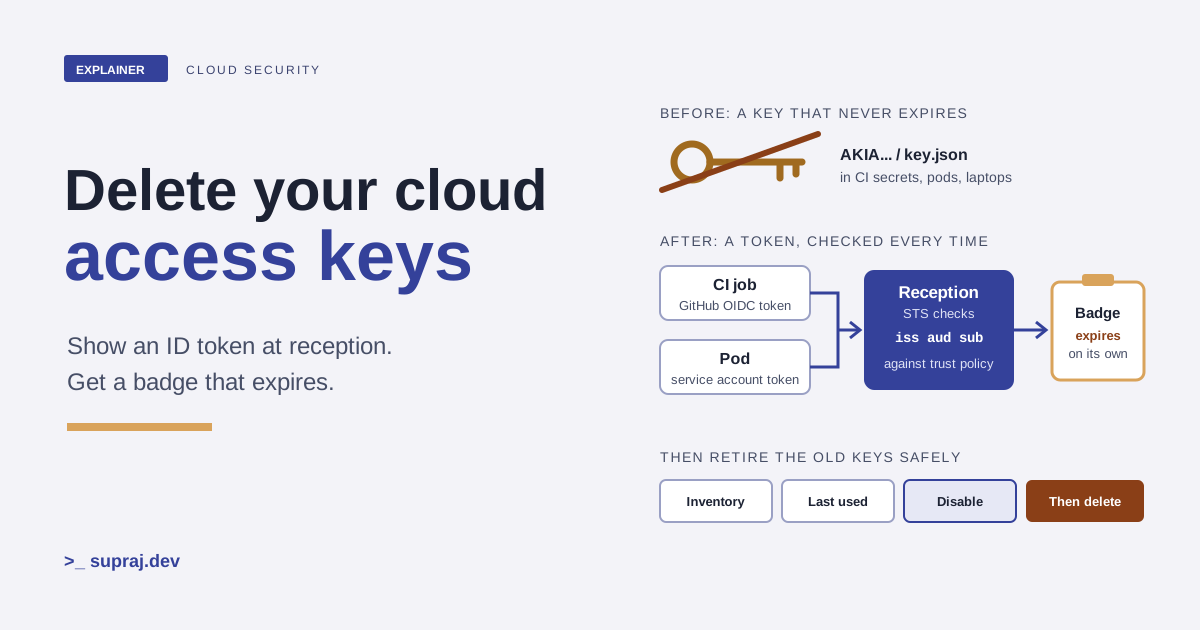
Picture an office building where every team was given a brass key years ago. The keys open the doors at any hour, nobody knows how many copies exist, and the lock never changes. Then someone finds one taped under a desk.
That's the situation after a leak scare. A security team searches and finds long-lived AWS access keys in GitHub Actions secrets, Google Cloud service account JSON files in Kubernetes Secrets, and both on developer laptops. The fix this article walks through is to stop handing out keys at all. Instead, every job shows an ID card at reception and gets a visitor badge that stops working at the end of the day. In the cloud, the ID card is an OIDC token and the badge is a short-lived credential.
01 / The problem
Why do long-lived keys keep leaking?
Because they're files that work anywhere, for anyone, until someone turns them off. AWS describes access keys as "long-term credentials" and says plainly that IAM users with access keys "are an account security risk". It also warns that keys in the shared credentials file "are stored in plaintext". [21]
Google Cloud's guidance on service account keys lists the threats: credential leakage, privilege escalation, information disclosure, hidden identity and malicious credential configurations. It adds a point that's easy to miss. A leaked password often fails because of 2-step verification, but a leaked service account key "is likely to succeed as service accounts are not subject to any additional sign-in verifications". [27] It names where attackers look: open source repositories, public Cloud Storage buckets and dumps of breached services. [27]
CI makes it worse. GitHub's docs describe the old pattern: you create a credential in the cloud, then "duplicate them in GitHub as a secret", and the workflow presents it every run. [1] Each copy is another place to leak from. Both providers say the same thing about the cure. AWS's best practices say to "require workloads to use temporary credentials with IAM roles". [35] Google says the best mitigation is to "avoid user-managed service account keys". [27]
- In the building
- A brass key opens the door for whoever holds it, at any hour, for years. Copies spread and nobody can count them.
- In the cloud
- An access key or JSON key signs requests for whoever has the file, until it's disabled. Every CI secret, Kubernetes Secret and laptop holds a copy.
02 / The mechanism
How does a token exchange replace a key?
The workload proves who it is with a signed token from a system that already knows it, and the cloud swaps that token for short-lived credentials. GitHub's docs describe the flow in four moves. [1]
- You set up a trust relationship in the cloud that lets specific workflows request tokens for a defined role.
- Every time a job runs, GitHub's OIDC provider generates a token with claims about that job.
- A step in the job requests the token and presents it to the cloud.
- The cloud checks the claims against the trust conditions and returns a short-lived access token for that job.
The token is a JSON Web Token. Three of its claims do most of the work. [2]
-
iss, the issuer. Who signed it. For GitHub Actions it'shttps://token.actions.githubusercontent.com. -
aud, the audience. Who the token is meant for. By default it's the URL of the repository owner. With the official AWS action, you usests.amazonaws.com. [3] -
sub, the subject. Which workload this is. GitHub builds it from the repository plus context, likerepo:octo-org/octo-repo:environment:prod.
On AWS, the swap is the STS call AssumeRoleWithWebIdentity. The role must
trust the identity provider that issued the token. The credentials last one hour by
default, and you can ask for 900 seconds up to the role's maximum session duration,
which can be set from 1 to 12 hours. [6] On Google Cloud,
Workload Identity Federation "follows the OAuth 2.0 token exchange specification": the
Security Token Service verifies the external token and returns a federated token.
[8]
Figure 1 · One job, one token, one short-lived credential
- 1. Job startsThe runner has no cloud secret, only permission to ask GitHub for a token.
- 2. GitHub signs a tokeniss, aud and sub describe this repo, branch or environment.
- 3. Present itThe job sends the token to AWS STS or Google's Security Token Service.
- 4. Check the claimsThe trust policy or attribute condition must match, or the request fails.
- 5. Short-lived accessTemporary credentials come back. Nothing durable is stored.
Five steps, and none of them reads a stored key. Step through to see what each one checks.
- In the building
- Reception checks three things on your ID card: who printed it, that it's meant for this building, and whose name is on it. Then it prints a day badge.
- In the cloud
- STS checks the token's issuer, audience and subject against the trust policy, then returns credentials that expire on their own.
03 / CI to AWS
How does a GitHub Actions job get into AWS without a key?
Three pieces: an OIDC identity provider in IAM, a role whose trust policy names your
repository, and a workflow that asks for the token. GitHub's guide gives the provider
settings: provider URL https://token.actions.githubusercontent.com and
audience sts.amazonaws.com if you use the official action.
[3]
The trust policy below is the shape AWS documents, narrowed to one repository and one GitHub environment. [5] [3]
{
  "Version": "2012-10-17",
  "Statement": [
    {
      "Effect": "Allow",
      "Principal": {
        "Federated": "arn:aws:iam::111122223333:oidc-provider/token.actions.githubusercontent.com"
      },
      "Action": "sts:AssumeRoleWithWebIdentity",
      "Condition": {
        "StringEquals": {
          "token.actions.githubusercontent.com:aud": "sts.amazonaws.com",
          "token.actions.githubusercontent.com:sub": "repo:acme/payments:environment:prod"
        }
      }
    }
  ]
}
The workflow needs one permission and one step. id-token: write lets the
job request the token. GitHub stresses that it "does not give the workflow permission
to modify or write to any resources". [3]
permissions:
  id-token: write   # lets the job request the OIDC token
  contents: read    # for actions/checkout

jobs:
  deploy:
    runs-on: ubuntu-latest
    environment: prod
    steps:
      - uses: actions/checkout@v6
      - uses: aws-actions/configure-aws-credentials@v6.3.0
        with:
          role-to-assume: arn:aws:iam::111122223333:role/payments-deploy
          aws-region: eu-west-1
      - run: aws sts get-caller-identity
GitHub's own example pins the action to a full commit SHA rather than a tag, which is
worth copying. [3] The action's
role-duration-seconds defaults to one hour. [7]
The last step is a cheap check: aws sts get-caller-identity returns the
role the job is running as, and needs no permissions. [36]
- In the building
- Reception has a list: "Badges for the payments team, prod shift only." Anyone else with a valid ID card is turned away.
- In the cloud
- The role's trust policy accepts the GitHub issuer, the STS audience and one exact subject. Other repositories get an access denied error.
04 / CI to Google Cloud
And into Google Cloud?
Google Cloud uses a workload identity pool and a provider inside it. The provider has
two settings that do the security work. The attribute mapping copies
token claims into Google attributes, and Google says you should at minimum map
google.subject=assertion.sub. The attribute condition is a
CEL expression that must be true or the token is rejected.
[9]
Two warnings in Google's guide shape the commands below. First, GitHub uses one issuer
URL for every organization, so "you must use an attribute condition that restricts
access to tokens issued by your GitHub organization". Second, name fields like
repository and repository_owner raise the risk of
cybersquatting: if you delete a repository or organization, someone may claim the name.
Google recommends the numeric *_id fields instead, "which are unique and
can't be reused". [9]
gcloud iam workload-identity-pools create github \
  --location="global" \
  --display-name="GitHub Actions"

gcloud iam workload-identity-pools providers create-oidc acme-github \
  --location="global" \
  --workload-identity-pool="github" \
  --issuer-uri="https://token.actions.githubusercontent.com/" \
  --attribute-mapping="google.subject=assertion.sub,attribute.repository_id=assertion.repository_id,attribute.repository_owner_id=assertion.repository_owner_id" \
  --attribute-condition="assertion.repository_owner_id=='1342004'"
Then grant access. Google recommends granting roles directly to the federated
principal, and using service account impersonation only where a product has a
limitation. [9] A direct grant to every job in one
repository uses a principalSet on a mapped attribute:
gcloud storage buckets add-iam-policy-binding gs://acme-payments-artifacts \
  --role="roles/storage.objectViewer" \
  --member="principalSet://iam.googleapis.com/projects/PROJECT_NUMBER/locations/global/workloadIdentityPools/github/attribute.repository_id/REPOSITORY_ID"
In the workflow, GitHub's guide uses the google-github-actions/auth action
with the provider's full resource name. [4] The action's
README calls direct federation the preferred setup, and notes that the action itself is
"not an officially supported Google product". [11] Google
also suggests a dedicated project for pools and providers.
[10]
- In the building
- Reception copies the details it trusts from the ID card onto its own form, then checks the employer number, not the employer's name, which anyone can register once it's free.
- In the cloud
- The attribute mapping copies claims. The attribute condition admits only your organization, by its numeric owner ID, and IAM grants go to a repository ID.
05 / The classic mistake
Which conditions stop any repo from assuming the role?
Here's the trap. Every GitHub Actions job in the world gets tokens from the same
issuer. A role that trusts the issuer but doesn't check the subject trusts all of
them. AWS says it directly: if you don't limit the sub key to your
organization or repository, "GitHub Actions from organizations or repositories outside
of your control are able to assume roles" in your account.
[5]
AWS blocks the worst version. When GitHub's provider is the trusted principal, IAM
checks that the sub condition key is present and isn't solely a wildcard
or null, and fails the request if it is. [5] But that check
still lets a broad pattern through. repo:acme/* passes, and it admits
every repository in your organization, including that intern's test repo. AWS
recommends limiting the condition "to a specific set of repositories or branches".
[5]
Try a few combinations. The tokens here use GitHub's documented subject formats.
Figure 2 · Will this token get in?
Pick a job and a condition to see whether AWS STS would accept the token.
aud of sts.amazonaws.com on every token.
Subjects use GitHub's previous format. Repositories created after 15 July 2026 use an
immutable format with owner and repository IDs, such as
repo:acme@123456/payments@456789:ref:refs/heads/main.
Four rules come out of GitHub's subject formats. [2]
-
Prefer environments for deploy roles. A job that references an
environment gets
repo:ORG/REPO:environment:NAME. Both AWS and GitHub recommend protection rules on that environment, so only chosen branches and tags can deploy. [5] [3] -
Pull requests have their own subject. A pull request job gets
repo:ORG/REPO:pull_request, but only if it doesn't reference an environment. Arepo:acme/payments:*pattern admits it. -
Mind the new immutable format. GitHub changed the default subject so
that a recycled name can't produce the same value. Repositories created after 15 July
2026, and renames or transfers after that date, get
repo:OWNER@OWNER-ID/REPO@REPO-ID:.... Older repositories keep the previous format unless you opt in. Write the condition for the format your repository actually sends. -
Check Dependabot. Dependabot jobs get an
event_nameofdynamic. If a role is only for workflows and your cloud can checkevent_name, allow only the events you expect.
You can also change what GitHub puts in sub, for example to require a
specific reusable workflow through job_workflow_ref. GitHub's advice is to
add the matching cloud condition first, because tokens in the new format may be
rejected until the cloud side agrees. [2]
- In the building
- The city prints ID cards for everyone. A rule that says "any city ID card" lets the whole city in. The list must name your team.
- In the cloud
-
GitHub's issuer signs tokens for every repository. Trust comes from the
subcondition, written as narrowly as the job allows.
06 / Kubernetes
What should pods use: Pod Identity, IRSA or GKE Workload Identity?
The Kubernetes Secret holding AWS_ACCESS_KEY_ID or a JSON key file is the
same problem as the CI secret. Here the token issuer is the cluster: each pod's
Kubernetes service account becomes its identity.
On EKS: prefer Pod Identity
AWS gives two options and states its preference: "AWS recommends using EKS Pod Identities to grant access to AWS resources to your pods whenever possible." [12] The comparison is mostly about operations.
| Facet | EKS Pod Identity | IRSA |
|---|---|---|
| Trust | One service principal, pods.eks.amazonaws.com. Set the role up once for any cluster. |
Each cluster's OIDC provider. Update the trust policy for every new cluster. |
| Scale limits | No OIDC provider, so that limit doesn't apply. | One IAM OIDC provider per cluster, with a default limit of 100 per account. About 4 trust relationships fit the default policy size. |
| Reuse | Session tags (cluster, namespace, service account) allow one role with tag-based access. | No session tags. Every pod gets all of the role's permissions. |
| Where it runs | Amazon EKS only, on Linux EC2 nodes. Not Fargate, not Windows nodes. | EKS, EKS Anywhere, ROSA and self-managed Kubernetes on EC2. |
Sources for the table: [12] and [13]. Pod Identity needs the EKS Pod Identity Agent on the cluster, unless EKS Auto Mode is on. [13] The role trusts the service principal, and you can narrow it with the session tags Pod Identity adds: [15]
"Principal": { "Service": "pods.eks.amazonaws.com" },
"Action": [ "sts:AssumeRole", "sts:TagSession" ],
"Condition": {
  "StringEquals": {
    "aws:RequestTag/kubernetes-namespace": [ "payments" ],
    "aws:RequestTag/kubernetes-service-account": [ "payments-api" ]
  }
}
aws eks create-pod-identity-association \
--cluster-name prod-eu \
--role-arn arn:aws:iam::111122223333:role/payments-api \
--namespace payments \
--service-account payments-apiThe association lives in EKS, not in the cluster: there's no annotation on the service account. [16]
If you need IRSA, for example on EKS Anywhere, you first create an IAM OIDC provider
for each cluster. [17] Its trust policy checks the cluster's
OIDC provider with sub set to
system:serviceaccount:NAMESPACE:SERVICE_ACCOUNT and aud set
to sts.amazonaws.com. The EKS guide notes that you can swap in
StringLike and * to admit every service account in a
namespace. Use that knowingly: it's the pod version of a wide subject.
[18]
One migration detail matters more than any other. The SDK looks for credentials in a chain. AWS warns that if a workload already has credentials earlier in that chain, "those credentials will continue to be used even if you configure an EKS Pod Identity association". [14] Static keys in environment variables come earlier. So the order is: create the association, then remove the key variables from the pod. Until you do, the pod keeps using the key.
On GKE: Workload Identity Federation for GKE
Google calls it "the recommended way" for GKE workloads to reach Google Cloud. Enabling
it creates a fixed pool, PROJECT_ID.svc.id.goog, registers the cluster as
a provider, and runs a metadata server on every node that intercepts credential
requests. Enabling it grants no permissions by itself. [19]
Autopilot clusters always have it on. On Standard clusters:
[20]
gcloud container clusters update prod-eu \
  --location=europe-west1 \
  --workload-pool=PROJECT_ID.svc.id.goog

gcloud storage buckets add-iam-policy-binding gs://acme-payments-artifacts \
  --role=roles/storage.objectViewer \
  --member=principal://iam.googleapis.com/projects/PROJECT_NUMBER/locations/global/workloadIdentityPools/PROJECT_ID.svc.id.goog/subject/ns/payments/sa/payments-api \
  --condition=None
Existing node pools also need the GKE metadata server, set with
--workload-metadata=GKE_METADATA. [20] Watch
for identity sameness. Every cluster in a project shares one pool, so
the same namespace and service account name in two clusters is one identity to IAM. If
an untrusted team runs a cluster in that project, it can create the same namespace and
get the same access. Google's fix: separate projects, or distinct namespace names, or
conditional IAM policies. [19]
- In the building
- Each desk in an office has its own staff card. Reception gives badges to the card, not to whoever sits on that floor.
- In the cloud
- Each Kubernetes service account is an identity. EKS and GKE turn its token into short-lived credentials for that service account only.
07 / The playbook
How do you retire the old keys without an outage?
Slowly, and reversibly until the very last step. Both clouds give you a switch that stops a key working but keeps it, and both recommend using it before you delete. AWS: even when last-used data shows no use, "we recommend that you do not immediately delete" the key; make it Inactive first. [22] Google: disable the key, "then wait until you are sure that the key is no longer needed", because you "cannot undelete a deleted key". [29] [30]
Figure 3 · Retiring one key, step by step
- Active, in use
- Active, unused
- Disabled
- Deleted
- 1. InventoryList every key and where its copies live.
- 2. Read last useWhen, which service, which Region.
- 3. Switch the consumerFederation in, key variables out.
- 4. Prove the switchNew path in the logs, old key gone quiet.
- 5. DisableInactive on AWS, disabled on Google Cloud.
- 6. Wait and watchRe-enable if something breaks, fix it, repeat.
- 7. Delete and blockRemove the key and stop new ones.
Inventory on AWS. The credential report lists every IAM user with
columns like access_key_1_last_used_date,
access_key_1_last_used_service and
access_key_1_last_rotated. It can be generated at most once every four
hours, and the last-used date records only the first use in any 15-minute span.
[24] The report is returned Base64-encoded.
[24]
aws iam generate-credential-report
aws iam get-credential-report --query Content --output text | base64 --decode > creds.csv

aws iam get-access-key-last-used --access-key-id AKIAIOSFODNN7EXAMPLE
Last-used data shows the date, service and Region of the most recent request, tracked
since 22 April 2015. "N/A" means the key hasn't been used since tracking began.
[23] To find who still uses a key, CloudTrail's
event history can filter by AccessKeyId, for management events in the last
90 days. [25]
aws cloudtrail lookup-events \
  --lookup-attributes AttributeKey=AccessKeyId,AttributeValue=AKIAIOSFODNN7EXAMPLE
Inventory on Google Cloud. List keys per service account, and read their last authentication with Activity Analyzer, which Google marks as Preview. [28] [31]
gcloud iam service-accounts keys list \
  --iam-account=ci-deployer@PROJECT_ID.iam.gserviceaccount.com

gcloud policy-intelligence query-activity \
  --activity-type=serviceAccountKeyLastAuthentication \
  --project=PROJECT_ID
Two caveats from Google. Results don't include disabled keys. And use outside Google Cloud, such as domain-wide delegation to Google Workspace APIs, isn't tracked there, so cross-check Cloud Monitoring's service account usage metrics before you disable anything. [31]
Switch and prove it. Move each consumer to federation, as in chapters 3 to 6, and delete the secret it used. Then watch two signals together: the new federated events appear (chapter 8), and the old key's last-used date stops moving.
Disable, wait, then delete.
# AWS: reversible
aws iam update-access-key --access-key-id AKIAIOSFODNN7EXAMPLE --status Inactive --user-name ci-deployer
# AWS: permanent, after the wait
aws iam delete-access-key --access-key-id AKIAIOSFODNN7EXAMPLE --user-name ci-deployer

# Google Cloud: reversible
gcloud iam service-accounts keys disable KEY_ID \
  --iam-account=ci-deployer@PROJECT_ID.iam.gserviceaccount.com --project=PROJECT_ID
# Google Cloud: permanent, after the wait
gcloud iam service-accounts keys delete KEY_ID \
  --iam-account=ci-deployer@PROJECT_ID.iam.gserviceaccount.com
The AWS CLI docs confirm an Inactive key "is still available and can be reactivated". [22] If something breaks, set it back to Active, fix that consumer, and start the wait again. One thing disabling doesn't do on Google Cloud: it "does not revoke short-lived credentials that were issued based on the key". For a key you believe was stolen, Google says to disable or delete the service account itself, which cuts off every workload using it. [29]
Block new keys. On Google Cloud, the
iam.managed.disableServiceAccountKeyCreation constraint stops new keys in
the projects it covers. For organizations created on or after 3 May 2024, the legacy
iam.disableServiceAccountKeyCreation constraint is enforced by default.
Google also auto-disables keys it detects as exposed when
iam.serviceAccountKeyExposureResponse is unset, since 16 June 2024, though
it "doesn't guarantee that it will detect exposed keys". [32]
And the laptops? People need a different path from workloads. AWS
recommends human users get temporary credentials through federation with an identity
provider, and suggests IAM Identity Center. [35] On Google
Cloud, developers sign in with their own account, for example
gcloud auth application-default login for local code.
[9]
- In the building
- Before changing the locks, you find out who still uses each brass key. Then you stop it opening doors, keep it in a drawer for a while, and only melt it down when nobody has come asking.
- In the cloud
- Inventory, last-used data, switch, disable, wait, delete. Disable is reversible on both clouds. Delete is not.
08 / Monitoring
What should you watch once the keys are gone?
Two things: that the new path is the only path, and that nobody is knocking on it who shouldn't be.
On AWS, CloudTrail. CloudTrail logs all authenticated IAM and STS
calls, and also unauthenticated calls to AssumeRoleWithWebIdentity,
including information from the identity provider. Some unauthenticated requests may not
be logged if they aren't valid enough. [26] The STS docs
note that the entry "includes the Subject of the provided web identity token", which is
how you map an action back to a repository or service account.
[6] AWS also suggests CloudTrail for access key use and
CloudWatch alarms on denied attempts. [21]
On Google Cloud, Cloud Audit Logs. Token exchanges are only logged
after you turn on Data Access audit logs, type "Admin Read", for both the IAM API and
the Security Token Service API. Each ExchangeToken entry then carries
principalSubject, the token's sub, and the mapped principal.
Failures from bad credentials aren't logged. [33] For any
keys that remain, service logs carry
authenticationInfo.serviceAccountKeyName, though some services, including
App Engine and Compute Engine, don't log it. [34]
| Signal | Where | Why it matters |
|---|---|---|
| A request signed by an access key you thought was retired | CloudTrail, filter by access key ID | A consumer was missed, or a copy is in someone else's hands. |
AssumeRoleWithWebIdentity from an unexpected subject |
CloudTrail | Your sub condition is wider than you think. |
ExchangeToken with an unexpected principalSubject |
Cloud Audit Logs, Data Access | The attribute condition is admitting more than one workload. |
CreateServiceAccountKey |
Cloud Audit Logs, Admin Activity | Someone is creating the thing you just removed. [37] |
Disable events by gcp-compromised-key-response |
Cloud Audit Logs | Google found an exposed key and turned it off. [32] |
- Start with CI. It holds the most copies and it's the easiest switch. Use one role or one Google grant per repository and environment, never one per organization.
- On EKS, move pods to Pod Identity with namespace and service account conditions. On GKE, grant to the service account principal and keep untrusted clusters in other projects.
- Retire keys in batches with a written wait period, and turn on the Google Cloud Data Access logs before you start, so the proof exists when you need it.
Keep these names
A small glossary
- Long-lived (static) key
- An AWS access key or Google Cloud service account key that works until someone disables it.
- OIDC token
- A signed JSON Web Token that states who a workload is. GitHub, EKS and GKE issue them.
- Issuer (iss)
- Who signed the token, such as
https://token.actions.githubusercontent.com. - Audience (aud)
- Who the token is meant for. The receiving cloud checks it.
- Subject (sub)
- Which workload the token describes, such as a repository and environment.
- Trust policy
- The part of an IAM role that says who may assume it, and under which conditions.
- Workload identity pool and provider
- Google Cloud's container for external identities, and the issuer it trusts.
- Attribute condition
- A CEL expression on a Google Cloud provider that every token must satisfy.
- EKS Pod Identity and IRSA
- Two ways to give EKS pods an IAM role through their Kubernetes service account.
- Identity sameness
- On GKE, the same namespace and service account in clusters of one project count as one identity.
Check the concept
Can you explain it back?
1. Why isn't a valid GitHub OIDC token enough to trust a job?
GitHub signs tokens for every repository with the same issuer. Validity proves GitHub issued it. Only the subject condition proves it's your repository.
2. Your trust policy uses repo:acme/payments:*. Can a pull request job assume the role?
Yes. A pull request job without an environment gets
repo:acme/payments:pull_request, which matches the wildcard.
3. You created a Pod Identity association, but the pod still uses the old key. Why?
The key is earlier in the SDK's credential chain, so it keeps winning. Remove the key environment variables or files from the pod.
4. Why does Google suggest repository_owner_id over repository_owner?
Names can be deleted and claimed by someone else. Numeric IDs are unique and can't be reused.
5. A key shows no use for weeks. Why disable it first instead of deleting it?
Last-used data can miss a rare job. A disabled key can be turned back on. A deleted key can't be recovered.
Continue the thread
More on cloud identity
- Least-privilege AWS IAM with an AI agent. Once the keys are gone, trim what the roles can do, using CloudTrail data.
- OCI Workload Identity on OKE. The same idea on Oracle Cloud: pod-level access scoped to cluster, namespace and service account.
- Kubernetes TLS certificates. Another kind of credential with an expiry date, and how clusters manage it.
Read further
Sources
All accessed 20 November 2026. Cloud docs change often; check the live page before relying on a limit or default.
- GitHub Docs: OpenID Connect
- GitHub Docs: OpenID Connect reference
- GitHub Docs: Configuring OpenID Connect in Amazon Web Services
- GitHub Docs: Configuring OpenID Connect in Google Cloud Platform
- AWS IAM User Guide: Create a role for OpenID Connect federation (and Configuring a role for GitHub OIDC identity provider)
- AWS STS API Reference: AssumeRoleWithWebIdentity
- aws-actions/configure-aws-credentials: README
- Google Cloud IAM: Workload Identity Federation
- Google Cloud IAM: Configure Workload Identity Federation with deployment pipelines
- Google Cloud IAM: Best practices for using Workload Identity Federation
- google-github-actions/auth: README
- Amazon EKS User Guide: Grant Kubernetes workloads access to AWS using Kubernetes Service Accounts
- Amazon EKS User Guide: Learn how EKS Pod Identity grants pods access to AWS services
- Amazon EKS User Guide: Understand how EKS Pod Identity works
- Amazon EKS User Guide: Create IAM role with trust policy required by EKS Pod Identity
- Amazon EKS User Guide: Assign an IAM role to a Kubernetes service account
- Amazon EKS User Guide: IAM roles for service accounts
- Amazon EKS User Guide: Assign IAM roles to Kubernetes service accounts (IRSA)
- GKE: About Workload Identity Federation for GKE
- GKE: Authenticate to Google Cloud APIs from GKE workloads
- AWS IAM User Guide: Manage access keys for IAM users
- AWS IAM User Guide: Update access keys, and AWS CLI: update-access-key
- AWS IAM API Reference: AccessKeyLastUsed
- AWS IAM User Guide: Generate credential reports, and AWS CLI: get-credential-report
- AWS CLI: cloudtrail lookup-events
- AWS IAM User Guide: Logging IAM and AWS STS API calls with AWS CloudTrail
- Google Cloud IAM: Best practices for managing service account keys
- Google Cloud IAM: List and get service account keys
- Google Cloud IAM: Disable and enable service account keys
- Google Cloud IAM: Create and delete service account keys
- Google Cloud Policy Intelligence: View recent usage for service accounts and keys
- Google Cloud: Restricting service account usage (organization policy constraints)
- Google Cloud IAM: Example logs for Workload Identity Federation
- Google Cloud IAM: Example logs for service accounts
- AWS IAM User Guide: Security best practices in IAM
- AWS CLI: sts get-caller-identity
- Google Cloud IAM: IAM audit logging