Part 02 MLOps: From Model to Production · Explainer
How does a notebook become a training pipeline?Think of a bakery.
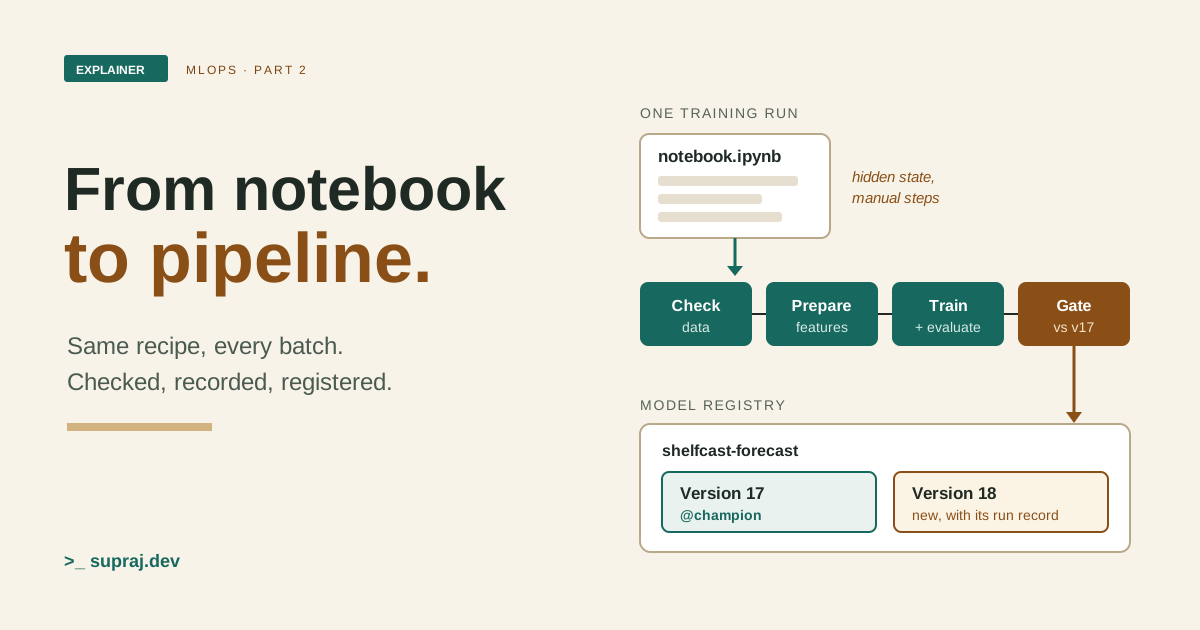
A model that worked once in a notebook is a good start. A pipeline is how you make it again, the same way, every time.
In Part 1, ShelfCast's daily batch used
model-v17. A weekly training run might produce candidate-v18, and
a release decision would say whether it replaces v17. We left one question open. Where does
that candidate actually come from?
Let's say the honest answer is "a notebook". A data scientist opened it, loaded some sales, tried a few ideas, and got a model with good numbers. That's a normal way to start. This part is about the next step: turning that one good result into a training pipeline that anyone can run again and get a candidate they can trust.
ShelfCast is still the fictional retailer from Part 1. Next to it, I'll use one picture all the way through: a bakery. A home cook can bake one great loaf. A bakery has to bake that same loaf every morning, check every batch, and know exactly which recipe made it.
01 / Notebook vs pipeline
Why isn't a notebook a pipeline?
A notebook is an interactive place to write and run code. The code runs in a separate process called the kernel, and the kernel keeps the state of your work. [3] Variables you made in earlier cells stay alive in memory until you restart the kernel or shut the server down. [2]
That is exactly why notebooks are great for exploring. It's also the first problem. The model on your screen can depend on cells you ran an hour ago, cells you edited since, or cells you ran twice. None of that is written down anywhere. Call it hidden state.
Google's MLOps guide has a name for the whole way of working that grows around this. It calls it MLOps level 0: manual process. [1] At level 0, every step is manual: data analysis, data preparation, training and validation. Someone runs each step by hand and moves to the next one by hand. The work is usually driven by experimental code written and run interactively in notebooks. [1]
The guide lists more signs of level 0. Three matter most for us. [1]
- A handoff. Data scientists hand a trained model to engineers as an artifact. The engineers then have to make the features available in production, which can lead to training-serving skew.
- Rare releases. A new model version is deployed only a couple of times a year.
- No CI and no CD. Testing is part of running the notebook or script.
Put those together and you get the three problems of this chapter. Hidden state: you can't see everything that made the model. Manual steps: someone has to remember the order. No repeatability: next week, a different person on a different laptop may not get the same candidate. Google names that last one directly: ML is experimental, and the challenge is tracking what worked and what didn't while keeping results reproducible. [1]
This doesn't mean you throw notebooks away. Google's own guidance is that exploration code can still live in notebooks, while the code for pipeline steps must be split into modules. [1]
- In the bakery
- A home cook bakes a great loaf. A pinch of this, an oven still warm from the last batch. Nobody wrote down either.
- In the system
- A notebook trains a good model. A variable from an old cell, a file loaded last Tuesday. The kernel remembers. The record doesn't.
02 / The stages
What are the stages of a training pipeline?
Google describes the steps of getting a model to production. Data extraction, data analysis, data preparation, model training, model evaluation, model validation, then serving and monitoring. These steps can be done by hand or by an automatic pipeline. [1]
MLOps level 1 is where a pipeline takes over. The goal is continuous training: the steps are orchestrated, and moving from one step to the next is automatic. To retrain on new data safely, level 1 adds automated data validation and model validation, pipeline triggers, and metadata management. [1]
The biggest change is what you ship. At level 0 you deploy a trained model. At level 1 you deploy the whole training pipeline, and it runs again and again on its own. [1] The same pipeline code runs in development, pre-production and production. [1]
For ShelfCast, the training pipeline has seven stages.
- Ingest. Read one identified sales snapshot, using only information allowed by each forecast's cutoff, as Part 1 set out.
- Validate the data. Check it before any training happens.
- Prepare features. Clean the data, split it into training, validation and test sets, and build the features. [1]
- Train. Fit the model, maybe with hyperparameter tuning. The output is a trained model. [1]
- Evaluate. Score it on a held-out test set. The output is a set of metrics. [1]
- Validate the model. Decide if it is good enough to be a release candidate. Chapter 3 covers this gate.
- Register. Store the model as a new numbered version, with its record. Chapter 5 covers this.
Notice what's missing. Google keeps data analysis as a manual step for data scientists, even at its most automated level. [1] People still study the data. The pipeline repeats what they decided.
Figure 1 / Run the pipeline
Pick a batch, then step through the stages.
- 1 · Ingestsales snapshot
- 2 · Validate dataschema and values
- 3 · Preparesplits and features
- 4 · Traincandidate-v18
- 5 · Evaluatetest-set metrics
- 6 · Gatevs model-v17
- 7 · Registernew version
Clean batch: the snapshot matches the expected schema. Press "Run stage 1" to start.
Who runs the stages?
A tool called an orchestrator runs the stages in order and passes each one's output to the next. Kubeflow Pipelines is one example. In Kubeflow Pipelines, a pipeline is a definition of a workflow that joins components into a directed acyclic graph, or DAG. Each component run is one container run, and it can produce ML artifacts. [4] You write components and pipelines with its Python SDK, compile them to a YAML file, and submit that to a backend, such as the open-source KFP backend or Google Cloud's Vertex AI Pipelines. [4]
Containers matter here. Google says pipeline components should ideally run in containers, so the code runs the same way in development and production, and each step can have its own libraries. [1]
A good orchestrator also avoids repeat work. Kubeflow Pipelines has caching, on by default: if a component runs again with the same inputs and parameters, it reuses the earlier outputs, as long as they are still available. [5] So if training fails, a rerun doesn't need to rebuild unchanged features.
- In the bakery
- A written production line: check the delivery, weigh and mix, bake, taste, compare, then file the batch.
- In the system
- A pipeline definition: ingest, validate, prepare, train, evaluate, gate, then register.
03 / The two gates
What stops a bad batch from becoming a model?
A pipeline that runs on its own needs checks that run on their own too. Google puts two of them in the production pipeline: one for the data, before training, and one for the model, after training. [1]
Gate one: is this data fit to train on?
Data validation decides whether to retrain or stop the pipeline. [1] Google describes two kinds of problem it looks for. [1]
- Schema skew. The data has unexpected features, is missing expected ones, or has features with unexpected values. The advice is to stop the pipeline so the team can investigate.
- Data value skew. The statistical properties of the data have changed a lot. Google treats this as a reason to retrain, so the model can capture the new patterns.
The "Column missing" batch in Figure 1 is schema skew. Say the promotion column from Part 1's promotion feed is gone. The pipeline stops at stage 2. Nothing gets trained on a broken table.
Gate two: is this model good enough?
Model validation happens after training and before the model is promoted. Google lists four checks. [1]
- Produce evaluation metrics on a test dataset.
- Compare them with the current model, such as the production model or a baseline. The new model should do better before it is promoted.
- Check that it performs consistently across segments of the data. Google's example is a churn model that is better overall but varies a lot by customer region.
- Test it for deployment, including infrastructure compatibility and consistency with the prediction service's API.
For ShelfCast, that means candidate-v18 is compared with
model-v17 and the simple reference forecast, overall and for each important
store and product group. These are the slices from Part 1. The "Weaker candidate" batch
in Figure 1 trains fine and then fails this gate.
One thing stays the same as Part 1. The pipeline doesn't invent the pass mark. The model and planning owners agree on the rule. The pipeline applies it the same way on every run, and writes down the result either way.
- In the bakery
- Wet flour goes back at the door. A new loaf is tasted against today's loaf, from every corner of the tray, before the recipe changes.
- In the system
- Bad data stops the run at validation. A candidate is compared with model-v17, slice by slice, before anyone can promote it.
04 / Finding a run again
How do you find out later what made a model?
Part 1 made the point that a Git commit is only part of a model's identity. The same code on a different snapshot or with different settings can give a different model. So a pipeline has to record more than code.
Google calls this metadata management. Each time the pipeline runs, an ML metadata store records: [1]
- the pipeline and component versions that ran
- start and end times, and how long each step took
- who or what ran the pipeline
- the parameters passed to it
- pointers to what each step produced, such as the prepared data
- a pointer to the previous trained model
- evaluation metrics for the training and test sets
Google gives a practical reason for those pointers. If a step fails, you can resume from the latest completed step instead of running everything again. [1]
Experiment tracking
Experiment tracking tools record the same kind of facts for each training run. MLflow Tracking is one example. It is an API and UI for logging parameters, code versions, metrics and output files when you run ML code. [6]
Three MLflow words are worth knowing. [6]
-
A run is one execution of some data science code, like one
python train.py. It records metadata, such as metrics, parameters and start and end times, and artifacts, such as model weights. - An experiment groups runs and models for one task.
- A logged model is the trained model a run produces, with its own metadata and artifacts.
MLflow can also record which dataset a run used, with
mlflow.log_input(). [6] Here's roughly what the
training stage of ShelfCast's pipeline could log. The functions are MLflow's. The names
and values are ours.
[6] [8]
import mlflow

with mlflow.start_run():
    mlflow.log_param("recent_sales_window_days", 7)
    snapshot = mlflow.data.from_pandas(train_df, name="sales-snapshot")
    mlflow.log_input(snapshot, context="training")
    # ... train and evaluate candidate-v18 ...
    mlflow.log_metric("wape_test", wape_test)
By default, with no server set up, MLflow writes this to a local
mlruns folder. [6] That's fine on a laptop. For a
team, MLflow documents a tracking server that stores runs and artifacts in a shared place
with access control. [6] A pipeline should log to the shared
one, or its records leave with the laptop.
A record like this lets you find an old run and see what went into it. Part 1 explained why getting identical numbers back is a separate, harder claim. Tracking is the part you can't do without.
- In the bakery
- Every batch gets a label: flour sack number, recipe version, oven, baker and time. A complaint about Tuesday's loaf can be traced.
- In the system
- Every run records its snapshot, code version, parameters, metrics and artifacts. A question about candidate-v18 can be answered.
05 / The model registry
Where does a finished model go?
The last stage puts the model in a model registry. In Google's most automated setup, the output of an automatic pipeline run is a trained model pushed to the model registry. [1]
MLflow's Model Registry is one example. MLflow describes it as a central model store, with APIs and a UI, for managing a model's lifecycle. It tracks lineage, meaning which experiment and run produced the model, plus versions, aliases, tags and notes. [7]
Here is how its pieces fit together. [7]
-
A registered model has a unique name, such as
shelfcast-forecast. It holds versions, aliases and tags. -
A model version is a number. The first model registered under a name is
version 1, and each new one adds one. You can point at a version with a URI like
models:/shelfcast-forecast/17. -
An alias is a name you can move, such as
champion.models:/shelfcast-forecast@championmeans "whichever version champion points to right now". Production can target the alias, and you change what production uses by moving the alias to another version. -
A tag is a key and a value. MLflow's own example marks versions with
validation_status:pendingorvalidation_status:approved.
So in ShelfCast's registry, model-v17 is version 17 and carries the
champion alias. When the pipeline finishes, candidate-v18 becomes
version 18. It sits in the registry with its record and does nothing until someone moves
the alias. Part 1 called that step promotion, and the release policy still decides it.
Figure 2 / The registry
Choose where the champion alias points.
models:/shelfcast-forecast@champion → version 17
Champion points to version 17, the model the daily batch uses. Versions 16 and 18 stay in the registry, unchanged.
You can register a model from code. MLflow's Python API has
mlflow.register_model(model_uri, name), and its client has
set_registered_model_alias(name, alias, version) to move an alias.
[7] [8]
[9] One setup note from MLflow's docs: to use the registry with
tracking, you need a database-backed store, such as PostgreSQL.
[6]
For ShelfCast, we'll use one rule: let the pipeline register every candidate that passes the gate, but keep moving the alias as its own, deliberate step. Then the registry tells you what exists, and the alias tells you what's live. Those are different questions.
- In the bakery
- A numbered recipe book. A sticky note says "today's loaf". Moving the note changes what the morning shift bakes. Old pages stay in the book.
- In the system
- A registry of numbered versions. The champion alias says which one is live. Moving it changes what production uses. Old versions stay registered.
06 / Running it again
When should the pipeline run again?
A pipeline is only useful if something starts it. Google lists five triggers for retraining. [1]
| Trigger | What it means |
|---|---|
| On demand | Someone runs the pipeline by hand. |
| On a schedule | New labelled data arrives daily, weekly or monthly, so the pipeline runs on that rhythm. |
| New training data | New data arrives at irregular times, and its arrival starts a run. |
| Performance drops | The model is retrained when its performance gets noticeably worse. |
| Data distribution changes | The features used for prediction shift a lot, which suggests the model is stale. |
How often to retrain depends on how often the data patterns change and how expensive retraining is. [1] For ShelfCast, the last two triggers need monitoring, which we haven't built yet. So we'd start with a weekly schedule, timed after the week's sales labels have matured, plus on-demand runs. That matches Part 1's advice to start with an explicit, reviewed training process.
When the pipeline code changes
The triggers above retrain on new data with the same pipeline. Changing the pipeline itself, say a new feature, is a different event. Google's MLOps level 2 adds CI/CD for exactly this. [1]
At level 2, the pipeline and its components are built, tested and packaged when new code is pushed. Google's examples of CI tests include: [1]
- unit tests for feature engineering logic
- a test that training converges, with the loss going down
- a test that training doesn't produce NaN values
- a test that each component produces the artifacts it should
- tests of how the components work together
Delivery of the pipeline is staged too. Google's example is automatic deployment to a test environment, semi-automatic deployment to pre-production after review, and manual deployment to production after several successful pipeline runs in pre-production. [1]
You don't have to jump levels in one go. Google says you can adopt these practices gradually. [1] If you're at level 0 today, the first win is one pipeline that runs the same way twice.
- In the bakery
- The line runs every morning, or when a new flour delivery arrives. A new recipe is test-baked before it reaches the main line.
- In the system
- The pipeline runs on a schedule or on new data. New pipeline code goes through CI and a test environment before production.
07 / What comes next
What doesn't a training pipeline cover yet?
Our pipeline ends with a registered, validated model. Nobody has used it to predict anything yet. Google's list of steps continues past that point. [1]
- Serving. The model is deployed as an online service with a REST API, as an embedded model on a device, or as part of a batch prediction system. ShelfCast's daily batch is the third kind.
- Online validation. Before a newly deployed model serves online traffic, it goes through a canary deployment or an A/B test.
- Monitoring. Performance is tracked on live data. Its output is a trigger to run the pipeline again or start a new experiment.
Monitoring is also what makes the "performance drops" and "distribution changes" triggers possible. That's where the loop closes, and it's where the next part of this series picks up.
One more thing we skipped on purpose: a feature store. Google calls it an optional component of a level 1 pipeline. [1] Like Part 1 said, add one when shared features justify it.
- In the bakery
- The recipe book is ready and today's loaf is chosen. The shop counter isn't open yet, and nobody is asking customers how it tastes.
- In the system
- The registry holds a validated model. Serving it and watching how it does in production are the next jobs.
Keep these names
A small glossary
- Kernel
- The separate process that runs a notebook's code and keeps its state. [3]
- MLOps level 0, 1, 2
- Google's maturity levels: a manual process, ML pipeline automation, and CI/CD pipeline automation. [1]
- Training pipeline
- The automated chain of steps that turns data into a validated model, deployed and run as one unit at level 1. [1]
- Component
- One step of a pipeline. In Kubeflow Pipelines, each component run is one container run. [4]
- DAG
- Directed acyclic graph. The shape a Kubeflow pipeline's components form. [4]
- Data validation
- The check before training that decides whether to retrain or stop the pipeline. [1]
- Model validation
- The check after training that a model is good enough to promote, compared with the current model and across segments. [1]
- Metadata store
- Where each pipeline run's versions, parameters, timings, artifact pointers and metrics are recorded. [1]
- Run and experiment
- In MLflow, a run is one execution of ML code. An experiment groups runs and models for a task. [6]
- Model registry
- A central store for model versions, aliases, tags and lineage. [7]
- Alias
-
A movable name, like
champion, that points at one model version. [7] - Trigger
- What starts a pipeline run: on demand, a schedule, new data, a performance drop or a shift in data. [1]
Check the concept
Can you explain it back?
1. Your notebook trained a great model yesterday. Why might it not do it again today?
The kernel kept state from cells you ran, edited or reran, and none of that was recorded. The steps were run by hand, in an order nobody wrote down.
2. What do you deploy at MLOps level 1: a model or a pipeline?
The whole training pipeline. It then runs again on its own and produces models.
3. The sales snapshot is missing a column the model expects. Which gate catches it, and what happens?
Data validation, before training. Google's advice for schema skew is to stop the pipeline so the team can investigate.
4. A candidate beats model-v17 overall but is worse for one store group. Is that enough?
No. Model validation also checks that performance is consistent across segments. The owners' agreed rule decides.
5. Version 18 is in the registry. Is it live?
Not by itself. Production follows the champion alias. Version 18 is live only after someone moves the alias to it.
6. Someone adds a new feature to the pipeline code. Should the weekly schedule just pick it up?
No. A code change goes through CI and staged deployment of the pipeline first. Triggers rerun the pipeline you already trust on new data.
Continue the thread
Go back a step, or sideways.
If any ShelfCast word here was new, start with Part 1: what MLOps is. The release stages in Chapter 6 build on CI/CD and environments. And if your pipeline runs on Kubernetes, the monitoring ideas we'll need next start in Kubernetes observability.
Read further
Sources
Sources accessed 18 November 2026. ShelfCast, its versions and its batches are fictional. Tools are named as examples, not requirements.
- Google Cloud: MLOps, continuous delivery and automation pipelines in machine learning. Last reviewed 28 August 2024.
- Project Jupyter documentation: What is Jupyter?
- Jupyter Notebook documentation: Running Code.
- Kubeflow Pipelines: Overview.
- Kubeflow Pipelines: Use Caching.
- MLflow: MLflow Tracking.
- MLflow: Model Registry.
- MLflow Python API: mlflow module.
- MLflow Python API: mlflow.client.