Cloud & DevOps · Explainer
Ingress NGINX is retired.Moving to Gateway API without an outage.
A practical migration path for a team with dozens of services behind the community ingress-nginx controller: what to inventory, what to translate, and how to move traffic so you can always step back.
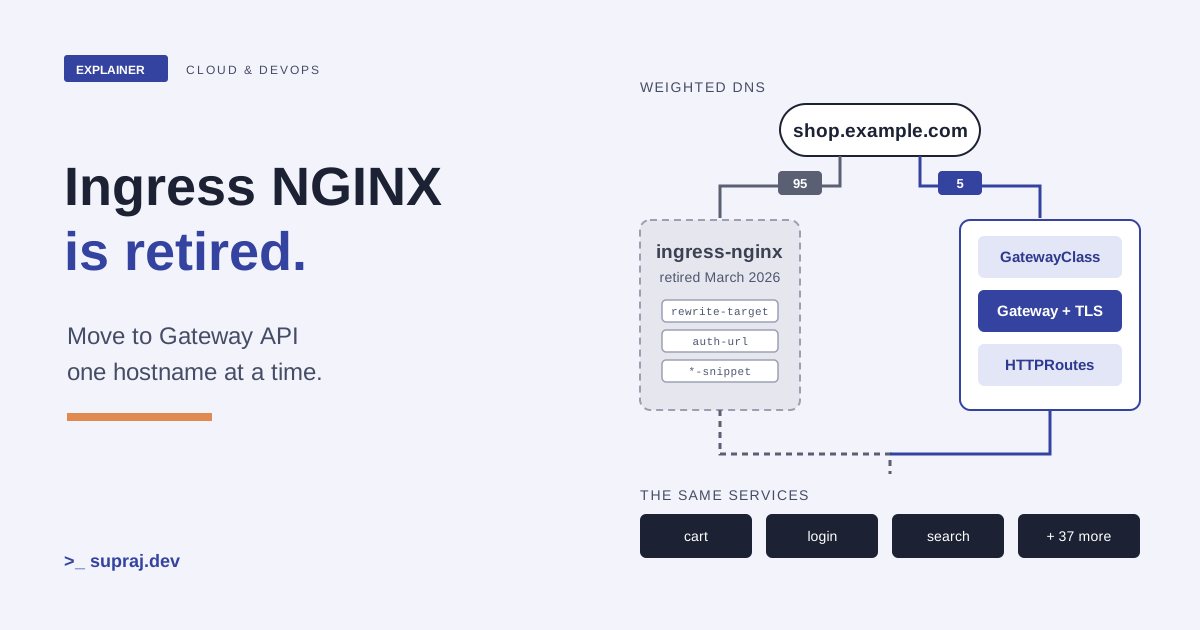
Picture a platform team with forty services behind one ingress-nginx controller. The Ingress objects look simple: a host, a path, a Service. The real behaviour lives elsewhere, in annotations, in the controller's ConfigMap, and in defaults nobody chose on purpose. That controller no longer gets fixes, and the team has to move off it without breaking anyone.
This guide walks that move end to end. One picture runs through it: a busy shopping centre moving to a new building next door. The old building has one front desk, and the guard there follows a binder of handwritten notes. The new building has proper entrances, signs that each shop owns, and a road sign outside that decides which building cars drive to. Every claim about the tools comes from official docs, project blogs and the project repositories, listed at the end.
01 / The deadline
What does "retired" actually mean for your cluster?
In November 2025, Kubernetes SIG Network and the Security Response Committee announced that Ingress NGINX would be retired. Best-effort maintenance continued until March 2026. After that there are no further releases, no bugfixes, and no updates to resolve any security vulnerabilities that may be discovered. [1]
Retired does not mean switched off. The announcement says existing deployments will not
be broken, and Helm charts and container images remain available. The GitHub repositories
were to be made read-only and left for reference. [1] That
is what happened: the kubernetes/ingress-nginx repository is archived, and
its last controller release, controller-v1.15.1, was published on 19 March
2026. [5]
That is the trap. Nothing breaks on the day, so nothing forces the work. The Kubernetes Steering and Security Response Committees put it bluntly in January 2026: staying on Ingress NGINX after retirement leaves you and your users vulnerable to attack, and none of the alternatives are drop-in replacements. [2] The project's README also says not to use it in multi-tenant production installations, because it assumes that anyone who can create Ingress objects is a cluster administrator. [5]
There is a second, quieter clock. The README's supported-versions table lists Kubernetes 1.31 to 1.35 for v1.15.1, and "supported" there means the project ran its end-to-end tests on those versions. [5] Kubernetes v1.36 shipped in April 2026 and v1.37 in August 2026. [33] Every cluster upgrade now moves you further outside anything the controller was tested against.
First, find out whether you are affected. The retirement post gives this check, run with cluster administrator permissions: [1]
kubectl get pods --all-namespaces \
  --selector app.kubernetes.io/name=ingress-nginx
The official recommendation is to migrate to Gateway API, which the Kubernetes docs call the successor to Ingress. If you must stay on Ingress, other controllers are listed in the Kubernetes documentation. [1] [6] The Ingress API itself is frozen. [7] This guide takes the Gateway API route.
- In the shopping centre
- The old building stays open, but the landlord has stopped all repairs. The locks will not be changed even if someone copies the key.
- In the system
- ingress-nginx keeps serving traffic, but no security fix will ever ship for it again.
02 / The new model
What is Gateway API, and why does it split the job three ways?
Gateway API is a family of API kinds for infrastructure provisioning and traffic
routing, installed as an add-on. [6] Its resources are
Custom Resource Definitions in the gateway.networking.k8s.io group, and the
core of it is three objects. [8]
- GatewayClass is cluster-scoped and describes a kind of gateway. Each one is handled by a single controller. It plays the role IngressClass plays today. [8]
- Gateway is a request for an entry point. It binds addresses to listeners, and each listener has a port, a protocol and, for HTTPS, its TLS settings. [8]
- HTTPRoute says how HTTP requests arriving at a Gateway map to Services: matches on path, headers or query, optional filters, and backends. [8] [16]
Ingress folds the load balancer and the routing rules into one object. Gateway API splits them on purpose. The Gateway, where traffic enters, is a task for a cluster operator. The HTTPRoute, where traffic goes, is a task for an application developer. [10] The docs name three personas for this: an infrastructure provider, a cluster operator and an application developer, each expected to map roughly to a Kubernetes RBAC role. [9]
The split has teeth. A Route attaches only if it names the Gateway in its
parentRefs and a listener on that Gateway accepts it. A listener can limit
which namespaces may attach through allowedRoutes, and the default is
Same, only Routes in the Gateway's own namespace.
[8] References that cross namespaces, such as a Gateway using
a certificate Secret from another namespace, need a ReferenceGrant in the
target namespace. [19]
For a team with dozens of services, the usual shape is one shared Gateway in an infrastructure namespace, owned by the platform team, and one HTTPRoute per service in each application namespace. The API overview describes exactly this: a shared Gateway used by several teams, plus a dedicated one for a team with special needs. [8]
The resources come in two release channels. Standard holds GA resources and graduated fields. Experimental holds everything in Standard plus new fields, with no backwards compatibility guarantee. The project recommends Standard by default. [14] At the time of writing, the getting-started guide installs the v1.7.0 Standard bundle like this: [15]
kubectl apply --server-side -f \
  https://github.com/kubernetes-sigs/gateway-api/releases/download/v1.7.0/standard-install.yaml
Many implementations install or bundle these CRDs themselves, so check your implementation's install guide before you run this. The CRD guide says CRDs are highly privileged and should be managed by a cluster admin or provider. [34]
- In the shopping centre
- The building company offers a type of entrance (GatewayClass). The centre manager opens one with doors and a badge check (Gateway). Each shop puts up its own sign pointing to its unit (HTTPRoute).
- In the system
- The platform team owns the Gateway and its TLS. Service teams own their HTTPRoutes and attach them only where the listener allows.
03 / The implementation
How do you choose an implementation?
Gateway API is a specification. Something has to implement it, and the official docs do not pick one for you. The Ingress-NGINX welcome guide names three factors: conformance, the underlying proxy technology your team already knows (such as Envoy or NGINX), and whether your cloud provider or CNI already offers an integrated implementation. [10]
Conformance is the factor you can check. The implementations page sorts projects into conformant and partially conformant, based on reports they submit. [12] Inside the spec, every feature has a support level. Core features are expected everywhere. Extended features are portable, but not every implementation has them. Implementation-specific features are not portable and are not covered by conformance tests. [13]
That matters for migration because many things you used annotations for sit in Extended
or beyond. Request timeouts are Extended (HTTPRouteRequestTimeout).
[18] Regular-expression path matching is
implementation-specific. [11] Even the port
field in a Route's parentRefs is Extended (HTTPRouteParentRefPort),
and the docs say you can check support in the GatewayClass under
status.supportedFeatures. [8]
A practical way to choose: take your annotation inventory from the next chapter, list the
Gateway API features each one needs, and keep only the implementations whose reports
cover them. For anything with no standard field, such as authentication, the migration
guide says you will need the implementation's own extensions: filters through
extensionRef, or Policy resources that attach to Gateway API objects.
[11] Read those docs before you commit, because that
configuration will not move with you to another implementation.
- In the shopping centre
- Before you sign a lease, check that the new building has a loading dock and a badge system, not just a front door.
- In the system
- Match your inventory against each implementation's conformance report and supported features, then read its docs for the rest.
05 / The translator
What does ingress2gateway translate, and what does it leave to you?
ingress2gateway is a SIG Network tool that reads Ingress resources and provider-specific resources, and writes Gateway API resources. Its README says it is not meant to copy annotations across. [22] Version 1.0 shipped in March 2026 with support for over 30 common Ingress-NGINX annotations, up from three. Each supported annotation is backed by integration tests that compare the runtime behaviour of ingress-nginx and Gateway API controllers on live clusters. [4] The latest release at the time of writing is v1.2.0. [24]
The tool has two halves. Providers read your Ingress resources
(ingress-nginx is one). Emitters write the output: the default
standard emitter writes core Gateway API resources, and others add
resources for a specific implementation. [22] Install it
with Go or Homebrew, then run it against files, a namespace, or the whole cluster:
[4] [22]
# Install (or download a binary from the releases page)
go install github.com/kubernetes-sigs/ingress2gateway@v1.0.0
brew install ingress2gateway

# Translate one namespace, or everything
ingress2gateway print --providers=ingress-nginx --namespace my-api > gwapi.yaml
ingress2gateway print --providers=ingress-nginx --all-namespaces > gwapi.yaml

# Or translate manifests from Git instead of the live cluster
ingress2gateway print --providers=ingress-nginx \
  --input-file ingress-a.yaml,ingress-b.yaml > gwapi.yaml
The go install line above is the one the README shows. Pin the release you
have reviewed. If your IngressClass is not called nginx, set
--ingress-nginx-ingress-class, because that is the default it selects.
[22]
The project calls this step "the most critical": review the output and the warnings.
[4] In the 1.0 walkthrough, the tool turned
enable-cors into a CORS filter, warned that
configuration-snippet is unsupported, mapped the TCP-level
proxy-read-timeout and proxy-send-timeout to a best-effort
10-second request timeout, and could not translate proxy-body-size with the
standard emitter. It also added a port 80 listener and a 308 redirect to HTTPS, to match
ingress-nginx's default. [4]
Read the output with three questions in mind.
-
Where did the Gateway land? In the walkthrough, the generated Gateway
sits in the Ingress's own namespace, with the GatewayClass name taken from
ingressClassName. [4] [22] A Gateway implementation typically gives each Gateway its own data plane. [11] With forty namespaces, you probably want one shared Gateway instead, so move the HTTPRoutes'parentRefsto it. - Which rules collided? The tool processes the oldest Ingress first and reports an error for the later one when two rules conflict. [22] Ingress controllers merge rules from all Ingresses in their own way, because the Ingress API does not say how. [11]
-
Which fields need Extended support? The generated routes use
parentRefs.port, which is the ExtendedHTTPRouteParentRefPortfeature. [4] [8] If your implementation lacks it, switch tosectionName.
Commit gwapi.yaml and the warning log to Git. Turn every WARN line into a
tracked item with an owner, and do not cut a hostname over while it has open items.
- In the shopping centre
- A translator rewrites the guard's binder for the new building, and puts a red flag on every note it could not translate.
- In the system
- ingress2gateway writes the YAML and the warnings. The warnings are the real output.
06 / Moving the cars
How do you run both and move traffic without an outage?
You do not swap controllers in place. You run the Gateway API controller next to ingress-nginx. The welcome guide for Ingress-NGINX users recommends exactly this, and notes that each controller gets a different external IP address, so you can test the new one without touching production traffic. [10]
That also tells you where the traffic switch lives. HTTPRoute weights split traffic
between backends inside one route rule, for example 90 to foo-v1 and 10
to foo-v2. [17] They cannot send a share of
clients to a different controller, because clients reach each controller at its own
address. The switch has to sit in front of both. The ingress2gateway 1.0 announcement
suggests weighted DNS, your cloud load balancer, or your platform's traffic-splitting
features. [4]
Before any real user arrives, test the new Gateway directly. Read its address from status, then send requests with the production hostname: [21] [28]
kubectl get gateway shared-gw -n infra \
  -o jsonpath='{.status.addresses[*].value}'

# --resolve sends the request to the new IP but keeps the real hostname in the URL
curl -sS -o /dev/null -w '%{http_code}\n' \
  --resolve shop.example.com:443:203.0.113.10 https://shop.example.com/cart
Then move one hostname at a time, in an order you choose: low-risk internal services first, payment and login last. Lower the DNS record's TTL well before the first shift. A TTL is how long a resolver may cache the record before asking again, so a short one makes both the shift and the rollback take effect sooner. [29]
Figure 2 / One hostname's cutover
Step through the cutover, and try a rollback.
- 1 · DeployGateway and routes live, no users.
- 2 · Testcurl --resolve against the new IP.
- 3 · CanaryA small DNS weight to the Gateway.
- 4 · HalfEqual weights, compare both sides.
- 5 · AllAll weight on the Gateway.
- 6 · HoldOld controller idle but kept running.
Before stage 1: every client resolves the hostname to ingress-nginx.
Run the canary long enough to see your normal traffic shape, including batch jobs and slow clients. Rolling back is moving the DNS weight back to ingress-nginx, which only works while it is still running with the old Ingress objects. The announcement's order is the right one: shift all traffic first, then delete the Ingress resources and uninstall the controller. [4]
- In the shopping centre
- Open the new building next door. Turn the road sign so one car in twenty goes there. If a shop is missing, turn the sign back.
- In the system
- Both controllers have their own IPs. Weighted DNS or a load balancer moves clients between them, one hostname at a time.
07 / Keys and badges
What happens to TLS and certificates?
In Ingress, TLS sits in the Ingress object. In Gateway API, TLS termination is a property of the Gateway listener, and the certificate and key are still stored in a Secret. [11] So the platform team now owns TLS, and a service team can no longer change it by editing its own route.
The simplest safe move is to point the new listeners at the same Secrets ingress-nginx already serves. Both controllers then present the same certificate during the parallel run, and nothing changes for clients. There is one catch for a shared Gateway: Ingress Secrets usually live in the application namespaces. A Gateway referencing a Secret in another namespace needs a ReferenceGrant there, or the reference is invalid. [19]
apiVersion: gateway.networking.k8s.io/v1
kind: ReferenceGrant
metadata:
  name: allow-infra-gateways
  namespace: shop            # where the Secret lives
spec:
  from:
  - group: gateway.networking.k8s.io
    kind: Gateway
    namespace: infra         # where the Gateway lives
  to:
  - group: ""
    kind: Secret
Listeners can carry different certificates per hostname, and a specific hostname wins over a wildcard on the same port. [19] If you use cert-manager, it can create certificates from annotations on a Gateway, much as it did for Ingress. You must enable its Gateway API support, and it only creates Secrets in the Gateway's own namespace. [27] Plan where certificates live before the cutover, not during it.
Two ingress-nginx annotations change the TLS shape:
-
ssl-passthroughsends TLS straight to the backend. ingress2gateway turns it into a TLSRoute on aPassthroughlistener. [23] TLSRoute has been in the Standard channel since v1.5.0. [8] -
backend-protocol: HTTPSand theproxy-ssl-*annotations re-encrypt traffic to the backend. ingress2gateway maps them to aBackendTLSPolicy, but not the verify depth or protocol settings. [23]
- In the shopping centre
- The badge printer moves from each shop to the centre manager's office. Copy the existing badges so nobody's card stops working on moving day.
- In the system
- TLS moves to the Gateway listener. Reuse the existing Secrets, with a ReferenceGrant if they sit in another namespace.
08 / Proof
How do you prove parity, roll back and know it is working?
Status first. The Gateway API docs say to always check
status.conditions first. The common conditions are Accepted,
Programmed and ResolvedRefs, and you should check that
observedGeneration matches metadata.generation, or the status
is stale. [20]
kubectl get gateway shared-gw -n infra -o yaml
kubectl get httproute shop -n shop -o yaml
One trap: a Route whose parentRefs points at a Gateway that does not exist,
or at the wrong namespace, gets no status at all, because no controller can tell it is
theirs. [20] Silence is a failure. And if a backend
reference is invalid, for example a missing Service or ReferenceGrant, the requests
meant for it must get a 500. [21]
Then behaviour. Build a list of real requests per hostname from the old
controller's access logs: common paths, odd ones, paths with and without a trailing
slash, uppercase variants, double slashes, large uploads and slow endpoints. Run the
list against both controllers with curl --resolve and compare status codes,
Location headers and response headers. This catches the five surprises from
chapter 4, which show up as 404s where ingress-nginx returned 200 or 301.
[3] Also check how your implementation normalizes URLs,
because Gateway API does not standardize it. [4]
Rollback plan. Write it before stage 3, and rehearse it once. It has three parts: the DNS or load balancer change that sends the hostname back, who can make it, and the signal that triggers it. Keep the Ingress objects, the controller and its ConfigMap unchanged until the hold period ends. Do not upgrade the Gateway API CRDs mid-migration either. The CRD guide warns that moving backwards can lose configuration. [34]
What to monitor during and after each shift:
- Response codes per hostname on both sides, especially new 404s (missed matches) and 500s (invalid backend references). [3] [21]
- Redirect counts, so a lost trailing-slash or HTTPS redirect shows up early.
- Latency and timeout errors on slow or long-running endpoints.
- Gateway and Route conditions after every apply, not just once. [20]
- Requests still reaching ingress-nginx. That number has to reach zero before you uninstall it.
- Certificate expiry for every listener, now that TLS sits in one place.
Gateway API does not yet define standard metric names. The experimental
XTelemetryPolicy in v1.7.0 covers tracing only, not metrics or access
logs. [32] Use the metrics your implementation documents.
The recommendation. Choose a conformant implementation that covers your inventory, and stay on the Standard channel. Run ingress2gateway as the starting point and treat each warning as a ticket. Rebuild auth and rate limits on purpose. Cut over one hostname at a time through weighted DNS or a load balancer, keep ingress-nginx running through a hold period, and only then remove it.
- In the shopping centre
- Walk the new building with the old floor plan in hand, door by door. Keep the old building unlocked until the last shop has had a normal week.
- In the system
- Check status, replay real requests against both sides, watch the error codes, and keep the old path warm until the hold ends.
Keep these names
A small glossary
- ingress-nginx
- The community Ingress controller from the Kubernetes project, retired in March 2026. It is a different project from F5's NGINX Ingress controller. [1] [3]
- GatewayClass
- A cluster-scoped kind of gateway, handled by one controller. [8]
- Gateway
- An entry point that binds addresses to listeners (port, protocol, TLS). [8]
- HTTPRoute
- Rules that map HTTP requests on a Gateway to backends, with matches, filters and weights. [16]
- ReferenceGrant
- An object in a target namespace that allows references from another namespace, such as a Gateway using a Secret. [19]
- Standard channel
- The stable set of Gateway API resources and fields. Experimental has no compatibility guarantee. [14]
- Extended support
- Portable features that not every implementation supports. [13]
- ingress2gateway
- The SIG Network tool that translates Ingress and provider resources to Gateway API and warns about what it cannot translate. [22]
- Snippet annotation
- An ingress-nginx annotation that injects raw NGINX configuration. Off by default. [26]
- TTL
- How long a DNS record may be cached before it should be looked up again. [29]
Check the concept
Can you explain it back?
1. Will ingress-nginx stop serving traffic now that it is retired?
No. Existing deployments keep working. What stopped is releases, bugfixes and security updates.
2. Who owns the Gateway and who owns the HTTPRoute?
The cluster operator owns the Gateway, including TLS. Application developers own their HTTPRoutes.
3. Can you shift users from ingress-nginx to the new Gateway with HTTPRoute weights?
No. HTTPRoute weights split traffic between backends behind one Gateway. The two controllers have different IPs, so the shift happens in DNS or a load balancer in front of both.
4. Your Ingress has auth-url. What does ingress2gateway do with
it?
It is not on the supported list, so you rebuild authentication with your implementation's extensions, and test that unauthenticated requests are refused.
5. An HTTPRoute shows no status at all. What is the likely cause?
Its parentRefs does not point at a Gateway any controller owns, so no
controller updates it.
6. When is it safe to uninstall ingress-nginx?
After every hostname has moved, requests to it have dropped to zero, and the hold period has passed. Until then it is your rollback.
Continue the thread
Keep building the platform.
TLS moves to the Gateway in this migration, so how TLS certificates work in Kubernetes is a useful next read. To watch the cutover, see Kubernetes observability, and to roll the new manifests through environments, see CI/CD and environments.
Read further
Sources
ingress2gateway references use the kubernetes-sigs/ingress2gateway
repository at commit 40de970 (main on 20 November 2026). Sources accessed
20 November 2026.
- Kubernetes blog: Ingress NGINX Retirement: What You Need to Know (11 November 2025).
- Kubernetes blog: Ingress NGINX: Statement from the Kubernetes Steering and Security Response Committees (29 January 2026).
- Kubernetes blog: Before You Migrate: Five Surprising Ingress-NGINX Behaviors You Need to Know (27 February 2026).
- Kubernetes blog: Announcing Ingress2Gateway 1.0 (20 March 2026).
- kubernetes/ingress-nginx: repository README (archived) and release controller-v1.15.1.
- Kubernetes docs: Gateway API.
- Kubernetes docs: Ingress.
- Gateway API: API Overview.
- Gateway API: Roles and Personas.
- Gateway API: A Welcome Guide for Ingress-NGINX Users.
- Gateway API: Migrating from Ingress.
- Gateway API: Implementations.
- Gateway API: Conformance.
- Gateway API: Versioning.
- Gateway API: Getting started.
- Gateway API: HTTPRoute.
- Gateway API: HTTP traffic splitting.
- Gateway API: HTTP timeouts.
- Gateway API: TLS Configuration.
- Gateway API: Troubleshooting and Status.
- Gateway API: API specification v1.7.
- ingress2gateway: README.
- ingress2gateway: Ingress Nginx provider README.
- ingress2gateway: releases.
- ingress-nginx docs: Annotations.
- ingress-nginx docs: ConfigMap.
- cert-manager docs: Annotated Gateway resource.
- curl manual: --resolve.
- RFC 1035: Domain Names, section 3.2.1 (TTL).
- jq manual.
- Kubernetes docs: kubectl get.
- Gateway API: v1.7.0 release notes.
- Kubernetes blog: Kubernetes v1.36 (22 April 2026) and Kubernetes v1.37 (26 August 2026).
- Gateway API: CRD Management.