Cloud and DevOps · Playbook
Your EKS cluster is leaving standard supportA zero-downtime upgrade playbook.
Your cluster's version is about to cost six times as much per hour. You're several versions behind, and EKS won't let you jump. Here's how to climb one step at a time without dropping traffic.
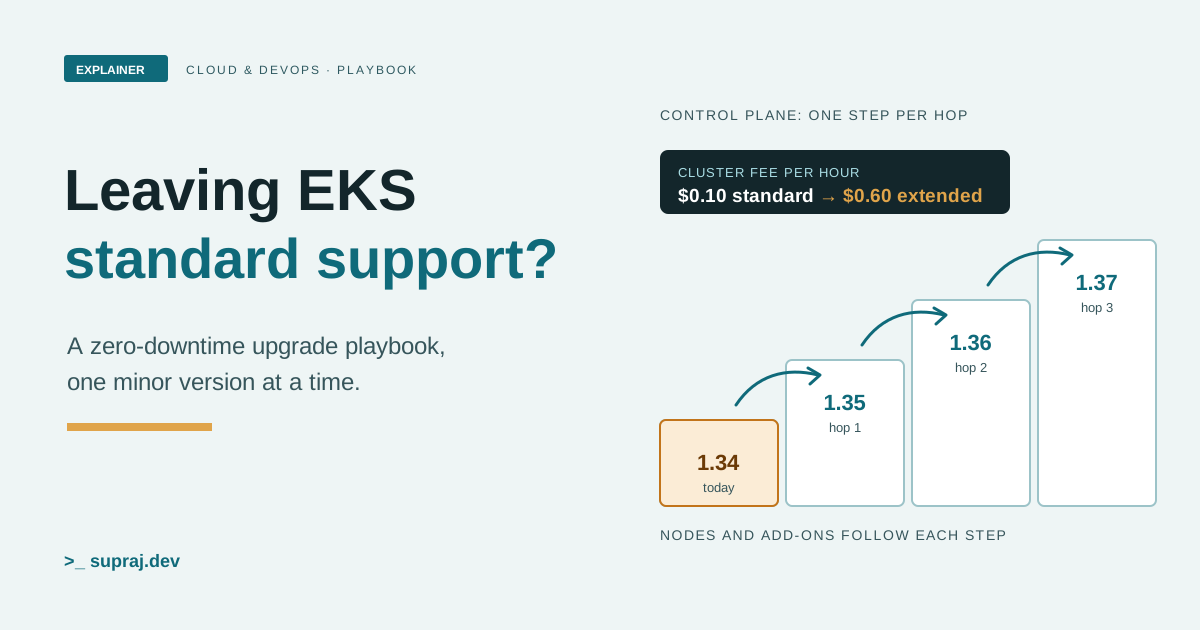
Here's the situation. A production cluster runs Kubernetes 1.34 on EKS. Standard support for 1.34 ends on 2 December 2026, twelve days from the day this was written. The newest version on EKS is 1.37. [1] Nobody upgraded for a year, and now the bill is about to change.
We'll use one picture all the way through: a city bus company. The depot office writes the rulebook every driver follows. That's the control plane. The buses are your nodes, and the passengers are your Pods. The ticket machines and radios fitted to every bus are the add-ons. An upgrade means a new edition of the rulebook, then a fleet of buses that can follow it, with no passenger left at a stop.
01 / The deadline
What does leaving standard support actually cost?
EKS gives each Kubernetes minor version 14 months of standard support from the day it's released on EKS. After that comes 12 months of extended support, at an extra cost per cluster hour. That's 26 months in all. [1]
The price, from the EKS pricing page on 20 November 2026: standard support is $0.10 per cluster per hour. Extended support is $0.60 per cluster per hour, which is the $0.10 plus $0.50. [2] So each cluster that slips over the line costs an extra $12 a day, or $4,380 over a year. Billing for extended support starts at the beginning of the end-of-standard-support day, in UTC. [1]
Here's the EKS calendar for the versions on offer that day. [1]
| Version | On EKS since | Standard support ends | Extended support ends |
|---|---|---|---|
| 1.37 | 1 Oct 2026 | 1 Dec 2027 | 1 Dec 2028 |
| 1.36 | 2 Jun 2026 | 2 Aug 2027 | 2 Aug 2028 |
| 1.35 | 27 Jan 2026 | 27 Mar 2027 | 27 Mar 2028 |
| 1.34 | 2 Oct 2025 | 2 Dec 2026 | 2 Dec 2027 |
| 1.33 | 29 May 2025 | 29 Jul 2026 | 29 Jul 2027 |
| 1.32 | 23 Jan 2025 | 23 Mar 2026 | 23 Mar 2027 |
| 1.31 | 26 Sep 2024 | 26 Nov 2025 | 26 Nov 2026 |
Two settings decide what happens at the line. Each cluster has an
upgrade policy. With EXTENDED, the default for new and
existing clusters, the cluster stays on its version and starts paying the extended
price. With STANDARD, AWS upgrades the cluster for you when standard
support ends. [7] Once a cluster is in extended support,
you can't switch the policy off. To change it, the cluster must be on a version in
standard support. [7]
Check yours:
aws eks describe-cluster \
  --name <cluster-name> \
  --query "cluster.upgradePolicy.supportType"
Don't treat the automatic upgrade as a safety net. At the end of extended support, AWS upgrades only the control plane. Managed node groups and self-managed nodes stay on the old version, and you won't get a notice before it happens. [1]
Figure 1 · Where is your cluster today?
Pick your control plane version
- Your version
- Standard support
- Standard support ends within 30 days
- Extended support
- Versions still to climb
1.34 is in standard support until 2 December 2026, 12 days away. One control plane hop, to 1.35, keeps it at $0.10 an hour until 27 March 2027. Three hops reach 1.37.
- In the bus depot
- The city licenses each rulebook edition for 14 months. After that you can keep using it for a year, but the licence fee goes up sixfold.
- In the cluster
- Standard support lasts 14 months at $0.10 an hour. Extended support adds 12 months at $0.60 an hour.
02 / The rule
Why can't you jump straight to the newest version?
Because EKS runs a highly available control plane, "you can update only one minor version at a time". To go from 1.34 to 1.37 you go 1.34 to 1.35, then 1.35 to 1.36, then 1.36 to 1.37. [3]
The reason comes from Kubernetes itself. In a highly available cluster, the newest and oldest API servers "must be within one minor version". During a rolling update, old and new API servers run side by side, so a two-version jump would break that rule. Kubernetes policy also says the API server must not skip minor versions when upgrading, even in a single-server cluster. [17]
The nodes have more room. A kubelet must never be newer than the API server, but it may be up to three minor versions older. [17] EKS uses this: with nodes on 1.25 or newer, you can move the control plane up to three versions ahead without touching the kubelet. [3] The same page also says nodes must match the control plane's version before you update it. Read the two together as: the skew is allowed, but the clean path is to bring nodes level before each next hop. [3]
kubectl has the tightest rule. It's supported within one minor version, older or newer, of the API server. [17] Update it as you climb.
- In the bus depot
- Office staff work from adjacent editions while the new one is phased in. Buses can run on a rulebook up to three editions old, but never a newer one.
- In the cluster
- API servers stay within one minor version of each other. Kubelets may lag the API server by up to three minor versions, never lead it.
03 / The risk
What will break when you move up a version?
Start with removed APIs. A beta API is deprecated and later stops being served, so any
manifest, Helm chart or controller still asking for it fails after the upgrade.
[19] The Kubernetes Deprecated API Migration Guide lists
every removal by release. On 20 November 2026 its newest entry was v1.32, which stopped
serving flowcontrol.apiserver.k8s.io/v1beta3.
[18] So the guide lists nothing removed in 1.35, 1.36 or
1.37.
That doesn't mean this climb is safe. EKS's own release notes list breaking changes that aren't API removals: [8]
- 1.35: the kubelet refuses to start by default on nodes using cgroup v1. It's also the last release supporting containerd 1.x, so you must be on containerd 2.0 or later before the next version.
-
1.36: the
gitRepovolume type is permanently disabled, and the kubelet refuses to run Pods that use it. Strict IP and CIDR validation is on, so creating or updating built-in objects with values like010.000.000.005fails. -
1.37: SELinux mount labelling is on by default. On SELinux-enabled
nodes, Pods that share a volume with different SELinux settings can stay stuck in
ContainerCreating.
Read every version's notes between where you are and where you're going. Each one has an "Action required" line. [8]
Let EKS look for you
EKS upgrade insights scan every cluster for upgrade problems, such as
deprecated API use, kubelet skew, kube-proxy skew and add-on compatibility.
[5] [6] An ERROR usually means a problem for the
next version (N+1). A WARNING means one for N+2 or later.
[6]
aws eks start-insights-refresh --region <region-code> --cluster-name <cluster-name>
aws eks list-insights --region <region-code> --cluster-name <cluster-name>
aws eks describe-insight --region <region-code> --cluster-name <cluster-name> --id <insight-id>
Know their limits. Insights refresh every 24 hours. The deprecated API check looks at a
rolling 30-day window, so after you fix a client it can take up to 30 days for the
insight to clear. [3] And EKS has temporarily rolled back
a feature that required --force when insights found issues, so for now a
failing insight doesn't stop the upgrade. [3] You have to read them.
For a second signal, every request to a deprecated API makes the API server return a
warning header and set the apiserver_requested_deprecated_apis metric, with
a removed_release label. [19]
- In the bus depot
- Before printing a new edition, the office checks who still uses the old forms. Some changes aren't forms at all, like a new rule about which fuel the engines take.
- In the cluster
-
Removed APIs are one risk. Behaviour changes like cgroup v1, containerd 1.x and
gitRepovolumes are another, and they're in the EKS release notes.
04 / The fittings
Which add-ons do you have to move yourself?
All three defaults. The Amazon VPC CNI, CoreDNS and kube-proxy come with every cluster, and AWS lists them in its upgrade steps. [3] It "doesn't automatically update an add-on" after you update your cluster to a new minor version. You start each update. [9]
- VPC CNI gives each Pod an IP address from your VPC. [10] On 20 November 2026 the latest EKS add-on version was the same for 1.31 through 1.37. To get to v1.12.0 or later you must pass through v1.7.0 first, and AWS recommends one minor version at a time. [10] If you're coming from a version older than v1.13.2, you must replace all nodes after the update. [26]
- CoreDNS answers every Pod's DNS lookups. Its latest version changed between 1.34 and 1.35. [11] Recent versions ship their own PodDisruptionBudget. If you created your own, the update might fail. The fix is to remove yours, or to choose overwrite as the conflict option. [11]
- kube-proxy runs on every node, and its latest version is different for each Kubernetes minor version. [12] It must not be newer than the API server, and may be up to three minor versions older. [17]
Ask EKS which versions fit the version you're moving to, then update:
aws eks describe-addon-versions --kubernetes-version 1.35 --addon-name coredns \
  --query 'addons[].addonVersions[].{Version: addonVersion, Defaultversion: compatibilities[0].defaultVersion}' \
  --output table

aws eks update-addon --cluster-name <cluster-name> --addon-name coredns \
  --addon-version <version-number> --resolve-conflicts PRESERVE
PRESERVE keeps your custom settings. Without it, EKS overwrites them with
its defaults. [9] Before each update, save the current
object, for example
kubectl get daemonset aws-node -n kube-system -o yaml > aws-k8s-cni-old.yaml
for the VPC CNI. [26] Then don't forget the rest: the
Cluster Autoscaler should match your new minor version, and GPU clusters need the NVIDIA
device plugin updated. [3]
- In the bus depot
- A new rulebook doesn't refit the ticket machines and radios. Someone has to swap each one for a model that understands the new rules.
- In the cluster
-
VPC CNI, CoreDNS and kube-proxy stay on their old versions until you call
update-addonwith a version compatible with the new minor version.
05 / The fleet
How do you replace the nodes without dropping traffic?
Nodes don't follow the control plane on their own. Managed node groups create EC2 instances in your account, and they "aren't automatically upgraded" when the control plane is. [1] You have three main ways to replace them.
A. Managed node group rolling update
You ask EKS to update the node group, and it does this for you: it raises the Auto Scaling group's size, waits for new nodes to be Ready, cordons and drains the old ones, waits 60 seconds after evicting each Pod, then terminates them. [14] The default strategy creates new nodes before terminating old ones, so you keep capacity. The minimal strategy terminates first, for cases like GPUs where you can't afford extra instances. [14]
aws eks update-nodegroup-config --cluster-name <cluster-name> \
  --nodegroup-name <nodegroup-name> --update-config maxUnavailable=2

aws eks update-nodegroup-version --cluster-name <cluster-name> \
  --nodegroup-name <nodegroup-name> --kubernetes-version 1.35
maxUnavailable sets how many nodes update at once. The default is one, and
the most is 100. [14] [16]
The node group version can't be newer than the control plane's.
[13]
B. Blue/green node groups
You create a new node group on the new version next to the old one. Then you taint the
old nodes so nothing new lands there, drain them one at a time, and delete the old
group once it's empty. [15] It's slower and costs double
capacity for a while. In return, you can watch the new nodes carry real traffic before
the old ones go. Until you delete the old group, you can move work back by removing
the taint and running kubectl uncordon on its nodes.
[23]
kubectl taint nodes <node-name> key=value:NoSchedule
kubectl drain <node-name> --ignore-daemonsets --delete-emptydir-data
C. Karpenter drift
If Karpenter runs your nodes, it replaces them itself. A NodeClaim counts as
drifted when it no longer matches its NodePool or EC2NodeClass, for
example when amiSelectorTerms now resolve to a newer AMI.
[24] Karpenter normally starts the replacement before it
terminates the old node, evicts Pods through the Eviction API so PDBs hold, and limits
the pace with NodePool disruption budgets. [24] Karpenter
warns that the @latest AMI alias isn't recommended in production, because
every new AMI release drifts all out-of-date nodes. Pin a version and move it on
purpose. [25]
spec:
  disruption:
    budgets:
    - nodes: "0"
      reasons:
      - "Drifted"
A budget like that one stops new drift disruptions, which is your brake if a rollout goes wrong. It doesn't stop drains already in progress. [24]
For most stateless fleets on managed node groups, the rolling update with the default
strategy. For node groups running stateful or hard-to-move work, blue/green, because
you choose the moment each node goes. On Karpenter, drift with a small
Drifted budget and a pinned AMI.
- In the bus depot
- Swap buses a few at a time on each route, or park a whole new fleet beside the old one and move passengers over before retiring it.
- In the cluster
- Rolling update replaces nodes in place, a few at a time. Blue/green runs two node groups and drains the old one. Karpenter drift replaces nodes that no longer match.
06 / The usual failure
Why do drains stall, and what do PodDisruptionBudgets have to do with it?
A PodDisruptionBudget (PDB) limits how many Pods of an application can
be down at once from voluntary disruptions, and draining a node for an upgrade is one.
[20] kubectl drain and the managed node group
update both evict Pods through the Eviction API, which checks the PDB.
[20] If the eviction would break the budget, the API
answers 429 Too Many Requests, and the drain retries. [22]
That's the safety. Here's how it turns into a stall:
-
A budget of zero.
maxUnavailable: 0, orminAvailableequal to the replica count, means zero voluntary evictions. Then "the drain never completes". [21] A one-replica Deployment withminAvailable: 1is the common case. - Pods that never get Ready. If new Pods don't become Ready, the Eviction API can keep answering 429 until you step in. [22] By default, the PDB waits for unhealthy Pods to become healthy before allowing evictions. [21]
- Two budgets on one Pod. If several PDBs select the same Pod, eviction fails with a 500 error. [22]
On a managed node group, a stall has a clock. If Pods don't leave a node within 15
minutes, the update fails with PodEvictionFailure. EKS names an
"aggressive PDB", or several PDBs on one Pod, as known causes.
[14] You can retry with --force, which
ignores PDBs and terminates the node anyway. [13] That
isn't zero downtime. Fix the budget instead.
Find the problem budgets before you start:
kubectl get poddisruptionbudgets -A
-A lists every namespace. [27] Any row with
ALLOWED DISRUPTIONS at 0 will block a drain at that moment.
[21] Give those apps a second replica, or use
maxUnavailable: 1, which Kubernetes recommends because it adapts as the
replica count changes. [21] Kubernetes also recommends
unhealthyPodEvictionPolicy: AlwaysAllow, so a crash-looping Pod can't hold
a drain hostage. [23]
apiVersion: policy/v1
kind: PodDisruptionBudget
metadata:
  name: checkout-pdb
spec:
  maxUnavailable: 1
  unhealthyPodEvictionPolicy: AlwaysAllow
  selector:
    matchLabels:
      app: checkout
One trap from the EKS docs: lowering a managed node group's desiredSize
doesn't respect PDBs at all. Nodes are terminated straight away.
[13] Don't shrink the group during an upgrade.
- In the bus depot
- The rule says at least three buses on route 9. If route 9 only has three, no bus can ever leave for its refit.
- In the cluster
- A PDB that allows zero disruptions blocks every eviction, and the drain waits forever, or fails after 15 minutes on a managed node group.
07 / The rehearsal
What should a staging rehearsal prove?
AWS recommends testing your applications against a new Kubernetes version before you update production, ideally with a continuous integration workflow. [3] A rehearsal is only useful if staging looks like production in the ways that break: the same add-ons, the same node image family, the same PDBs, the same admission webhooks and controllers.
Run each hop there first, with the same commands, and check four things:
- Your manifests and charts apply cleanly on the new version.
- Every node group drains without a
PodEvictionFailure. - Each add-on update keeps your custom settings.
- Your app's error rate and latency hold while nodes roll.
If you need stronger insurance for stateful data, AWS points to AWS Backup for EKS, to restore cluster state and persistent storage if an upgrade fails. [3]
- In the bus depot
- Run the new rulebook on a quiet night route with the same buses first. Find out there which ticket machines jam.
- In the cluster
- A staging cluster with production's add-ons, node images and PDBs runs every hop before production does.
08 / The playbook
How do you run one hop from start to finish?
AWS's order is: check readiness, update the control plane, update the nodes, update other cluster apps, update the add-ons, then update clients such as kubectl. [3] Step through one hop below, from 1.34 to 1.35.
Figure 2 · One hop, 1.34 to 1.35
- 1. Pre-flight. Everything is on 1.34. Refresh and read the insights, read the 1.35 release notes, and fix any PDB with zero allowed disruptions.
- 2. Update the control plane to 1.35. EKS swaps API servers in a rolling update. Nodes on 1.34 are one version behind, which the skew policy allows.
- 3. Watch. Run your smoke tests against the new API. Rolling back now only touches the control plane, because nothing else has moved.
- 4. Roll the nodes. Old and new nodes run side by side while Pods move, a few nodes at a time, under your PDBs.
- 5. Nodes match at 1.35. A rollback would now have to move them back first.
- 6. Update VPC CNI, CoreDNS and kube-proxy to versions compatible with 1.35, plus the Cluster Autoscaler and kubectl.
- The whole hop: control plane first, then nodes, then add-ons. Verify, wait, then start the next hop to 1.36 the same way.
The commands, in order
# 0. Where are we?
kubectl version
kubectl get nodes
aws eks describe-cluster-versions

# 1. Control plane, one minor version
aws eks update-cluster-version --name <cluster-name> \
  --kubernetes-version 1.35 --region <region-code>
aws eks describe-update --name <cluster-name> \
  --region <region-code> --update-id <update-id>

# 2. Nodes (managed node group)
aws eks update-nodegroup-version --cluster-name <cluster-name> \
  --nodegroup-name <nodegroup-name> --kubernetes-version 1.35

# 3. Add-ons: repeat for vpc-cni, coredns and kube-proxy
aws eks update-addon --cluster-name <cluster-name> --addon-name kube-proxy \
  --addon-version <version-for-1.35> --resolve-conflicts PRESERVE
The control plane update takes several minutes, and once it starts you can't pause or stop it. If EKS's health checks fail, it reverts and the cluster stays on the old version. [3] It also needs up to five free IP addresses in the cluster's subnets, or it can fail. [3]
API server addresses change during the update, so your clients must reconnect cleanly. Recent kubectl and the official client libraries do this for you. [3] Old in-cluster controllers with home-made clients are the ones to check.
09 / The safety net
How do you know it worked, and what can you undo?
Check the hop landed:
aws eks describe-update --name <cluster-name> --region <region-code> --update-id <update-id>
kubectl version
kubectl get nodes -L eks.amazonaws.com/nodegroup
aws eks describe-addon --cluster-name <cluster-name> --addon-name coredns
aws eks list-insights --region <region-code> --cluster-name <cluster-name>
You want the update Successful, every node on the new version, each
add-on ACTIVE with no health issues, and no insight in
ERROR for the next version. [3]
[26] [6] Then check the things
your users feel: error rates, latency and DNS failures.
The control plane can be rolled back, for a week
The old rule was that an EKS control plane can never be downgraded. That changed. EKS now lets you roll a cluster back to the previous minor version within 7 days of an in-place upgrade. After 7 days, you can't. Your option then is a new cluster on the older version and a workload migration. [3] [4]
The limits matter more than the feature: [4]
- Only one step back. After 1.34 to 1.35 to 1.36, you can only go back to 1.35.
-
Not after the automatic upgrade at the end of extended support. Rolling back into an
extended-support version needs the
EXTENDEDpolicy, and its charges resume. - Add-ons, managed node groups and self-managed nodes aren't rolled back. Nodes can't be newer than the control plane, so you roll them back first.
- etcd data is kept as it is. Resources created with APIs that the older version doesn't know can cause trouble. Rollback readiness insights check for this.
The rollback uses the same command with the previous version. Read the
ROLLBACK_READINESS insights first, because ERROR or
UNKNOWN ones block it. [4]
aws eks list-insights --cluster-name <cluster-name> --region <region-code> \
  --filter '{"categories": ["ROLLBACK_READINESS"]}'
aws eks update-cluster-version --name <cluster-name> \
  --kubernetes-version 1.34 --region <region-code>
--force skips the insight checks, and EKS then "can't guarantee the safety
of the rollback". [4] Treat rollback as an emergency brake
for the first week, not a reason to skip staging.
- In the bus depot
- The printer takes back last week's edition, one edition only, and only if the buses and ticket machines go back first.
- In the cluster
- Control plane rollback to N-1 within 7 days. You roll back nodes and add-ons yourself, and etcd keeps everything written since.
10 / The habit
How do you stop ending up here again?
Kubernetes releases a new minor version about every four months on average. [1] EKS announces the end of standard support for a version at least 60 days in advance, and sends an AWS Health notice about 12 months after the version arrived on EKS. [1] That's plenty of warning, if someone owns it.
So match the cadence: one hop roughly every four months, run through staging first, using this playbook every time. Kubernetes also suggests getting onto the latest patch of your current minor version before you upgrade, then going to the latest patch of the next one. [17]
- This week: rehearse 1.34 to 1.35 in staging, fix every zero-disruption PDB, and check cgroup v1 and containerd versions on custom node images.
- Before 2 December: run the one hop in production. That alone avoids the $0.50 per hour extended charge, and 1.35 stays in standard support until 27 March 2027.
- Then 1.35 to 1.36 and 1.36 to 1.37, with a few days of soak between hops. Don't try to cram all three hops into the last twelve days.
Put the next deadline in a calendar the moment you finish. On 1.37, standard support ends on 1 December 2027. [1]
Keep these names
A small glossary
- Control plane
- The API servers and controllers EKS runs for you. The bus depot's office.
- Standard and extended support
- 14 months at the normal price, then 12 more at a higher hourly price.
- Upgrade policy
- Per-cluster setting:
EXTENDEDstays and pays,STANDARDis upgraded automatically. - Version skew
- How far apart component versions may be. Kubelets may trail the API server by three minor versions.
- Upgrade insights
- EKS checks that flag upgrade problems, refreshed every 24 hours.
- Managed node group
- EC2 nodes that EKS creates and can update for you with a rolling replacement.
- Drain
- Marking a node unschedulable and evicting its Pods so it can be removed.
- PodDisruptionBudget (PDB)
- A limit on how many of an app's Pods voluntary disruptions may take down at once.
- Drift (Karpenter)
- A node that no longer matches its NodePool or EC2NodeClass, so Karpenter replaces it.
- Version rollback
- Returning the control plane to N-1 within 7 days of an in-place upgrade.
Check the concept
Can you explain it back?
1. Your cluster is on 1.34 and must reach 1.37. How many control plane updates is that?
Three: 1.34 to 1.35, 1.35 to 1.36, 1.36 to 1.37. EKS updates the control plane one minor version at a time.
2. The upgrade policy is EXTENDED and standard support ends tomorrow. What changes?
Nothing runs differently, but the cluster price goes from $0.10 to $0.60 an hour from the start of that day in UTC, and you can't disable extended support until you're back on a standard-support version.
3. A managed node group update fails with PodEvictionFailure. What's the first thing to check?
PodDisruptionBudgets that allow zero disruptions, or several PDBs selecting the same Pod. Pods must leave a node within 15 minutes.
4. The deprecation guide shows no removals after 1.32. Is a 1.34 to 1.37 climb safe?
Not by itself. The EKS release notes list other breaking changes on the way, such as
cgroup v1, containerd 1.x, gitRepo volumes and SELinux mount labelling.
5. You upgraded to 1.35 nine days ago and found a bug. Can you roll back?
Not in place. Rollback is only open for 7 days. Now you'd fix forward, or build a new cluster on 1.34 and migrate.
Continue the thread
More on running clusters
- CI/CD and environments: why a staging environment exists, and how changes move through it.
- Kubernetes observability: the signals to watch while nodes roll.
- Kubernetes certificates and TLS: what the API server and kubelets trust, and why it matters when they're replaced.
- Least-privilege AWS IAM: scoping the role that runs your upgrade commands.
Read further
Sources
All read on 20 November 2026. AWS and Kubernetes docs are living pages; versions, dates and prices here are as served that day.
- Amazon EKS User Guide: Understand the Kubernetes version lifecycle on EKS
- Amazon EKS pricing
- Amazon EKS User Guide: Update existing cluster to new Kubernetes version
- Amazon EKS User Guide: Roll back a cluster to a previous Kubernetes version
- Amazon EKS User Guide: Prepare for Kubernetes version upgrades with cluster insights
- Amazon EKS User Guide: View cluster insights
- Amazon EKS User Guide: View current cluster upgrade policy
- Amazon EKS User Guide: Release notes for Kubernetes versions on standard support
- Amazon EKS User Guide: Update an Amazon EKS add-on
- Amazon EKS User Guide: Assign IPs to Pods with the Amazon VPC CNI
- Amazon EKS User Guide: Manage CoreDNS for DNS in Amazon EKS clusters
- Amazon EKS User Guide: Manage kube-proxy in Amazon EKS clusters
- Amazon EKS User Guide: Update a managed node group for your cluster
- Amazon EKS User Guide: Understand each phase of node updates
- Amazon EKS User Guide: Migrate applications to a new node group
- AWS CLI Command Reference: eks update-nodegroup-config
- Kubernetes: Version Skew Policy
- Kubernetes: Deprecated API Migration Guide
- Kubernetes: Kubernetes Deprecation Policy
- Kubernetes: Disruptions
- Kubernetes: Specifying a Disruption Budget for your Application
- Kubernetes: API-initiated Eviction
- Kubernetes: Safely Drain a Node
- Karpenter docs: Disruption
- Karpenter docs: NodeClasses
- Amazon EKS User Guide: Update the Amazon VPC CNI (Amazon EKS add-on)
- Kubernetes: kubectl get reference
Written with AI assistance. Every technical claim was checked against the original sources listed above.