Cloud · Explainer
What is AWS Emulator?Think of a flight simulator.
AWS released a program that pretends to be AWS on your own computer. Here is what it is, and what it isn't.
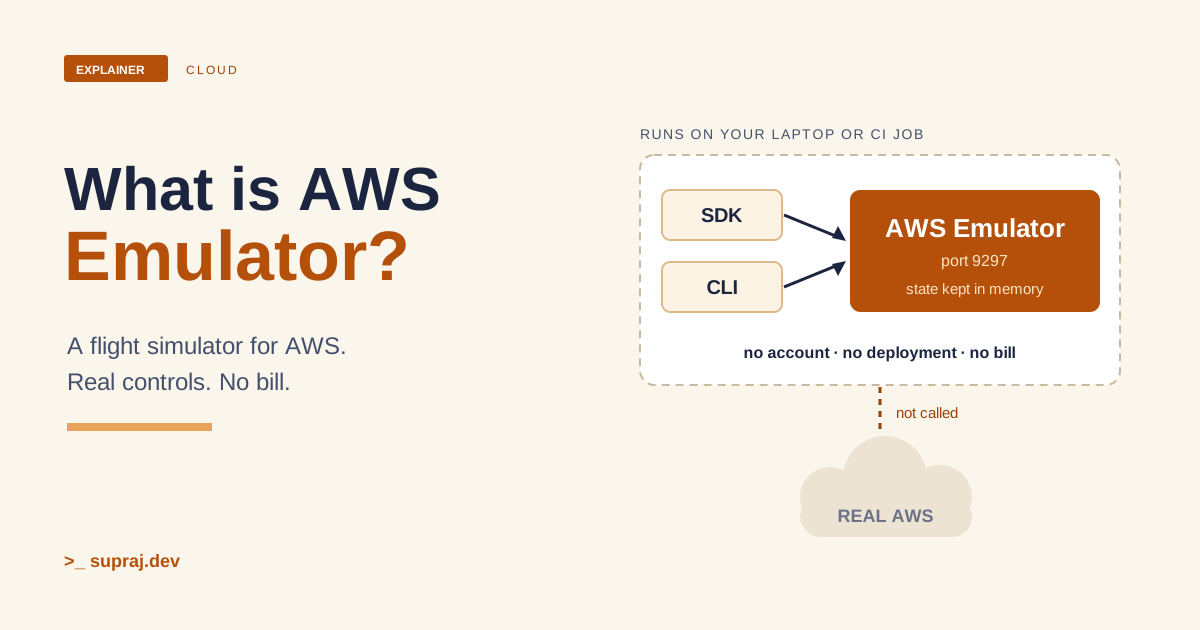
AWS announced AWS Emulator on 11 November 2026. The short version: it is a program that answers AWS API calls on your own machine, so you can test your AWS code without touching the real cloud. [1]
This is the explanation for someone who has never used it. I'll use one picture all the way through: a flight simulator. Everything about AWS Emulator here comes from AWS's announcement, documentation and README. I haven't run the emulator myself, and the hands-on chapter says so again where it matters.
01 / The simulator
What is AWS Emulator?
A pilot doesn't learn to land by crashing a real plane. A pilot sits in a simulator. The controls are the real controls. But no fuel is burned, and a crash costs nothing.
AWS Emulator is that simulator for AWS. AWS describes it as a local emulator of the AWS APIs. You use it to test your software without calling AWS, on your own machine, on a development server, or in continuous integration (CI). You don't need an AWS account. [2]
It is a local program that serves an AWS API endpoint, and it has no graphical interface. After you start it, you set environment variables to point the AWS CLI or an AWS SDK at its address. Then you run your code as usual. [2]
Figure 1 / Cockpit, simulator, plane
Tap a layer to see its job.
AWS Emulator: the simulator. It runs on your machine or in your CI job, answers the calls it supports, keeps resources in memory, and returns 501 for operations it hasn't implemented.
- In the flight simulator
- The controls are real. The plane, the fuel and the sky are not.
- In the system
- The SDK and CLI calls are real. The AWS account and the AWS resources are not involved.
02 / Why it matters
Why does it matter?
There are four reasons, and they are the same four reasons a pilot uses a simulator.
- Speed. Your SDK and CLI calls go to the emulator and return in milliseconds, with no deployment. [1]
- Cost. There is no additional service fee. You pay only for AWS resources when you deploy on AWS. [2]
- Coding agents. AWS gives its own example. A coding agent creates a DynamoDB table, tests against it offline, and fixes its code before deploying. [1] A mistake in the simulator costs nothing.
- CI. You can run integration tests in your pipeline with no AWS account and no AWS resources. [2]
There is one more thing that makes this practical. Each copy you start gets its own port, keys and in-memory state. So agents, test suites and CI jobs never see each other's resources. [1] Every pilot gets their own simulator.
- In the flight simulator
- Practise as often as you like. Nobody pays for fuel, and nobody else is in your cockpit.
- In the system
- Test as often as you like. No bill, and your tests don't share state with other jobs.
03 / One request
How does one request travel through it?
Three ideas explain most of how it works.
- It speaks the same language. The services are generated from the API models that AWS publishes, the same models behind the AWS SDKs. So the emulator accepts the calls your code already sends. [1]
- It aims to answer the same way. For supported operations it returns the same result as AWS for a valid call, and the same error for an invalid one. AWS says the behaviour is filled in and verified release by release. [1]
-
It tells you when it doesn't know. If it hasn't implemented an
operation yet, it returns HTTP 501 with the error code
NotImplemented, and a test that calls it fails right away. [3]
Now follow one call from your code, step by step.
Figure 2 / From call to answer
Follow one request.
- 1 · SendYour code or the AWS CLI sends the usual call to the emulator's address, signed with keys the emulator made when it started.
- 2 · Check the keysBy default the emulator requires a signed request, as AWS does. Real credentials left in your shell are rejected.
- 3 · AnswerIf it supports the operation, it replies as AWS would, with a result or the same error, and keeps resources in memory.
- 4 · Not modelled yetIf it hasn't implemented the operation, it replies 501 NotImplemented, so the test fails right away.
- 5 · StopPress Ctrl+C. Everything held in memory is deleted, along with the files it wrote.
How close is "the same answer"? AWS measures it with fidelity tests. A fidelity test is a short program that uses an AWS SDK to run a workflow against an AWS service and checks how AWS behaves. A fidelity score is how many of those tests the emulator passes for a service, such as 40 of 50. AWS publishes the scores with each release. [3]
The docs say the emulator matches AWS most closely for control plane APIs, the ones that create, describe, update, delete and list resources. Fidelity for data plane APIs, and support for infrastructure as code tools like CloudFormation, Terraform and the AWS CDK, varies by service. [3] Check the score for the services you use before you rely on it.
- In the flight simulator
- Pull the lever and the plane responds. A manoeuvre the simulator hasn't modelled yet stops the exercise at once.
- In the system
- Make a call and the emulator answers. An unsupported call returns 501.
04 / Hands-on run
What does a short hands-on run look like?
These steps come from AWS's own documentation. They were not run for this article, so check the docs if anything differs on your machine. [5] [4]
Step 1: install and start it. On Linux, AWS provides RPM and Debian packages. For example, on a Debian-based x86_64 machine: [5]
curl -fsSLo aws-emulator.deb https://downloads.aws.com/aws-emulator/packages/aws-emulator/LTS/latest/aws-emulator_amd64.deb
sudo apt-get install -y ./aws-emulator.deb
aws-emulator -v
Then start it. It keeps running in that terminal.
aws-emulator
By default it serves HTTPS on 127.0.0.1:9297, so only your own machine can
reach it. [5] On macOS and Windows you run it in Docker
instead, from an image you build with a short Dockerfile from the AWS docs. AWS doesn't
publish a prebuilt image. [6]
Step 2: point your tools at it. In a second terminal, set these
variables. They tell the AWS CLI and SDKs where the emulator is and which keys to use. When
the emulator starts, it generates fresh keys and writes them under
~/.aws/emulator/9297/. [4]
export AWS_ENDPOINT_URL=https://127.0.0.1:9297
export AWS_SHARED_CREDENTIALS_FILE=~/.aws/emulator/9297/emulator_credentials
export AWS_CONFIG_FILE=~/.aws/emulator/9297/config
export AWS_CA_BUNDLE=~/.aws/emulator/9297/ca.pem
export AWS_EC2_METADATA_DISABLED=true
export AWS_DISABLE_HOST_PREFIX_INJECTION=true
export AWS_REGION=us-east-1
export AWS_DEFAULT_REGION=us-east-1
unset AWS_ACCESS_KEY_ID AWS_SECRET_ACCESS_KEY AWS_SESSION_TOKEN AWS_PROFILE
The last line matters. If real credentials stay in your shell, your tools sign requests with them and the emulator rejects the requests. [4]
Step 3: check you are in the simulator, not the real plane.
aws sts get-caller-identity
The docs say the emulator uses one account, 000000000000. If you see your own
account ID instead, your requests are going to AWS. Stop and check your variables.
[4]
Step 4: build something. Create a bucket and list it, using AWS's own example: [2]
aws s3api create-bucket --bucket amzn-s3-demo-bucket
aws s3api list-buckets --query 'Buckets[].Name'
Now try a mistake on purpose. DynamoDB table names must be at least 3 characters, so this call should fail the way it fails on AWS: [2]
aws dynamodb create-table --table-name ab \
    --attribute-definitions AttributeName=id,AttributeType=S \
    --key-schema AttributeName=id,KeyType=HASH \
    --billing-mode PAY_PER_REQUEST
The docs show a ValidationException saying the table name must have length
greater than or equal to 3. [2] That is the point of the
tool: your code meets the same errors it would meet in the real cloud, and nothing was
deployed.
Step 5: stop it. Press Ctrl+C in the emulator terminal. It deletes its
files and all emulated resources, because it keeps resources only in memory.
[5] To run several at once, give each its own port with
aws-emulator -p <port> and use that port in the variables above.
[5]
One warning from the docs. If AWS_ENDPOINT_URL isn't set in the shell that
runs your tests, your code calls real AWS with whatever credentials it finds. Set the
variables in the same script that runs your tests, and keep real credentials out of your
test jobs. [4]
- In the flight simulator
- Check the screen says "simulator" before you fly. Then crash all you like.
- In the system
- Check
get-caller-identityshows the emulator's account before you test.
05 / What it can't do
What does it not do?
A simulator is not the sky. These are the limits AWS lists.
- State disappears. The emulator keeps all resources in memory and deletes them when it stops. A restart also gives your tests a clean state. [2]
-
Some operations return 501. Unsupported operations return
501 Not Implemented. Coverage differs by service, so check the fidelity scores. [1] [3] - It is not a security test. It doesn't evaluate IAM policies and resource-based policies the way AWS does. Don't use it to test security. [2]
- One Region and one account. It accepts any Region and account ID but doesn't keep resources separate by them. Use one of each per emulator. [2]
- Not for production, load or long runs. AWS says it is for building and testing, and hasn't tested it for long-running use or load testing. [2]
- It isn't real AWS. AWS checks its behaviour against the real service in one Region, so differences can exist. Test on real AWS before production. [2] [3]
- It runs natively only on Linux. On macOS and Windows you use Docker. [7]
- In the flight simulator
- Hours in the simulator don't replace a check flight in the real plane.
- In the system
- Passing tests on the emulator don't replace testing on real AWS before production.
06 / When to use it
When should you use it?
Use it when:
- You want fast, free, repeatable tests for code that calls AWS.
- You run CI and don't want an AWS account in the pipeline.
- A coding agent should try its code safely before anything reaches the cloud.
- You want each developer, test suite or job to have its own isolated state.
Don't use it as your only test. To see whether your own project is expected to work, check
the fidelity tests and scores for the operations you call. AWS also offers an
aws-emulator skill for coding agents that does this check for you.
[8]
Community tools in this space already existed. LocalStack describes itself, in its README, as a framework to develop and test AWS applications locally. [9] Moto describes itself as a library that lets tests mock out AWS services. [10] They are separate projects with their own terms, so read their own pages for licence, pricing and status before you choose. This article doesn't compare them with AWS Emulator.
The tool is new. AWS publishes the source under CC0 1.0 Universal, except the
vendor/ directory, which is under Apache License 2.0.
[7] Treat the fidelity report as your guide to what works
today.
- In the flight simulator
- Use it to practise often and safely. Then fly the real plane with a check.
- In the system
- Use it for fast, safe tests. Then run the same checks on real AWS.
Keep these names
A small glossary
- AWS Emulator
- A local emulator of the AWS APIs that you use to test software without calling AWS. [2]
- Endpoint
-
The address your tools send requests to. For the emulator it is
https://127.0.0.1:9297by default. [4] - AWS SDK and AWS CLI
- The libraries and the command-line tool you use to call AWS. You point them at the emulator with environment variables. [2]
- SigV4
- Signature Version 4, the way AWS signs API requests. The emulator requires it by default when it runs as a local process. [4]
- 501 Not Implemented
-
What the emulator returns, with the error code
NotImplemented, for an operation it hasn't implemented yet. [3] - Fidelity test
- A short program that uses an AWS SDK to run a workflow against an AWS service and checks how AWS behaves. [3]
- Fidelity score
- For each service, the number of fidelity tests the emulator passes out of the total, such as 40 of 50. [3]
- Control plane
- The APIs that create, read or describe, update, delete and list resources, such as creating an S3 bucket. [3]
- Data plane
- A service's primary function, such as getting and putting objects in an S3 bucket. [3]
- In-memory state
- The resources the emulator keeps in memory. They are deleted when it stops. [2]
Check the concept
Can you explain it back?
1. Do you need an AWS account to run AWS Emulator?
No. Your requests go to the emulator, not to AWS, and there is no additional service fee.
2. What happens if you call an operation the emulator hasn't implemented?
It returns HTTP 501 with the error code NotImplemented, so a test that calls it fails right away.
3. Two CI jobs each start an emulator. Do they see each other's resources?
No. Each copy gets its own port, keys and in-memory state.
4. What happens to your resources when you stop the emulator?
They are deleted, because the emulator keeps them only in memory.
5. Is passing tests on the emulator enough to ship?
No. It is for building and testing, and its behaviour can differ from AWS. Test on real AWS before production.
Continue the thread
Now look at testing and access.
The emulator helps you test earlier. These articles cover the pipeline it runs in and the access rules it doesn't check: what CI/CD and environments are and least-privilege IAM with an agent.
Read further
Sources
AWS Emulator references use AWS's announcement, user guide and README. Sources accessed 18 November 2026.
- AWS: AWS Emulator is now available (11 November 2026).
- AWS Emulator User Guide: What is AWS Emulator?
- AWS Emulator User Guide: Fidelity in AWS Emulator.
- AWS Emulator User Guide: Pointing your AWS SDK at AWS Emulator.
- AWS Emulator User Guide: Getting started on Linux.
- AWS Emulator User Guide: Getting started with Docker.
- AWS Emulator User Guide: Setting up AWS Emulator. Also the project README on GitHub.
- AWS Emulator User Guide: Checking whether your project works with AWS Emulator.
- LocalStack: project README.
- Moto: project README.