A plain-English definition of an AI agent that you can explain to anyone, the difference between a chatbot, a workflow and an agent, the five parts inside every agent, and the loop that makes it “agentic”, traced one step at a time on a real task. No code in this part. No prior AI knowledge needed.
This is Part 1 of a four-part series.
- What is an AI agent? (you are here) The idea, the parts, the loop.
- How AI agents actually work: tool calling, messages and memory, and a working agent in about 80 lines of Python.
- Design patterns and safety: the five building blocks in code, multi-agent systems, a refund agent design, and defences against manipulation.
- The production playbook: architecture, reliability, identity, approvals, testing, rollouts, monitoring, cost, privacy and the launch checklist.
Read them in order. Each part assumes only what the previous part taught.
01 / Story Two assistants, one cancelled flight
It is 9 p.m. You are at Delhi airport. Your 10:30 p.m. flight to Bengaluru has just been cancelled. You open two different AI apps and type the same sentence into both:
“My flight got cancelled. Rebook me on the next one.”
Assistant A replies:
“I’m sorry to hear that! Here’s what you can do: 1. Open your airline’s app. 2. Go to Manage booking. 3. Look for alternative flights. 4. Contact customer support if you need help.”
Polite, correct, and useless. You still have to do every step yourself.
Assistant B replies:
“I found your booking (PNR K7Q2XD). Flight 512 is cancelled. The next three flights to Bengaluru leave at 14:10, 17:45 and 21:00 tomorrow. The 14:10 is the earliest and the change is free under the cancellation policy. Shall I book it?”
You type yes. A minute later: “Done. New boarding pass is in your email.”
Both assistants use the same kind of technology underneath: a large language model (LLM). The difference is not how smart the model is. The difference is that Assistant B can take actions, look at what happened, and decide what to do next until the job is finished.
Assistant A is a chatbot. Assistant B is an AI agent. This whole series is about the gap between them.
02 / Basics First, what is an LLM?
Before we can talk about agents we need one honest sentence about the thing inside them.
A large language model (LLM) is a program trained on a huge amount of text to do one job: given some text, predict the text that should come next. Claude, GPT, Gemini and Llama are all LLMs.
That one ability turns out to be surprisingly powerful. If you give an LLM a question, the most likely “next text” is a good answer. If you give it a messy email, the most likely next text after “Summary:” is a summary.
But notice what an LLM cannot do on its own:
| An LLM on its own… | Why |
|---|---|
| Cannot check your real booking | It has no access to the airline’s systems |
| Does not know today’s date or prices | Its knowledge stops when training stopped |
| Cannot click, send, buy or save anything | It only produces text |
| Forgets you between conversations | Each call starts fresh unless you send history again |
Think of an LLM as a brilliant brain in a jar. It can reason, write and plan beautifully, but it has no eyes, no hands and no notebook. An agent is what you get when you give that brain hands, a notebook and a job.
03 / Definition The one-sentence definition
Here is the definition to remember. Read it slowly:
An AI agent is a system where an LLM runs in a loop, decides which actions to take using tools, looks at the results, and keeps going until a goal is reached (or a limit stops it).
Let us take that sentence apart word by word, because every part matters.
- “An LLM”: the brain. It does the reasoning and decides what to do.
- “runs in a loop”: it is not one question and one answer. It is many rounds. This is the single most important word.
- “decides which actions to take”: the model picks the next step, not a fixed script written by a programmer.
- “using tools”: actions happen through tools: functions such as
search_flights,send_emailorrun_sqlthat your software exposes to the model. - “looks at the results”: after each action, the result is shown back to the model so it can adjust.
- “until a goal is reached”: it has a finish line, such as “the flight is rebooked”.
- “or a limit stops it”: good agents also have brakes: a maximum number of steps, a time limit, a budget, or a human who must approve.
If a system has all of these, it is an agent. If it is missing the loop or the model’s freedom to choose, it is something simpler, and that is often a good thing, as we will see.
04 / Ladder Chatbot, workflow, agent: who decides the next step?
People use the word “agent” for almost anything with AI in it now. The clearest way to cut through the noise is to ask one question: who decides what happens next?
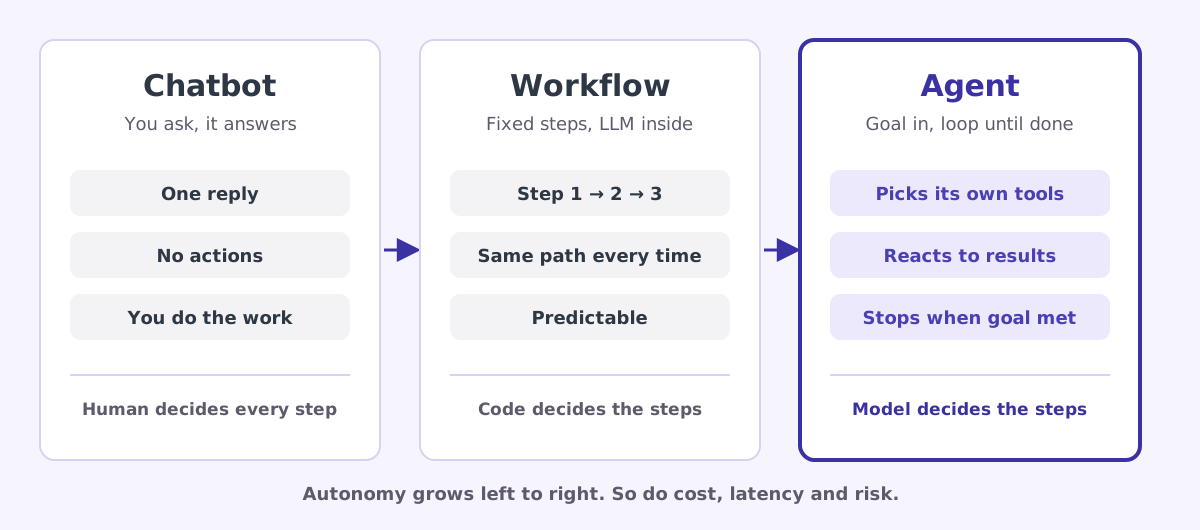
1. Chatbot. You ask, it answers, done. You decide every next step. Example: asking an AI to explain a concept.
2. Workflow. A programmer wrote a fixed sequence of steps, and some of the steps call an LLM. The path is the same every time. The code decides the steps. Example: every new support ticket is (1) summarised by an LLM, (2) classified as billing or technical, (3) routed to the right team. Useful and predictable, but it can never do a step nobody wrote.
3. Agent. You give it a goal and a set of tools. The model decides which tool to use, in what order, how many times, and when it is finished. Example: Assistant B above. Nobody wrote “first get the booking, then search flights, then compare the times”. The model worked that out.
Here is the same idea as a table you can come back to:
| Chatbot | Workflow | Agent | |
|---|---|---|---|
| Who picks the next step | The human | The programmer’s code | The model |
| Can take actions | No | Yes, fixed ones | Yes, chosen at runtime |
| Same path every run | n/a | Yes | No |
| Handles surprises | No | Only ones you planned for | Often, yes |
| Cost and latency | Lowest | Low to medium | Highest |
| Easiest to test | Yes | Yes | Hardest |
An agent is the most flexible option and also the most expensive, slowest and hardest to test. Many real products that call themselves “agents” are actually workflows, and they are better for it. A good engineer climbs this ladder only as high as the problem demands.
05 / Anatomy The five parts of every AI agent
Open up any agent, from a tiny demo to a coding assistant like Claude Code, and you will find the same five parts.
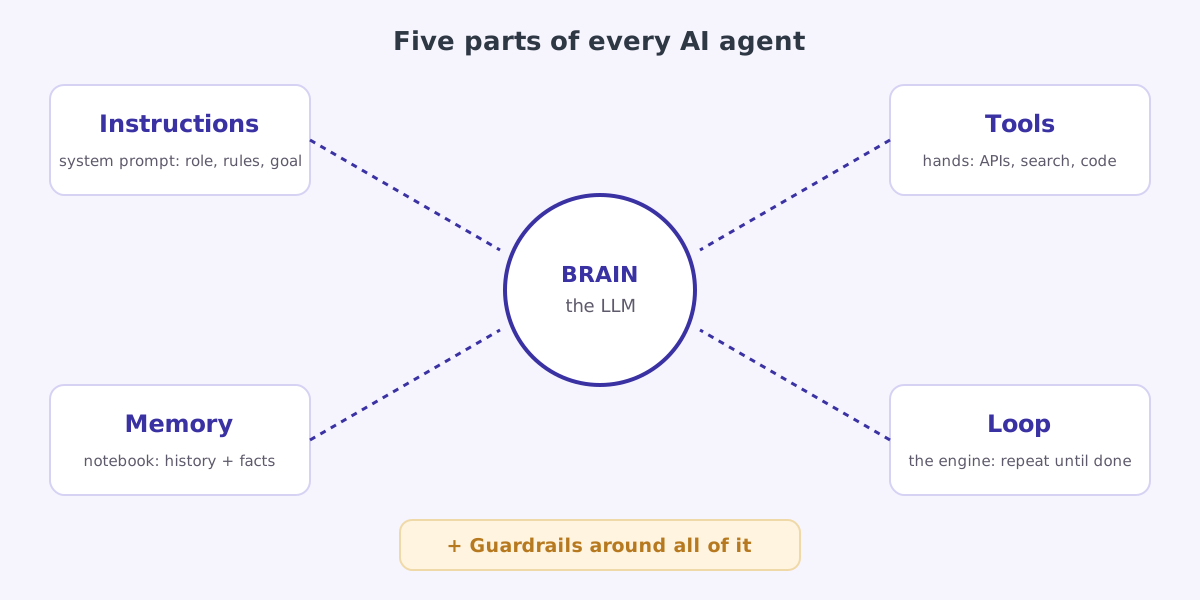
Let us use a kitchen to make each part concrete. Imagine a new chef in a restaurant.
1. The brain: the LLM
The chef’s skill and judgement. It reads the situation and decides what to do next. In an agent, this is the model, for example Claude Opus or Gemini. A stronger brain makes better decisions, but even the best chef is useless without a kitchen.
2. The instructions: the system prompt
The chef’s briefing on day one: “You are the chef at a vegetarian restaurant. Never use peanuts. If an order is unclear, ask the waiter.” In an agent, this is the system prompt, a block of text sent with every request that sets the role, the rules, the tone and the goal.
A real system prompt for our flight agent might start like this:
You are a travel rebooking assistant for Acme Travel.
Goal: get the customer onto the best replacement flight.
Rules:
- Always look up the booking before suggesting anything.
- Prefer free changes. Never pay a fare difference above 2,000 INR without asking.
- ALWAYS ask the customer to confirm before booking.
3. The tools: the hands
The chef’s knives, stove and fridge. Without them, the chef can only describe a dish. In an agent, tools are functions your software offers to the model, each with a name, a description and the inputs it needs:
| Tool | What it does | Read or write? |
|---|---|---|
get_booking(pnr) | Looks up a booking | Read |
search_flights(from, to, date) | Lists available flights | Read |
book_flight(pnr, flight_id) | Changes the booking | Write |
send_email(to, subject, body) | Emails the customer | Write |
The key idea, which Part 2 explains in detail: the model never runs a tool itself. It only says “please call search_flights with these inputs”. Your code runs the tool and hands back the result. That separation is what keeps you in control.
4. The memory: the notebook
The chef’s order tickets and recipe book. In an agent there are two main kinds:
- Short-term memory is the conversation so far: every message, every tool call and every result. It is sent back to the model on each step so it remembers what already happened.
- Long-term memory is anything saved for later, such as “this customer prefers aisle seats”, stored in a database and pulled in when relevant.
5. The loop: the engine
This is what turns a brain-with-hands into an agent. The chef does not cook one step and walk away. They check the pan, taste, adjust, and repeat until the dish is ready. The next section is entirely about this loop.
Plus: guardrails around everything
Rules the chef cannot break, enforced by the kitchen, not by trust: the fire alarm, the locked wine cabinet, the manager who signs off on refunds. In an agent: step limits, spending caps, permission checks and human approval for risky actions. Parts 3 and 4 cover these in depth.
06 / Loop The agent loop, one step at a time
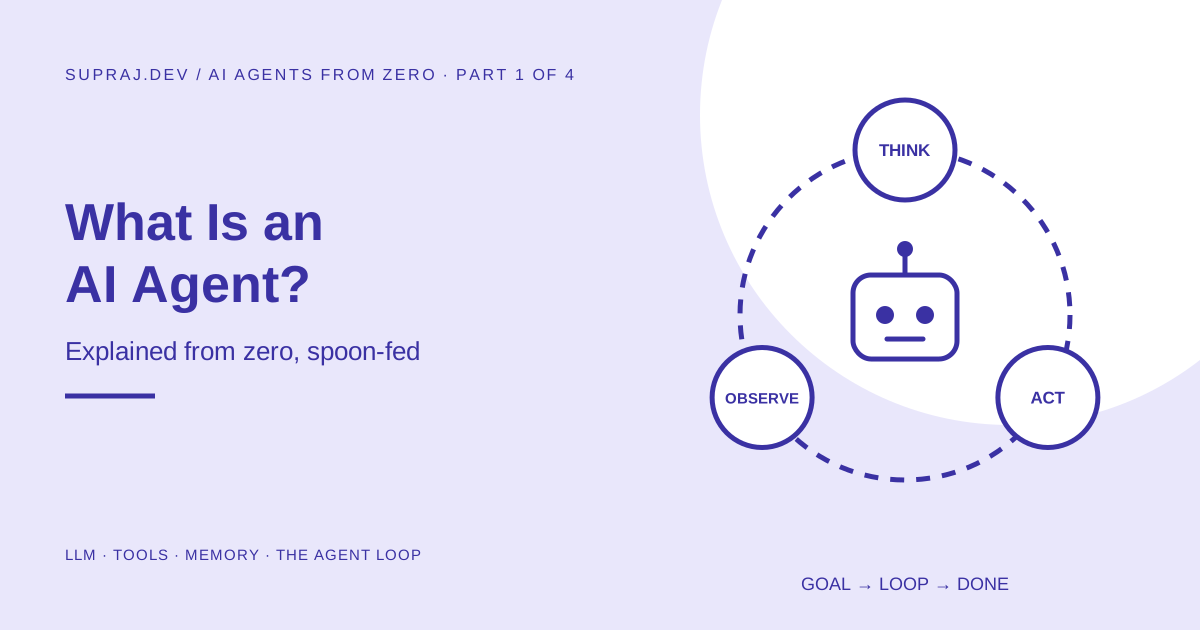
Every agent, however fancy, runs some version of the same three-beat loop:
- Think. Look at the goal and everything so far. Decide the next step.
- Act. Call a tool.
- Observe. Read the tool’s result and add it to memory.
Then go back to step 1. Stop when the goal is met, a human says stop, or a limit is hit.
This pattern has a name in research: ReAct, short for Reasoning and Acting, from a 2022 paper by Yao and colleagues. The core insight: reasoning alone, with no way to check facts, tends to invent things, and acting alone, with no reasoning, loses track of the goal. Interleaving the two, so that each real observation can update the plan, worked better than either on interactive tasks.
Here is the loop running on our cancelled flight. Read each box in order, left to right, top to bottom.
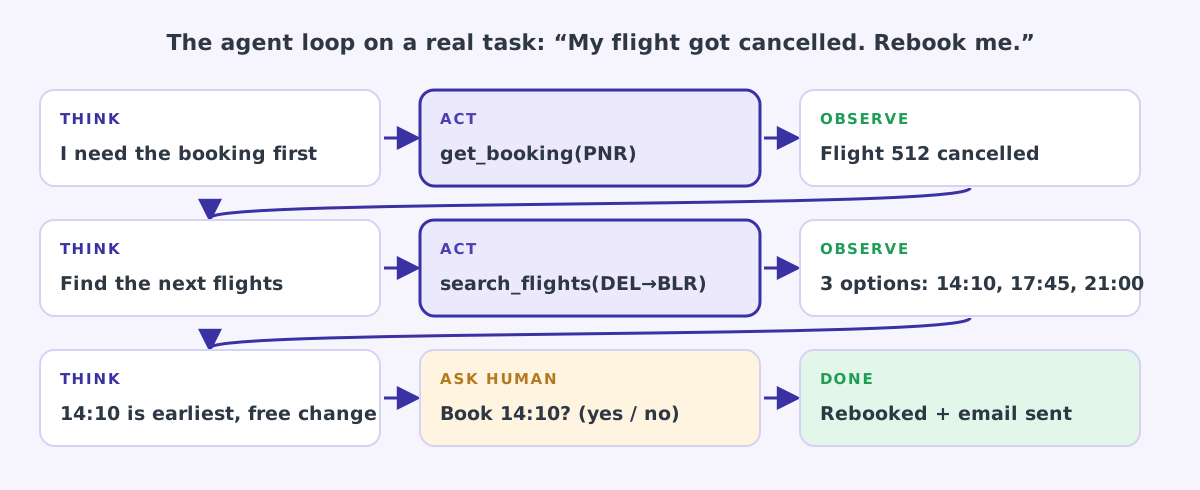
Now let us slow down even more and look at exactly what the agent “sees” and “thinks” in each round. This is the part most tutorials skip, and it is the part that makes everything click.
| Round | What the model sees (new information) | What it thinks | What it does |
|---|---|---|---|
| 1 | The goal: “My flight got cancelled. Rebook me." | "I do not know which booking. I must look it up first, my rules say so.” | Calls get_booking("K7Q2XD") |
| 2 | Result: flight 512, Delhi to Bengaluru, status: cancelled, free change allowed | ”Confirmed cancelled and the change is free. Now I need options.” | Calls search_flights("DEL", "BLR", "tomorrow") |
| 3 | Result: three flights, 14:10, 17:45, 21:00 | ”14:10 is earliest. The rules say I must confirm before booking.” | Replies to the user and asks for confirmation |
| 4 | User says “yes" | "Approved. Book it.” | Calls book_flight("K7Q2XD", "FL-221") |
| 5 | Result: success, new ticket number | ”Customer should get the details.” | Calls send_email(...) |
| 6 | Result: email sent | ”Goal achieved. Nothing left to do.” | Replies “Done” and stops |
Three things in this table are worth pausing on:
- Nobody wrote this sequence. The programmer only provided four tools and some rules. The order (look up, then search, then ask, then book, then email) came from the model reasoning about the goal.
- Each round depends on the last result. If round 2 had said “status: delayed 40 minutes”, the model would have taken a completely different path, probably telling you to wait. A fixed workflow could not adapt like that unless someone had coded that branch.
- The agent knew when to stop. “Knowing when you are done” is a real skill, and a surprisingly common way agents fail is by stopping too early or never stopping at all.
An agent is a while loop with an LLM deciding what goes inside it. In pseudocode: while goal not done and limits not hit: ask the model what to do, do it, show it the result. That is genuinely the whole idea. Part 2 turns this sentence into real, working code.
07 / Not What an AI agent is not
A lot of confusion comes from what people imagine agents are. Let us clear out the myths.
It is not conscious or “alive”. An agent is a loop in ordinary software. The model inside it predicts text. It does not want anything; the “goal” is just text you gave it.
It is not always right. The model can misread a result, pick the wrong tool, or invent a value that looks plausible (a hallucination). Agents need checks for exactly this reason.
It is not one giant model doing everything. Most of what an agent can do comes from your tools and your code. The model is the decision-maker, not the doer.
It is not automatically safe to give it access. If an agent can send emails and read untrusted web pages, a malicious page can try to instruct it to send your data somewhere. This is called prompt injection, and it is the number one risk on the OWASP Top 10 for LLM applications. We will deal with it properly in Part 3.
Not everything called an “agent” is one. A chatbot with a nice avatar is still a chatbot. A fixed pipeline is still a workflow. The test is simple: does the model choose the next action, in a loop, based on results?
08 / Decide When should you use an agent?
Before building an agent, ask four questions. If the answer to any of them is no, use something simpler.
| Question | What it means | Example “yes” | Example “no” |
|---|---|---|---|
| Is the task open-ended? | You cannot write down every step in advance | ”Fix this failing test” (could be anything) | “Extract the invoice total from this PDF” |
| Is it worth the cost? | Agents use many model calls, so they cost more and take longer | Saving an engineer an hour | Answering “what is 2+2” |
| Can the model actually do it? | Today’s models are strong, but not at everything | Reading logs and finding a bug | Predicting next month’s stock price |
| Can mistakes be caught or undone? | Tests, reviews, approvals, rollbacks | Code change reviewed in a pull request | Wiring money with no approval |
Some quick verdicts to train your instinct:
| Task | Best fit | Why |
|---|---|---|
| Translate product descriptions into Hindi | Single LLM call | One input, one output |
| Summarise a ticket, tag it, route it | Workflow | Same three steps every time |
| Answer questions from your company docs | Workflow with search (RAG) | Search, then answer; the path rarely changes |
| Investigate why last night’s deploy broke | Agent | Unknown number of steps, each depends on the last finding |
| Fix a bug across a large codebase | Agent | Needs exploring, editing, testing and retrying |
| Book travel within a budget, with approval | Agent with a human in the loop | Needs adapting to availability, but bookings must be approved |
09 / Real Agents you have probably already met
Agents stopped being a research demo some time ago. You can find them in everyday tools:
- Coding agents such as Claude Code, GitHub Copilot’s agent mode or Cursor. Give them a task like “add a dark-mode toggle” and they read files, edit code, run tests, read the errors, and try again.
- Deep research assistants. Ask a question and they search the web dozens of times, read sources, and write a report with citations.
- Computer-use agents that look at screenshots of a screen and click, type and scroll to finish a task in apps that have no API.
- Customer support agents that can check an order, issue a refund within policy, and hand over to a human when unsure.
- Cloud and DevOps agents. On this site, the iam-zero agent reads real CloudTrail logs, works out which AWS permissions are actually used, and opens a pull request to remove the rest.
Every one of these is the same loop from section 06, with different tools and instructions.
10 / Words The vocabulary, in one place
You will meet these words in every article and framework. Bookmark this table.
| Word | Plain-English meaning |
|---|---|
| LLM | The text-predicting model that acts as the agent’s brain |
| Prompt | The text you send to the model |
| System prompt | Standing instructions sent on every call: role, rules, goal |
| Token | A chunk of text (roughly three-quarters of an English word). Models read, write and bill in tokens |
| Context window | The maximum amount of text the model can look at in one call: its short-term memory limit |
| Tool (or function) | An action your code offers the model, with a name, description and inputs |
| Tool calling | The model replying with a structured request to use a tool, instead of plain text |
| Agent loop | Think, act, observe, repeat |
| ReAct | The research pattern of alternating reasoning and actions |
| RAG | Retrieval-augmented generation: search your documents first, then let the model answer using what was found |
| MCP | Model Context Protocol, an open standard for plugging tools and data into any agent, like USB-C for AI tools |
| Hallucination | The model stating something false with confidence |
| Prompt injection | Malicious instructions hidden in content the agent reads |
| Guardrails | Checks and limits around the model that it cannot override |
| Human in the loop | A person must approve certain actions before they happen |
| Evals | Tests that measure how well your agent performs on a set of real tasks |
| Multi-agent | Several agents, each with its own role, working together |
11 / Practice Check yourself
Try each one before opening the answer.
1. A support system always summarises a ticket, then classifies it, then routes it. Is it an agent?
No. It is a workflow. The steps are fixed by code and never change. The model fills in each step but does not choose the next one.
2. What is the single most important word in the definition of an agent?
Loop. Without repeating think, act, observe, you just have one model call, however clever.
3. Does the model run the tools itself?
No. The model only asks for a tool to be called, with specific inputs. Your code decides whether to run it, runs it, and sends the result back. Part 2 shows exactly how.
4. In the flight example, why did the agent ask “Shall I book it?” before booking?
Because the system prompt rules said to always confirm before booking. Booking is a write action that spends money, so it was put behind a human approval: a simple and very effective guardrail.
5. Your manager wants an “agent” that converts uploaded CSV files to JSON. Good idea?
No. It is a fixed, well-defined transformation. Plain code is cheaper, faster and 100% predictable. Do not use an agent where a function will do.
12 / Recap Key takeaways
- An LLM on its own only produces text. It has no hands, no live data and no memory between calls.
- An AI agent is an LLM running in a loop, choosing actions through tools, observing results, and continuing until a goal or a limit is reached.
- Ask “who decides the next step?”: the human (chatbot), the code (workflow) or the model (agent).
- Every agent has five parts: brain, instructions, tools, memory, loop, wrapped in guardrails.
- The model never executes anything itself. It requests; your code acts. That is your control point.
- Use the simplest option that works. Agents are for open-ended tasks that are worth the cost and where mistakes can be caught.
13 / Next Next: open the hood
What an agent is, its five parts, and the think-act-observe loop.
The exact messages sent to the model, how tool calling works, three kinds of memory, and a working agent in about 80 lines of Python.
14 / Sources Sources and further reading
- Building effective agents, Anthropic engineering: the workflow-versus-agent distinction used in this article
- ReAct: Synergizing Reasoning and Acting in Language Models, Yao et al., 2022
- OWASP Top 10 for Large Language Model Applications
- Model Context Protocol
- On this site: Loop engineering, AI guardrails, Least-privilege IAM with an agent