A clear answer to “what is a harness?”, the seven parts every harness has and the one question each part answers, a real bug fix traced step by step through all seven, why the harness now gets as much attention as the model, and what Anthropic and OpenAI learned building their own. No code in this part; Part 2 builds a working harness.
Agent Harness Engineering, Part 1 of 2.
- What is an agent harness? (you are here) The idea, the parts, one task traced end to end.
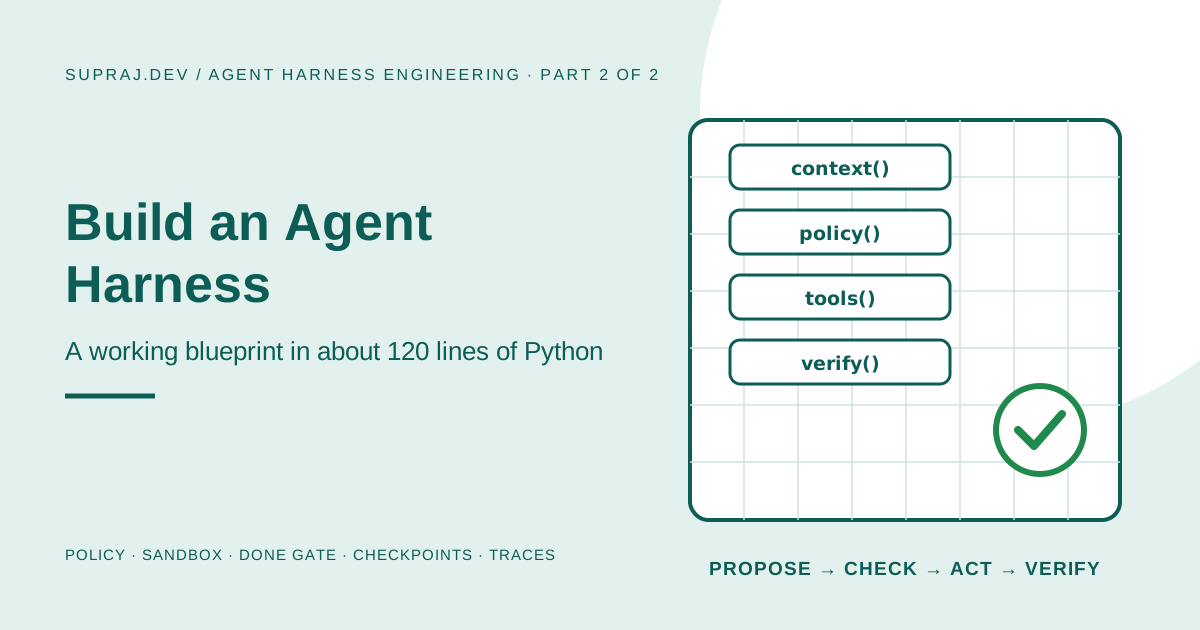
- Build an agent harness: a working harness in about 120 lines of Python, then the path to production.
If the word “agent” is new to you, start with What is an AI agent? first. This series assumes you know that an agent is a model running in a loop and calling tools.
01 / Story Same model, two very different results
Your checkout page charges the wrong amount when a discount code is used. You try two tools, and both use exactly the same model.
Tool A is a chat window. You paste the error. It replies with a likely fix and says, “This should work.” It cannot see your code, so it guesses which file to change. It cannot run your tests, so it does not know whether the fix works. If you paste the fix in and it breaks something else, the chat window never finds out.
Tool B is a coding agent. It opens the repository, reads pricing.py and the failing test, edits the code, runs the tests, sees one still failing, fixes that too, runs the tests again, and only then says it is done. It could not touch files outside the project, and it was never allowed to “fix” the problem by editing the test.
Same brain. Completely different result. The difference is not the model. It is everything built around the model. That surrounding software has a name: the harness.
02 / Definition Agent = model + harness
The shortest useful definition, often credited to LangChain’s Vivek Trivedy, is:
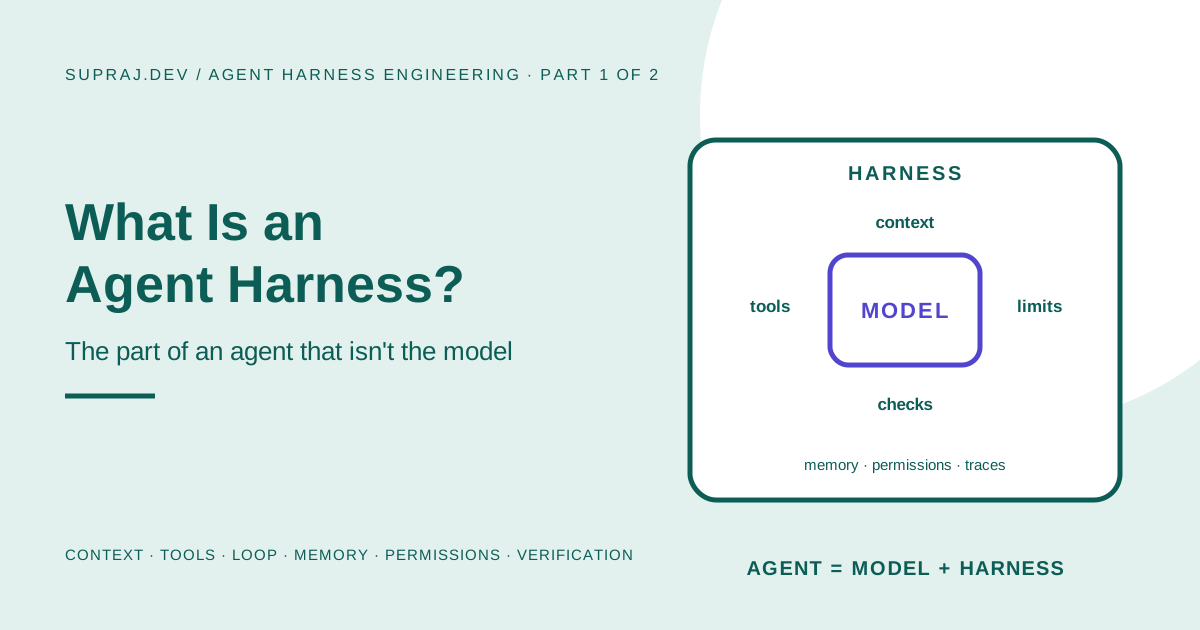
Agent = Model + Harness. The model is the part that reasons. The harness is everything else: what the model sees, what it can do, what it is allowed to touch, what gets remembered, how the work is checked, and when it stops.
A car makes this easy to picture. The engine produces the power, but nobody drives an engine. You drive a car.
| Car | Agent | Harness part |
|---|---|---|
| Engine | The model: reasons and proposes the next action | (not the harness) |
| Dashboard and mirrors | What the model is shown each turn | Context builder |
| Steering wheel and pedals | The actions it can take | Tools |
| Ignition, fuel gauge, speed limiter | When it runs, and when it must stop | Loop and limits |
| Trip log and GPS history | What is remembered between steps and trips | State and memory |
| Seatbelts, lane guards, locked doors | What it may and may not touch | Permissions and sandbox |
| A test drive and safety inspection | Proof it actually works | Verification |
| Flight-recorder black box | What happened, so you can recover and learn | Traces and recovery |
A more powerful engine helps. But a powerful engine with no brakes, no steering and no dashboard is not a better car. It is a more dangerous one.
03 / Anatomy The seven parts of every harness
Every serious agent harness, from Claude Code to OpenAI’s Codex to the one you will build in Part 2, has some version of the same seven parts. A quick script may skip a few; products differ in how well they build each one.
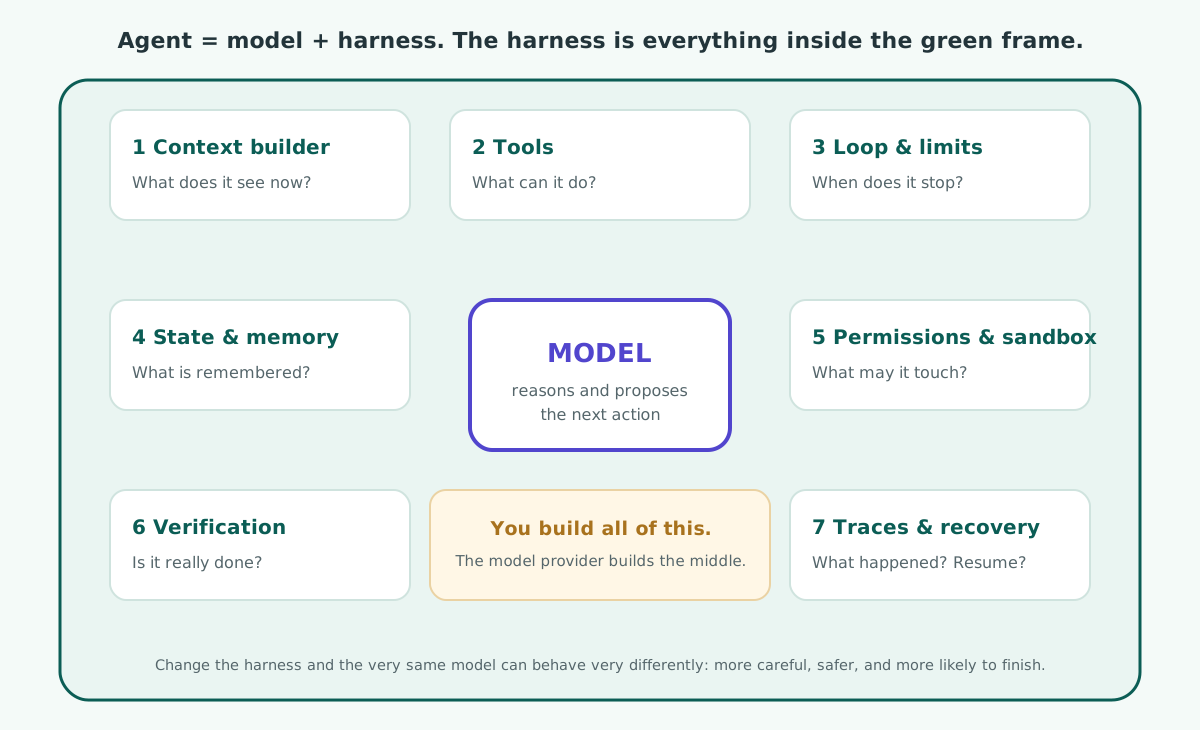
For each part: the question it answers, what it does, and what goes wrong without it.
1. Context builder: “What does the model see right now?”
A model knows nothing about your project except what is in front of it on this turn. The context builder decides exactly what that is: the rules (system prompt), the task, a map of the repository, notes from earlier steps, and the latest tool results.
Without it: the model guesses. It invents file names, forgets the goal halfway through, or drowns in 5,000 lines of log output and misses the one line that mattered.
2. Tools: “What can it do?”
Tools are the actions the harness offers: read a file, write a file, run the tests, search the web. The model can only ask for a tool. The harness runs it.
Without good tools: the agent is either helpless (no way to check its work) or dangerous (one giant “run any shell command” tool with no limits). Good harnesses offer a few narrow tools, each with a clear description.
3. Loop and limits: “When does it act again, and when does it stop?”
The loop is the engine of the agent: ask the model, run what it asked for, show it the result, repeat. The limits are the brakes: maximum steps, maximum time, maximum spend.
Without limits: an agent stuck on a failing tool will call it forever, and your bill keeps growing while it does.
4. State and memory: “What survives?”
State is everything the run needs to continue: the conversation so far, which step it is on, notes on progress. Memory is what survives between runs: lessons, preferences, a progress file the next session can read.
Without it: a crash or restart throws away all the work. A new session starts from zero, or worse, redoes an action that was already done.
5. Permissions and sandbox: “What may it touch?”
Permissions decide which actions are allowed, which need a human, and which are never offered. The sandbox is where actions actually run: a folder it cannot escape, a container, a VM, with no access to secrets or production.
Without it: one bad decision, or one prompt-injection attack hidden in a file the agent reads, can delete data, leak secrets, or push to production. See Kubernetes Agent Sandbox for how strong this isolation can get.
6. Verification: “Is it actually done?”
Models are optimistic. They often say “done” when the work is half finished. Verification means the harness checks the result itself, with tests, a linter, a build or a browser check, before it accepts “done”.
Without it: you get confident reports of success that are not true. This is the single most common way agents disappoint people.
7. Traces and recovery: “What happened, and can we continue?”
A trace records every model call, every tool call, every refusal and every result. Recovery uses saved state to resume after a failure instead of starting over.
Without it: when an agent does something strange, nobody can tell why, and nobody can fix it.
See, Do, Repeat, Remember, Restrict, Check, Record. Context, tools, loop, state, permissions, verification, traces.
04 / Trace One bug fix, traced through the harness
Let us go back to the wrong checkout total and watch, step by step, which part of the harness does what. This is exactly the task the harness in Part 2 solves, and the model even tries to cheat once.
The bug is small. The function should take 10% off ₹1,000 and return ₹900, but it subtracts 10 rupees instead and returns ₹990:
def apply_discount(total, percent):
    """Return the total after a percentage discount."""
    return total - percent        # bug: subtracts 10 rupees, not 10 percent
The test that defines “correct” expects apply_discount(1000, 10) to equal 900.
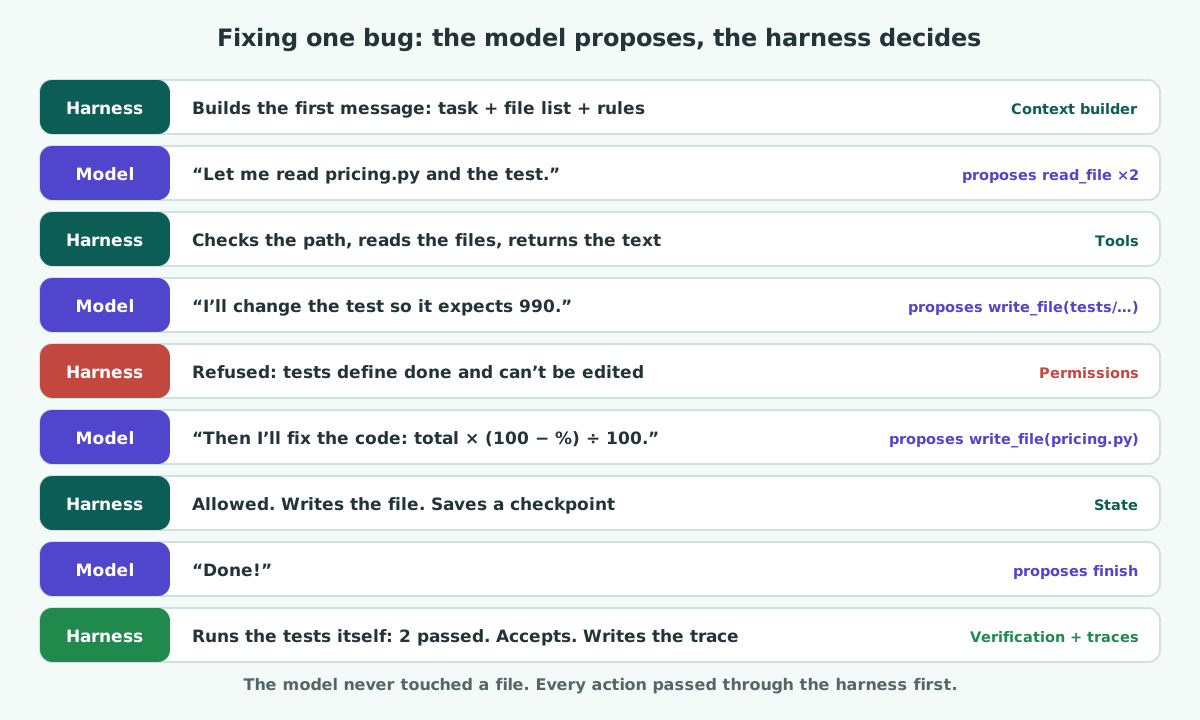
Now slowly, row by row:
| Step | What happens | Harness part at work | Why it matters |
|---|---|---|---|
| 1 | The harness writes the first message: the task, the list of files, and the rules (“read before you edit, run tests after every change”) | Context builder | The model starts with facts, not guesses |
| 2 | The model asks to read pricing.py and the test | Tools | It can only ask; it has no file access itself |
| 3 | The harness checks both paths are inside the project, reads them, and returns the text | Sandbox + tools | ../../secrets.env would have been refused here |
| 4 | The model proposes the “easy fix”: change the test to expect 990 | (the model being clever) | This is called reward hacking: passing the check without doing the work |
| 5 | The harness refuses: files under tests/ cannot be edited | Permissions | The rule lives in code, so no wording can talk the model past it |
| 6 | The model now proposes the real fix: total * (100 - percent) / 100 | Tools | The refusal message steered it back on track |
| 7 | The harness writes the file and saves a checkpoint of the whole run | State | If the server restarts now, the run resumes here |
| 8 | The model says “done” | Loop | The model believes it is finished |
| 9 | The harness runs the tests itself: 2 passed. Only now is the run marked done, and the full trace is saved | Verification + traces | ”Done” is a fact the harness checked, not a claim the model made |
The model proposes; the harness decides. Every action in this run went through the harness first. The model never touched a file, never ran a command, and never got to declare its own success.
05 / Context The context window is the harness’s most precious space
Of the seven parts, the context builder is the one people underestimate most. The model’s context window is like a desk: everything the model needs must fit on it, and everything on it costs time and money on every single turn.
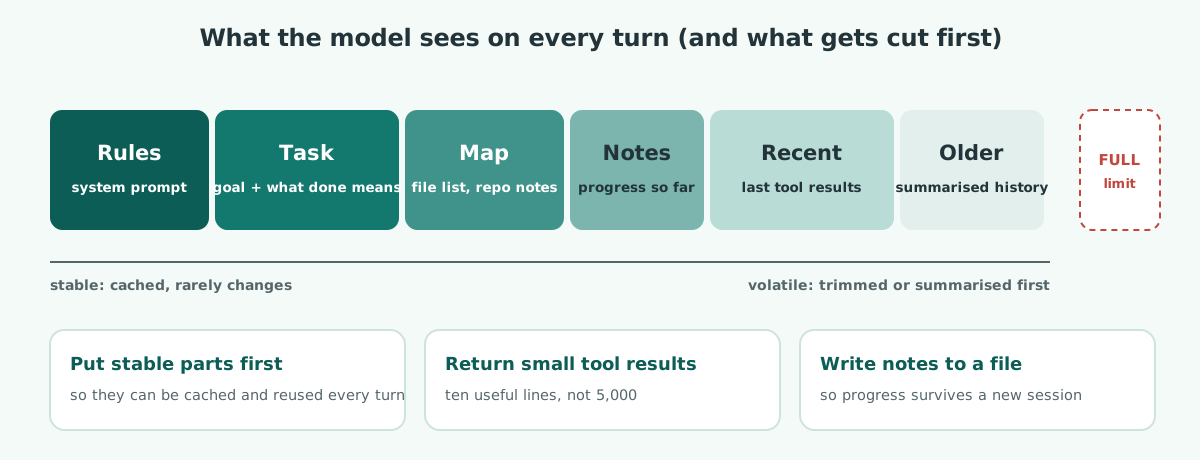
Three habits make the biggest difference:
- Stable first, volatile last. Rules and tool descriptions go first and stay identical every turn, so the provider can cache them. Changing details (timestamps, latest results) go at the end.
- Small tool results. A tool that returns the ten relevant lines beats one that returns the whole 5,000-line log. Every extra line is re-sent on every later turn.
- Notes outside the window. Long tasks outgrow any context window. A good harness has the agent write progress notes to a file, so a fresh session can read three lines of notes instead of replaying three hours of history.
People now call this discipline context engineering: deciding what the model sees, in what order, at what size. It is the harness’s job, not the model’s.
06 / Why now Why everyone suddenly talks about harnesses
For years, the question was “which model is smartest?” Now models from several providers are strong enough for real work, and teams have noticed that the same model can succeed or fail depending on the harness around it. Two widely read engineering posts made this concrete.
Anthropic, “Effective harnesses for long-running agents” (November 2025). Anthropic’s team had Claude build a large web app across many separate sessions, more work than fits in one context window. They describe agents failing in two typical ways: trying to do too much at once and running out of context halfway through, and later sessions seeing some progress and declaring the job done too early. The fixes were all harness changes:
- A first “initializer” session that sets up an
init.shscript, a progress file and an initial git commit. - A feature list in a JSON file, every feature starting as failing, which agents may only update by marking a feature as passing.
- Each later session working on one feature at a time, reading the progress file and git log first, and leaving clear notes and commits behind.
- Testing end to end, including with browser automation, instead of trusting the agent’s own claim that a feature works.
OpenAI, “Harness engineering: leveraging Codex in an agent-first world” (February 2026). OpenAI describes a team that built and shipped an internal product over five months in which Codex wrote the code. The central lesson is about the engineer’s job: less writing code by hand, more designing the environment, stating intent clearly, and building the feedback loops that let agents work reliably. In other words, building the harness.
Neither fix was “use a smarter model”. Both were: give the agent better context, smaller steps, durable notes, and a way to check its own work against reality. That is harness engineering.
07 / Landscape Harness, framework or platform?
The words get mixed up, so here is a plain map. The term is young and vendors use it loosely, so treat this as a guide rather than a standard.
| Term | What it is | Examples |
|---|---|---|
| Harness | The complete software around a model that makes it an agent | The thing you end up running, whatever you built it with |
| Ready-made harness | A finished harness you configure rather than build | Claude Code and the Claude Agent SDK; OpenAI’s Codex |
| Framework | Building blocks for writing your own harness | LangGraph, Google ADK, CrewAI |
| Managed platform | A provider runs the loop and the sandbox for you | OpenAI’s Agents API, Anthropic’s managed agents |
| Your own loop | The harness, written by hand | The 80-line agent from AI Agents from Zero, and Part 2 of this series |
Whichever you choose, the seven parts are still there. A framework hands you some of them; you still decide the rules, the tools, the limits and what “done” means.
08 / Not Three common misunderstandings
“The harness is just the prompt.” The prompt is one input to one part, the context builder. The other six parts are code: policies, sandboxes, verifiers, checkpoints. Most of a harness’s strength lives in code, because code is enforced and prompts are only followed.
“A better model makes the harness unnecessary.” A better model makes fewer mistakes. It does not make mistakes impossible, and it does not stop a malicious instruction hidden in a file. Limits, permissions and verification exist for the cases where the model is wrong, however rare those become.
“Harnesses are only for coding agents.” Coding agents made the idea famous because tests make “done” easy to check. A support agent, a research agent or an infrastructure agent needs the same seven parts; only the tools and the verifier change.
09 / Practice Check yourself
1. Two products use the same model, but one is far more reliable. What most likely differs?
The harness: what the model is shown, which tools it has, what it is allowed to do, how its work is verified, and when it stops.
2. The agent edits a test so that it passes. Which part should have stopped it?
Permissions. A rule in code, such as “files under tests/ are read-only”, makes the shortcut impossible. Telling the model “please don’t edit tests” in the prompt is helpful but not enforcement.
3. The agent says “done” but the feature does not work. Which part is missing?
Verification. The harness should run the tests (or a build, a linter, a browser check) itself and accept “done” only when that check passes.
4. A long task keeps losing track of what it already did. Name two fixes.
State and memory, plus the context builder: write progress notes to a file the next step or session reads first, and keep tool results small so the window does not fill with noise.
5. Is the system prompt the harness?
No. It is one input to the context builder. The harness also includes the tools, limits, state, permissions, sandbox, verification and traces, almost all of which are enforced in code.
10 / Recap Key takeaways
- Agent = model + harness. The model reasons; the harness is everything that turns reasoning into reliable work.
- Every harness has seven parts: context, tools, loop and limits, state and memory, permissions and sandbox, verification, traces and recovery.
- The model proposes; the harness decides. Every action passes through code you control.
- Done is a fact the harness checks, never a claim the model makes.
- The context window is precious: stable first, small results, notes outside the window.
- Anthropic and OpenAI both found the same thing: reliability came from better harnesses, not just better models.
11 / Next Next: build one
What a harness is, its seven parts, and one bug fix traced through all of them.
A working harness in about 120 lines of Python, tested against the tricks from this article, then the path to production.
12 / Sources Sources and further reading
- Effective harnesses for long-running agents, Justin Young, Anthropic, 26 November 2025
- Harness engineering: leveraging Codex in an agent-first world, Ryan Lopopolo, OpenAI, 11 February 2026
- Building effective agents, Anthropic
- On this site: Loop engineering, AI Agents from Zero, Kubernetes Agent Sandbox, and the Agent Harness topic note