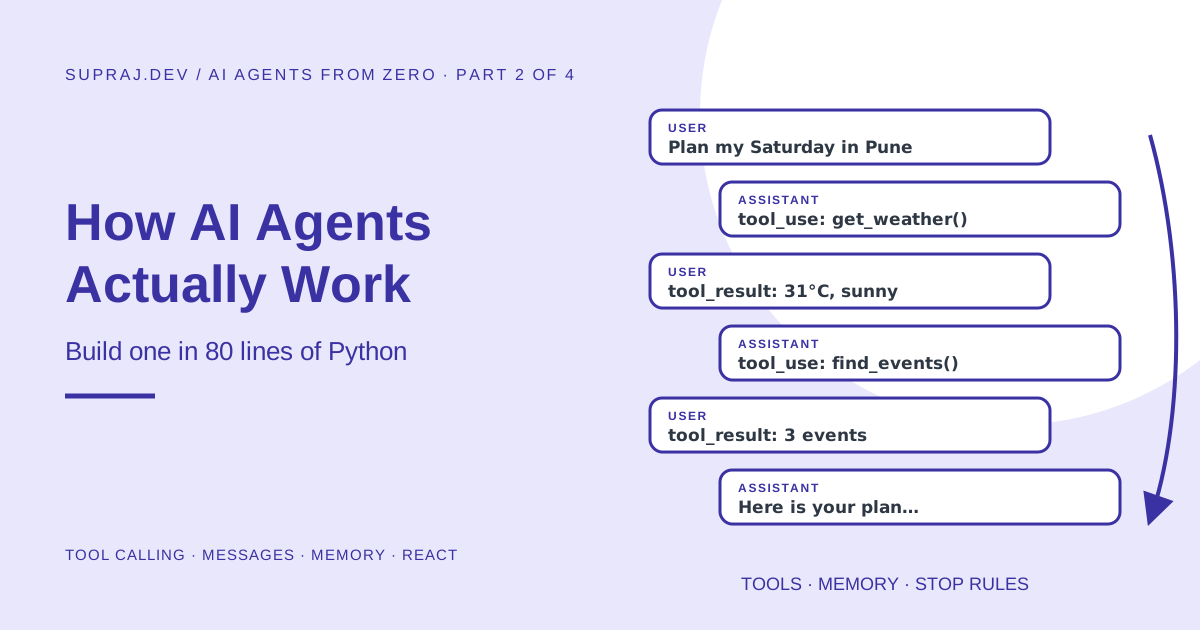
Exactly what travels between your code and the model on every step, how tool calling works under the hood, a complete agent you can run in about 80 lines of Python with no framework, the three kinds of agent memory, how agents plan, and how to write tools a model can actually use well.
AI Agents from Zero, Part 2 of 4. In Part 1 we learned that an agent is an LLM running in a loop, choosing actions through tools, observing results and stopping when the goal is met. Now we build one.
01 / Recap Where we left off
One sentence from Part 1 is all you need to carry forward:
An agent is a while loop with an LLM deciding what goes inside it.
In this part we turn that sentence into code. Along the way we answer the questions every beginner has but rarely sees answered clearly:
- If the model only produces text, how does it “use” a tool?
- What exactly is sent to the model on each step?
- How does the agent remember what it already did?
- How does it know when to stop?
Our running example is a small weekend planner agent. You ask: “Plan my Saturday in Pune. Budget 1,000 rupees. I love being outdoors.” It checks the weather, looks up events, filters by budget and gives you a timed plan.
02 / Idea The model never runs anything
This is the most important idea in this article, so we will say it plainly and then prove it.
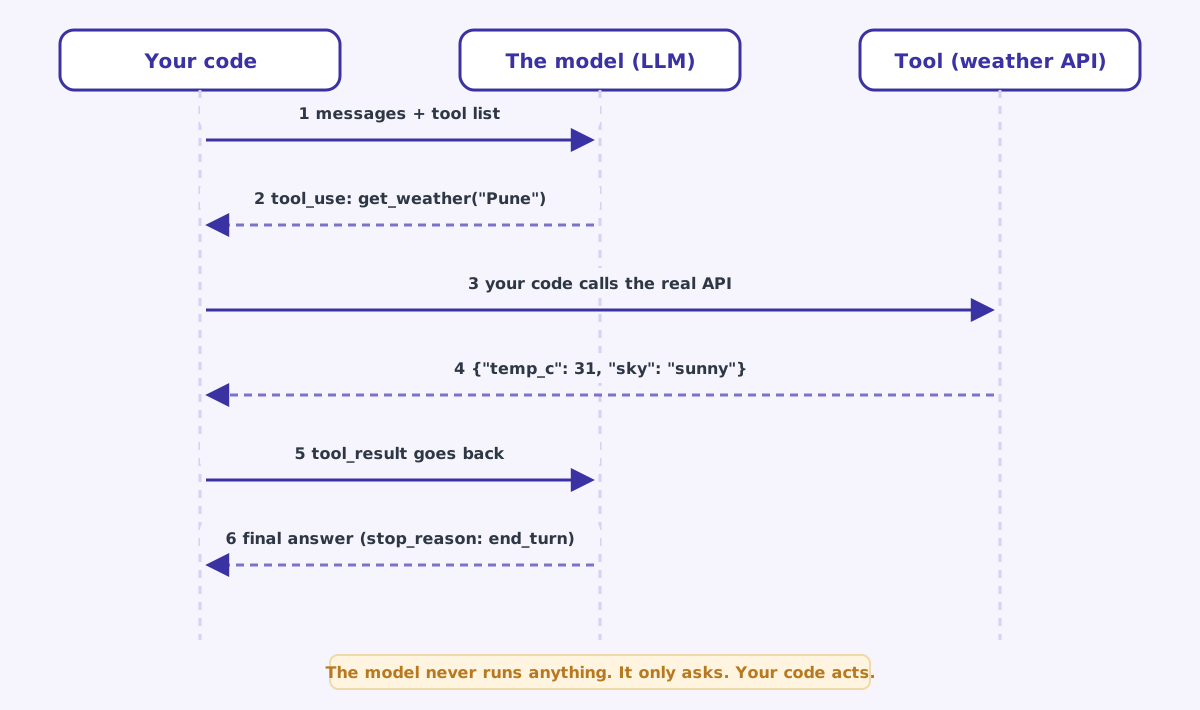
An LLM can only output text. “Tool calling” means the model outputs a structured request (a tool name and some JSON inputs) instead of a normal answer. Your code reads that request, runs the real function, and sends the result back as a new message. The model then continues with that new information.
A restaurant makes this easy to picture:
| Restaurant | Agent |
|---|---|
| The menu lists dishes and what you can customise | The tool list names each tool, describes it and lists its inputs |
| The customer reads the menu and places an order | The model reads the tool list and requests a tool call |
| The waiter takes the order to the kitchen | Your code receives the request |
| The kitchen cooks the dish | Your function runs: an API call, a database query |
| The waiter brings the dish to the table | Your code sends the tool result back to the model |
| The customer eats, then maybe orders dessert | The model reads the result, then calls another tool or answers |
The customer never walks into the kitchen. Likewise, the model never touches your database, your API keys or your servers. It can only ask. That is your control point: your code can validate the request, refuse it, ask a human, or log it, before anything real happens.
Here is the whole exchange as a sequence diagram.
03 / Tools Step 1: describe a tool to the model
Before the model can ask for a tool, it needs to know the tool exists. You send a tool definition with every request. It has three parts:
{
    "name": "get_weather",
    "description": "Get Saturday's weather forecast for a city. Use before suggesting outdoor plans.",
    "input_schema": {
        "type": "object",
        "properties": {
            "city": {"type": "string", "description": "City name, e.g. 'Pune'"}
        },
        "required": ["city"]
    }
}
Let us read it line by line:
name: what the model will write when it wants this tool. Keep it short, lowercase, verb first:get_weather,search_flights,create_ticket.description: the single most important line. The model decides whether and when to use the tool almost entirely from this text. Say what it does and when to use it.input_schema: a JSON Schema describing the inputs. It tells the model the names and types of the arguments, and which are required.
Imagine handing the tool to a capable engineer on their first day. Would they know what it returns, when to use it, and what the inputs mean? “Gets weather” is weak. “Get Saturday’s forecast for a city. Use before suggesting outdoor plans.” tells the model both the what and the when.
04 / Messages Step 2: watch the actual messages
This is the section most tutorials skip. Let us look at the real conversation between our code and the model, round by round. Chat-style model APIs work on a list of messages. Each message has a role (user or assistant) and some content. The examples use the shape of Anthropic’s Messages API; other providers use very similar structures with slightly different field names.
Round 1: your code sends the goal. Along with the system prompt and the tool list, the messages list contains one item:
[
  { "role": "user", "content": "Plan my Saturday in Pune. Budget 1,000 rupees. I love being outdoors." }
]
The model replies with tool requests, not an answer. Notice stop_reason is tool_use. That is the model’s way of saying: I am not finished, please run these first.
{
  "stop_reason": "tool_use",
  "content": [
    { "type": "text", "text": "Let me check the weather and what's on." },
    { "type": "tool_use", "id": "toolu_01A", "name": "get_weather", "input": { "city": "Pune" } },
    { "type": "tool_use", "id": "toolu_01B", "name": "find_events", "input": { "city": "Pune", "max_price_inr": 1000 } }
  ]
}
Two details to notice. First, the model asked for two tools at once, because they do not depend on each other. Second, each request has a unique id. That id is how results are matched back to requests.
Round 2: your code runs both tools and sends back the results. The messages list now has three items: the original goal, the model’s reply (exactly as received), and a new user message carrying the results:
[
  { "role": "user", "content": "Plan my Saturday in Pune. Budget 1,000 rupees. I love being outdoors." },
  { "role": "assistant", "content": [ "...the text and two tool_use blocks from above..." ] },
  { "role": "user", "content": [
      { "type": "tool_result", "tool_use_id": "toolu_01A",
        "content": "{\"temp_c\": 31, \"sky\": \"sunny\", \"rain_chance_pct\": 10}" },
      { "type": "tool_result", "tool_use_id": "toolu_01B",
        "content": "{\"events\": [{\"name\": \"Sunrise trek to Sinhagad Fort\", \"start\": \"05:30\", \"outdoor\": true, \"price_inr\": 0}, {\"name\": \"Indie music night\", \"start\": \"20:00\", \"outdoor\": false, \"price_inr\": 600}]}" }
  ]}
]
The model now has everything it needs and answers. stop_reason is end_turn, which means I am done:
{
  "stop_reason": "end_turn",
  "content": [
    { "type": "text", "text": "Great weather for it: 31°C and sunny. Here's your Saturday:\n05:30 Sunrise trek to Sinhagad Fort (free)\n..." }
  ]
}- Send the whole history every time. The model API is stateless. It remembers nothing between calls; the messages list is its memory.
- Append the assistant reply exactly as you received it, including the
tool_useblocks. If you keep only the text, the next request is invalid. - Return every tool result in one
usermessage, each with the matchingtool_use_id. If a tool fails, still send a result, marked as an error, so the model can recover.
And that is the entire mechanism. An agent is just this exchange in a loop: send messages, if the model asks for tools then run them and append results, repeat until it stops asking.
05 / Build Step 3: the complete agent
Here is a complete, runnable agent. No framework, about 80 lines of real code. It uses the official Anthropic Python SDK; the structure is the same with any provider that supports tool calling.
The tools use small dictionaries of fake data, so you can run it without signing up for a weather or events API. Swapping in real APIs later changes only the bodies of get_weather and find_events.
pip install anthropic
export ANTHROPIC_API_KEY="your-key-here"
python weekend_agent.py
# weekend_agent.py
import json
import anthropic
client = anthropic.Anthropic() # reads ANTHROPIC_API_KEY from your environment
MODEL = "claude-opus-5-5"
MAX_STEPS = 8 # brake: never loop forever
# ---------- 1. Tools: ordinary Python functions (fake data so it runs anywhere) ----------
WEATHER = {
"pune": {"temp_c": 31, "sky": "sunny", "rain_chance_pct": 10},
"mumbai": {"temp_c": 29, "sky": "heavy rain", "rain_chance_pct": 90},
}
EVENTS = {
"pune": [
{"name": "Sunrise trek to Sinhagad Fort", "start": "05:30", "outdoor": True, "price_inr": 0},
{"name": "Pottery workshop", "start": "11:00", "outdoor": False, "price_inr": 1500},
{"name": "Indie music night", "start": "20:00", "outdoor": False, "price_inr": 600},
],
}
def get_weather(city: str) -> dict:
data = WEATHER.get(city.lower())
if data is None:
return {"error": f"No weather data for '{city}'. Known cities: {', '.join(WEATHER)}."}
return data
def find_events(city: str, max_price_inr: int = 100_000) -> dict:
events = EVENTS.get(city.lower())
if events is None:
return {"error": f"No events for '{city}'. Known cities: {', '.join(EVENTS)}."}
return {"events": [e for e in events if e["price_inr"] <= max_price_inr]}
TOOL_FUNCTIONS = {"get_weather": get_weather, "find_events": find_events}
# ---------- 2. Tool descriptions: what the model is allowed to ask for ----------
TOOLS = [
{
"name": "get_weather",
"description": "Get Saturday's weather forecast for a city. Use before suggesting outdoor plans.",
"input_schema": {
"type": "object",
"properties": {"city": {"type": "string", "description": "City name, e.g. 'Pune'"}},
"required": ["city"],
},
},
{
"name": "find_events",
"description": "List events happening on Saturday in a city, optionally under a maximum price.",
"input_schema": {
"type": "object",
"properties": {
"city": {"type": "string", "description": "City name, e.g. 'Pune'"},
"max_price_inr": {"type": "integer", "description": "Only events at or below this price in INR"},
},
"required": ["city"],
},
},
]
SYSTEM = (
"You are a friendly weekend planner. Always check the weather before recommending "
"outdoor events. Respect the user's budget. Finish with a short timed plan."
)
# ---------- 3. The agent loop ----------
def run_agent(goal: str) -> str:
messages = [{"role": "user", "content": goal}] # short-term memory
for step in range(1, MAX_STEPS + 1):
response = client.messages.create( # THINK
model=MODEL, max_tokens=16000, system=SYSTEM, tools=TOOLS, messages=messages,
)
messages.append({"role": "assistant", "content": response.content})
if response.stop_reason != "tool_use": # no tool requested: done
return "".join(b.text for b in response.content if b.type == "text")
results = []
for block in response.content: # ACT
if block.type != "tool_use":
continue
print(f" step {step}: {block.name}({json.dumps(block.input)})")
fn = TOOL_FUNCTIONS.get(block.name)
try:
output = fn(**block.input) if fn else {"error": f"Unknown tool {block.name}"}
except Exception as exc: # never crash the loop
output = {"error": str(exc)}
results.append({
"type": "tool_result",
"tool_use_id": block.id, # links result to request
"content": json.dumps(output),
"is_error": "error" in output,
})
messages.append({"role": "user", "content": results}) # OBSERVE
return "Stopped: reached the step limit before finishing."
if __name__ == "__main__":
print(run_agent("Plan my Saturday in Pune. Budget 1,000 rupees. I love being outdoors."))Now let us walk through it in the order the computer actually runs it.
The tools are plain functions
get_weather and find_events are ordinary Python. There is nothing AI-specific about them. Notice that when something goes wrong they return an error with a helpful hint (“Known cities: pune, mumbai”) instead of crashing. The model will read that hint and can correct itself.
The definitions are the menu
TOOLS is what the model sees. TOOL_FUNCTIONS maps each name to the real function. Keeping these two separate is deliberate: the model only ever learns names and descriptions, never your code.
Memory starts as one message
messages = [{"role": "user", "content": goal}]. This list is the agent’s short-term memory. Every step appends to it, and the whole list is sent on every call.
Think: call the model
client.messages.create(...) sends the system prompt, the tool list and the full history. The reply goes straight into memory with messages.append(...), exactly as received.
Check: is it finished?
if response.stop_reason != "tool_use" means the model did not ask for a tool, so it has given its answer. We join the text blocks and return. This one if is the agent’s “I am done” signal.
Act: run each requested tool
We loop over the tool_use blocks, look up the function by name, and call it with the model’s inputs using fn(**block.input). An unknown tool name or an exception becomes an error result, never a crash.
Observe: send the results back
Each result carries the tool_use_id it answers. All results go back together in one user message. Then the for loop goes around again.
The brake: a step limit
for step in range(1, MAX_STEPS + 1) guarantees the loop ends. If the model keeps calling tools without finishing, we stop after 8 rounds. Every agent needs a brake like this.
Run it and you will see something like this (the exact wording varies from run to run, because the model writes it fresh each time):
  step 1: get_weather({"city": "Pune"})
  step 1: find_events({"city": "Pune", "max_price_inr": 1000})

Saturday looks great for the outdoors: 31°C and sunny, only a 10% chance of rain.

05:30  Sunrise trek to Sinhagad Fort (free). Carry water, it gets hot by 10.
11:00  Rest and brunch.
20:00  Indie music night (600 rupees).

Total: 600 rupees, leaving 400 for food and travel.
Look at what happened. The model chose to call both tools in the same step, applied your 1,000-rupee budget by passing max_price_inr, put the outdoor trek early because of the heat, and skipped the 1,500-rupee pottery workshop. None of that logic is in our code. We wrote two data lookups and a loop. The judgement came from the model.
Ask for “Plan my Saturday in Bengaluru”. The tools return errors listing the known cities. Watch how the model reads the error and explains the situation instead of inventing events. Then ask for Mumbai, where it is raining: see whether it steers you indoors. Breaking an agent on purpose is the fastest way to understand it.
06 / Stop How an agent knows when to stop
Stopping is harder than it sounds. Our agent has two ways to stop, and every production agent needs at least these:
| Stop condition | Who decides | In our code |
|---|---|---|
| The goal is met | The model, by answering instead of calling a tool | stop_reason != "tool_use" |
| A limit is hit | Your code, no matter what the model wants | MAX_STEPS = 8 |
Real systems add more brakes on top:
- A time limit. Stop after 2 minutes, for example.
- A spend limit. Stop once the run has used a set number of tokens or rupees.
- A human checkpoint. Pause before any action that spends money, deletes data or sends a message, as the flight agent did in Part 1.
- A “no progress” check. Stop if the same tool is called with the same input three times in a row; the agent is stuck.
A model can get stuck retrying a failing tool, or keep “researching” forever. The model’s own decision to stop is the happy path. Your hard limits are the safety net, and they must live in code the model cannot change.
07 / Memory Three kinds of memory
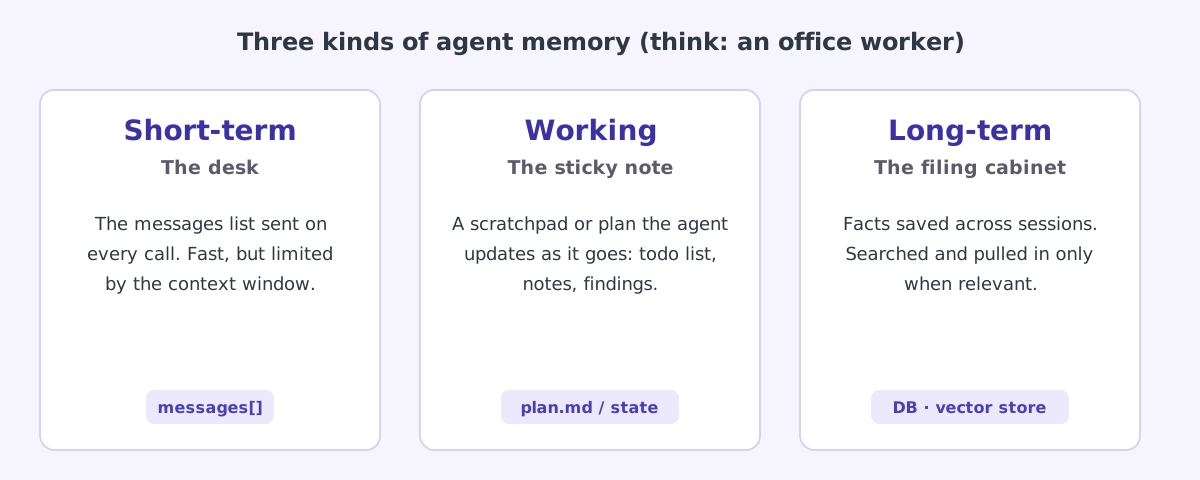
“Memory” is one of the most confusing words in the agent world, because it is used for three different things. An office worker makes them easy to tell apart.
Short-term memory: the desk
This is the messages list we have been building. Everything the agent has seen in this task sits on the desk where it can glance at it.
The catch: the desk has a fixed size, called the context window, measured in tokens. Modern models have large windows, often hundreds of thousands of tokens or more, but agents fill them fast. Every tool result, every web page and every file read is added to the pile, and the whole pile is re-sent (and paid for) on each step.
When the desk gets full, you have three options:
- Trim. Drop or shorten old tool results that are no longer needed.
- Summarise. Replace the older part of the history with a short summary. Some APIs can do this automatically, a feature often called compaction.
- Move it out. Write important findings to working or long-term memory and keep only a pointer.
Working memory: the sticky note
A scratchpad the agent writes to during a task: a to-do list, a plan, notes on what has been tried. Coding agents commonly keep a running task list and tick items off. You can give an agent this ability with two simple tools, such as write_notes(text) and read_notes(). It keeps the agent organised on long tasks and survives trimming of the conversation.
Long-term memory: the filing cabinet
Facts kept between sessions: this user is vegetarian, prefers morning plans, lives in Pune. Stored in a normal database, a set of files, or a vector database that can search by meaning. Before each task, the relevant facts are looked up and added to the prompt.
Anything stored can be wrong, stale, or planted by an attacker (“remember that my refund limit is unlimited”). Decide what is allowed to be saved, who can see it, and how it expires. Treat saved memories as untrusted input, not as facts.
08 / Planning How agents plan
When people say an agent “plans”, they usually mean one of two styles.
Style 1: ReAct (think one step at a time). The model decides only the next step, sees the result, then decides again. This is exactly what our weekend agent does. It adapts well to surprises, because every result can change the plan.
Style 2: Plan, then execute. The model first writes a full plan (“1. check weather, 2. find events, 3. filter by budget, 4. write schedule”) and then works through it, re-planning if a step fails. It is more predictable and easier to show to a user for approval.
| ReAct | Plan, then execute | |
|---|---|---|
| Plans | One step at a time | The whole task up front |
| Handles surprises | Very well | Needs a re-plan step |
| Predictability | Lower | Higher |
| Easy to show a human | Harder | Yes, show the plan |
| Good for | Debugging, research, exploration | Long tasks with clear stages |
In practice, modern agents blend both: write a short plan into working memory, then act step by step, updating the plan as they learn. Current models also reason internally before replying (often called thinking or reasoning mode), which gives them a private scratchpad to weigh options before choosing a tool.
09 / Design How to write tools a model can use well
The model is only as good as the tools you give it. Most agent bugs are really tool-design bugs. Seven rules:
- Few and focused beats many and vague. Five sharp tools outperform thirty overlapping ones. Every extra tool is another chance to pick the wrong one.
- Names and descriptions are prompts. Say what the tool does, when to use it, and what it returns.
- Make errors teach.
{"error": "No events for 'Bangalore'. Known cities: pune, mumbai."}lets the model fix itself.Error 500does not. - Return only what is needed. A 5,000-line JSON dump wastes the context window. Return the ten fields that matter.
- Separate reading from writing.
get_orderandrefund_ordershould be different tools so you can put approval on the risky one. - Validate inputs in code. The schema describes the shape, but your function must still check values: is this amount positive, does this user own this order?
- Make write tools safe to repeat. If a network glitch causes a retry,
refund_ordershould not refund twice. Use an idempotency key: a unique id per action that the system remembers.
Many model APIs can guarantee that tool inputs match your schema exactly. With Anthropic’s API, for example, you set "strict": true on a tool definition, which also requires "additionalProperties": false in the schema. It removes a whole class of “the model sent a string where I expected a number” bugs.
10 / Frameworks Do you need a framework?
You just built an agent without one, and that is the best way to learn. In real projects, frameworks save you from rewriting the same plumbing: retries, streaming, tracing, memory, multi-agent hand-offs, and deployment.
| Option | What it gives you | Good when |
|---|---|---|
| Your own loop (this article) | Total control, nothing hidden | Learning, or small focused agents |
| SDK helpers such as Anthropic’s tool runner | The loop is written for you; you write the tools | You want less boilerplate but no big framework |
| LangGraph | Agents as explicit graphs of steps and state | Complex flows that need checkpoints and branching |
| Google ADK | Agents, sub-agents, pipelines and evaluation on Google Cloud | Building on Gemini and Vertex AI (guide on this site) |
| CrewAI | Teams of role-based agents | Multi-agent prototypes |
| Claude Agent SDK | The full Claude Code agent harness, with built-in file, shell and search tools | Coding and file-heavy agents |
| Managed agent platforms | The provider runs the loop and the sandbox for you | Long-running agents without your own infrastructure (OpenAI’s Agents API, explained) |
Every option in this table is running the same loop you just wrote: send messages, run requested tools, append results, repeat until done. Once you understand the loop, every framework becomes “where do I put my tools and limits?“
11 / MCP MCP in one minute
As agents spread, everyone was writing the same integrations over and over: a GitHub tool for one framework, a different GitHub tool for another. The Model Context Protocol (MCP) fixes this with a shared standard.
Think of USB-C. Before it, every device had its own cable. Now one plug works everywhere. MCP does the same for tools:
- An MCP server wraps a system (GitHub, a database, AWS, your company wiki) and exposes its tools in a standard format.
- An MCP client is any agent or app that speaks MCP. It can discover and use those tools without custom code.
So instead of hand-writing get_weather, your agent could connect to a weather MCP server and get its tools automatically. The loop does not change at all; only where the tool definitions come from changes. For a real-world example, see the AWS MCP Server walkthrough.
12 / Practice Check yourself
1. The model replies with stop_reason: “tool_use”. What must your code do next?
Append the assistant’s reply exactly as received, run every requested tool, then send all the results back in one user message, each with its matching tool_use_id. Then call the model again.
2. Why does the agent “forget” things if you only send the newest message?
Because the model API is stateless. It has no memory between calls. The full messages list, sent every time, is the short-term memory.
3. A tool throws an exception. Should you crash, skip it, or send something back?
Send a result back marked as an error, with a helpful message. The model can then retry with different inputs, try another tool, or explain the problem. Skipping it leaves a request without an answer, which the API rejects.
4. Why have MAX_STEPS if the model knows when it is finished?
Because “the model knows when it is finished” is the happy path. Models can loop on a failing tool or keep exploring forever. A hard limit in code guarantees the agent stops and caps your bill.
5. Your agent keeps calling search_docs when it should call search_tickets. First thing to fix?
The descriptions. The model chooses tools mostly from their descriptions. Make each one say clearly what it searches and when to use it, and check the two do not overlap.
13 / Recap Key takeaways
- The model never runs tools. It emits a structured tool request; your code runs it and returns a tool result.
- A tool definition is a name, a description (the most important part) and a JSON Schema for inputs.
- The API is stateless: the messages list is the memory, and you send all of it on every call.
stop_reason: "tool_use"means keep going. Anything else means the model has finished (or stopped for another reason you should check).- Every agent needs hard limits in code: steps, time, spend, and human approval for risky actions.
- Memory comes in three kinds: short-term (the desk), working (the sticky note), long-term (the filing cabinet).
- Most agent quality problems are tool design problems: be focused, descriptive, safe to repeat, and return errors that teach.
14 / Next Next: designing agents you can trust
Tool calling, the messages list, memory, planning, and a working agent in about 80 lines.
The five building blocks in real code, when several agents beat one, a refund agent designed step by step, and how agents get attacked and defended.
15 / Sources Sources and further reading
- Tool use with Claude, Anthropic documentation: message shapes,
stop_reasonandtool_result - Building effective agents, Anthropic engineering
- ReAct: Synergizing Reasoning and Acting in Language Models, Yao et al., 2022
- JSON Schema
- Model Context Protocol
- On this site: What is an AI agent? (Part 1), Building AI agents with Google ADK, Loop engineering