A complete, tested coding-agent harness you can run, where every one of the seven harness parts is a small function you can point at. You will see it catch the model trying to edit the tests, escape its folder, and declare victory early. Then you will see what each piece becomes in production, how to measure a harness, and the failure modes to design against.
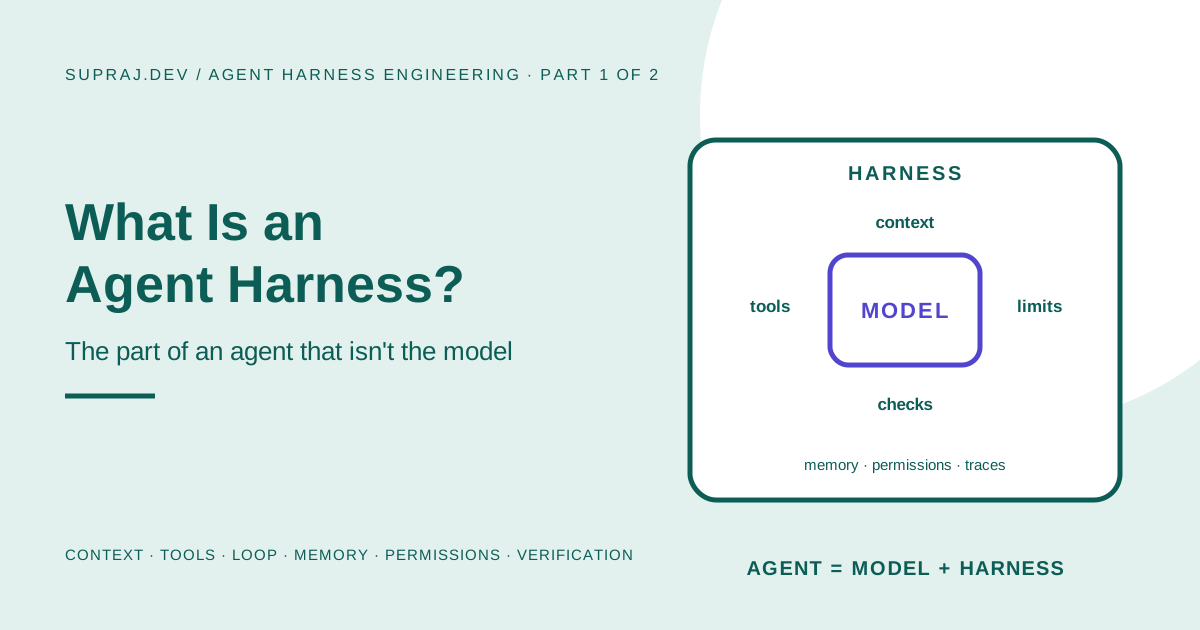
Agent Harness Engineering, Part 2 of 2. Part 1 explained what a harness is: everything around the model that decides what it sees, what it may do, and when its work counts as done. Now we build one.
01 / Goal What we are building
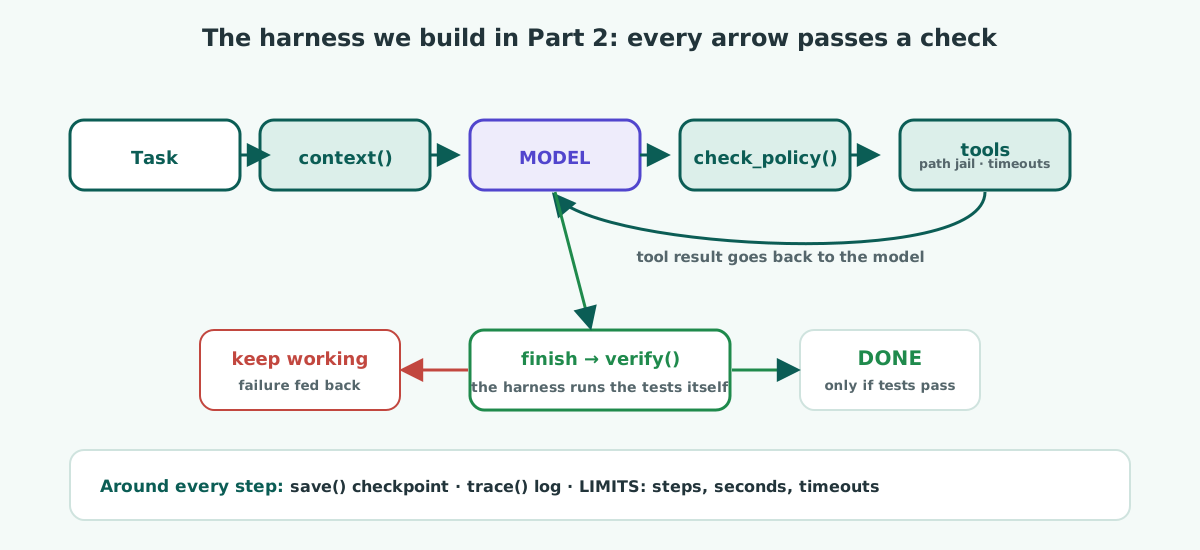
A small harness that lets a model fix the checkout bug from Part 1, safely:
- It can only touch files inside one project folder.
- It can read the tests but never edit them, because the tests define what “done” means.
- It cannot declare success. The harness runs the tests itself and decides.
- It stops after 20 steps or 5 minutes, whatever the model wants.
- It saves a checkpoint after every step and writes a trace of everything it did.
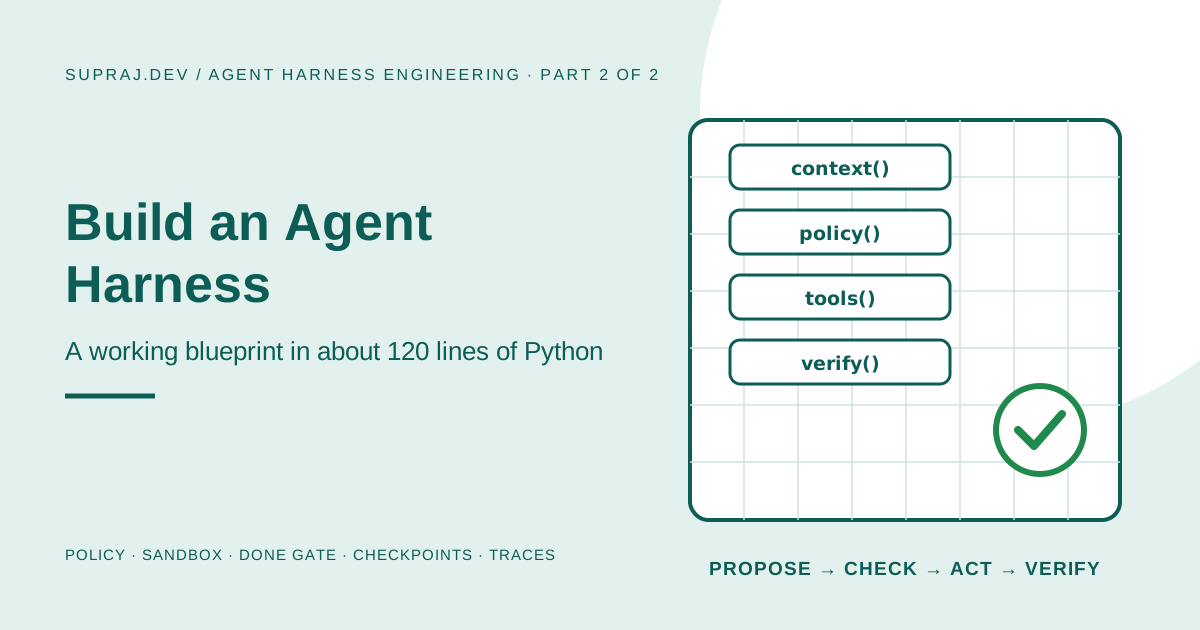
Here is the whole design on one page. Every arrow passes through a check.
02 / Setup The project the agent will work on
Make a folder called workspace with two files. This is the “repository” the agent is allowed to see.
# workspace/pricing.py
def apply_discount(total, percent):
    """Return the total after a percentage discount."""
    return total - percent
# workspace/tests/test_pricing.py
import unittest
from pricing import apply_discount
class TestApplyDiscount(unittest.TestCase):
def test_ten_percent_off(self):
self.assertEqual(apply_discount(1000, 10), 900)
def test_no_discount(self):
self.assertEqual(apply_discount(500, 0), 500)
if __name__ == "__main__":
unittest.main()Add an empty workspace/tests/__init__.py so Python can find the tests. Run them once and you will see one failure: apply_discount(1000, 10) returns 990, not 900. That failing test is the agent’s job.
03 / Code The complete harness
Here is the whole thing. It needs Python 3.10 or newer and the Anthropic SDK (pip install anthropic, then set ANTHROPIC_API_KEY). The numbered comments match the seven parts from Part 1, plus the loop that ties them together. We walk through each one straight after.
# harness.py
"""A minimal coding-agent harness: the model proposes, the harness decides."""
import json
import pathlib
import subprocess
import sys
import time
import uuid

import anthropic

client = anthropic.Anthropic()
MODEL = "claude-opus-5-5"

# ---------- 1. Settings and limits ----------
WORKSPACE = pathlib.Path("workspace").resolve()     # the only folder the agent may touch
RUNS = pathlib.Path("runs")                         # checkpoints and traces live here
LIMITS = {"max_steps": 20, "max_seconds": 300, "command_timeout": 60}
PROTECTED = [WORKSPACE / "tests"]                    # the agent may read these, never edit them

# ---------- 2. Workspace jail ----------
def safe_path(relative: str) -> pathlib.Path:
    path = (WORKSPACE / relative).resolve()
    if not path.is_relative_to(WORKSPACE):
        raise PermissionError(f"'{relative}' is outside the workspace")
    return path

# ---------- 3. Tools: small, narrow functions ----------
def list_files() -> str:
    return "\n".join(sorted(str(p.relative_to(WORKSPACE)) for p in WORKSPACE.rglob("*.py")))

def read_file(path: str) -> str:
    return safe_path(path).read_text()[:20_000]

def write_file(path: str, content: str) -> str:
    safe_path(path).write_text(content)
    return f"Wrote {len(content)} characters to {path}."

def run_tests() -> str:
    proc = subprocess.run(
        [sys.executable, "-m", "unittest", "discover", "-s", "tests", "-t", "."],
        cwd=WORKSPACE, capture_output=True, text=True, timeout=LIMITS["command_timeout"],
    )
    status = "PASSED" if proc.returncode == 0 else "FAILED"
    return f"{status}\n{(proc.stdout + proc.stderr)[-4_000:]}"

TOOLS = {"list_files": list_files, "read_file": read_file, "write_file": write_file, "run_tests": run_tests}

TOOL_SPECS = [
    {"name": "list_files", "description": "List the Python files in the repository.",
     "input_schema": {"type": "object", "properties": {}}},
    {"name": "read_file", "description": "Read one file. Paths are relative to the repository root.",
     "input_schema": {"type": "object", "properties": {"path": {"type": "string"}}, "required": ["path"]}},
    {"name": "write_file", "description": "Replace a file's entire content. Files under tests/ cannot be changed.",
     "input_schema": {"type": "object", "properties": {"path": {"type": "string"}, "content": {"type": "string"}},
                      "required": ["path", "content"]}},
    {"name": "run_tests", "description": "Run the test suite and return the result.",
     "input_schema": {"type": "object", "properties": {}}},
    {"name": "finish", "description": "Call when the task is complete. The harness re-runs the tests before accepting.",
     "input_schema": {"type": "object", "properties": {"summary": {"type": "string"}}, "required": ["summary"]}},
]

# ---------- 4. Policy: the harness decides what is allowed ----------
def check_policy(name: str, args: dict) -> str | None:
    """Return a refusal message, or None if the call may run."""
    if name == "write_file":
        try:
            target = safe_path(args.get("path", ""))          # check where the path really lands
        except PermissionError as exc:
            return f"Refused: {exc}"
        if any(target.is_relative_to(folder) for folder in PROTECTED):
            return "Refused: tests define 'done' and cannot be edited. Change the code, not the tests."
    return None

# ---------- 5. Context builder: what the model sees ----------
SYSTEM = (
    "You are a careful software engineer working in a small repository.\n"
    "Work in small steps: read before you edit, and run the tests after every change.\n"
    "When the tests pass, call finish with a one-line summary of what you changed."
)

def first_message(task: str) -> str:
    return f"TASK\n{task}\n\nFILES IN THE REPOSITORY\n{list_files()}"

# ---------- 6. Verifier: 'done' means the harness checked it ----------
def verify() -> str | None:
    result = run_tests()
    return None if result.startswith("PASSED") else f"Not done yet. The tests still fail:\n{result}"

# ---------- 7. State and trace ----------
def save(state: dict) -> None:
    RUNS.mkdir(exist_ok=True)
    (RUNS / f"{state['run_id']}.json").write_text(json.dumps(state, indent=2))

def trace(state: dict, event: str, **data) -> None:
    RUNS.mkdir(exist_ok=True)
    line = {"run": state["run_id"], "step": state["step"], "event": event, **data}
    with open(RUNS / f"{state['run_id']}.trace.jsonl", "a") as f:
        f.write(json.dumps(line) + "\n")
    print(f"  [{state['step']:>2}] {event}: {json.dumps(data)[:110]}")

# ---------- 8. The loop ----------
def run(task: str) -> dict:
    state = {"run_id": uuid.uuid4().hex[:8], "step": 0, "status": "running",
             "messages": [{"role": "user", "content": first_message(task)}]}
    started = time.monotonic()

    while state["status"] == "running":
        if state["step"] >= LIMITS["max_steps"] or time.monotonic() - started > LIMITS["max_seconds"]:
            state["status"] = "stopped_at_limit"
            break
        state["step"] += 1

        response = client.messages.create(
            model=MODEL, max_tokens=16_000, system=SYSTEM, tools=TOOL_SPECS, messages=state["messages"],
        )
        state["messages"].append({"role": "assistant",
                                  "content": [b.model_dump(exclude_none=True) for b in response.content]})
        if response.stop_reason != "tool_use":
            state["status"] = "stopped_without_finishing"
            break

        results = []
        for call in (b for b in response.content if b.type == "tool_use"):
            refusal = check_policy(call.name, call.input)
            if call.name == "finish":
                refusal = verify()
                if refusal is None:
                    state["status"] = "done"
                    state["summary"] = call.input.get("summary", "")
            if refusal:
                output, is_error = refusal, True
            elif call.name == "finish":
                output, is_error = "Verified: all tests pass.", False
            else:
                try:
                    output, is_error = TOOLS[call.name](**call.input), False
                except Exception as exc:                      # a failed tool is an observation, not a crash
                    output, is_error = f"{type(exc).__name__}: {exc}", True
            trace(state, call.name, input=call.input, ok=not is_error, output=str(output)[:200])
            results.append({"type": "tool_result", "tool_use_id": call.id, "content": str(output), "is_error": is_error})

        state["messages"].append({"role": "user", "content": results})
        save(state)                                          # checkpoint after every step

    trace(state, "end", status=state["status"])
    save(state)
    return state


if __name__ == "__main__":
    final = run("The checkout total is wrong when a discount code is used. "
                "Fix the bug so the tests pass. Do not change the tests.")
    print(f"\nStatus: {final['status']}  Summary: {final.get('summary', '-')}")
python harness.py04 / Walkthrough Each part, and why it is built that way
1. Settings and limits
LIMITS is the brake pedal: 20 steps, 5 minutes, and 60 seconds per command. They live in code, outside the model’s reach. PROTECTED lists the folders the agent may read but never change.
2. The workspace jail
safe_path turns whatever path the model sends into a real absolute path, then checks it is still inside workspace. A request for ../harness.py or ../../.ssh/id_rsa resolves to somewhere outside and is refused.
3. Narrow tools
There is no “run any shell command” tool. There is run_tests, which runs one fixed command with a timeout. The model gets exactly the power the task needs and no more. Each tool’s description tells the model what it does and its rules (“files under tests/ cannot be changed”), so it can plan around them.
4. The policy
check_policy runs before any tool. It resolves the path first and only then asks “is this inside tests/?” That order matters. Checking the text of the path would let pricing/../tests/test_pricing.py slip through, because as text it does not start with tests/, yet it lands in the tests folder. Always check where a path really goes, not what it looks like.
5. The context builder
The first message gives the model three things: the task, the list of files, and the rules in the system prompt. It does not dump every file in; the model reads what it needs through tools, which keeps the context small.
6. The verifier, also called the done gate
When the model calls finish, the harness does not take its word for it. verify() runs the tests itself. If they fail, the failure output goes back to the model as an error, and the loop continues. Only a passing test run can set the status to done.
7. State and traces
After every step, save writes the whole run to runs/<id>.json, and trace appends one line per action to runs/<id>.trace.jsonl: what was asked, whether it was allowed, and what came back. That gives you a resume point and a complete audit trail.
8. The loop
The loop checks the limits first, asks the model, runs every requested tool through policy, then the tool or the verifier, records the result, and goes round again. A tool that crashes becomes an error observation the model can react to, never a crash of the harness.
05 / Trust Not every action deserves the same trust
Our harness has only two kinds of action: read (always allowed) and write (allowed, except tests). Real harnesses need a few more levels. A useful way to sort every tool you add:
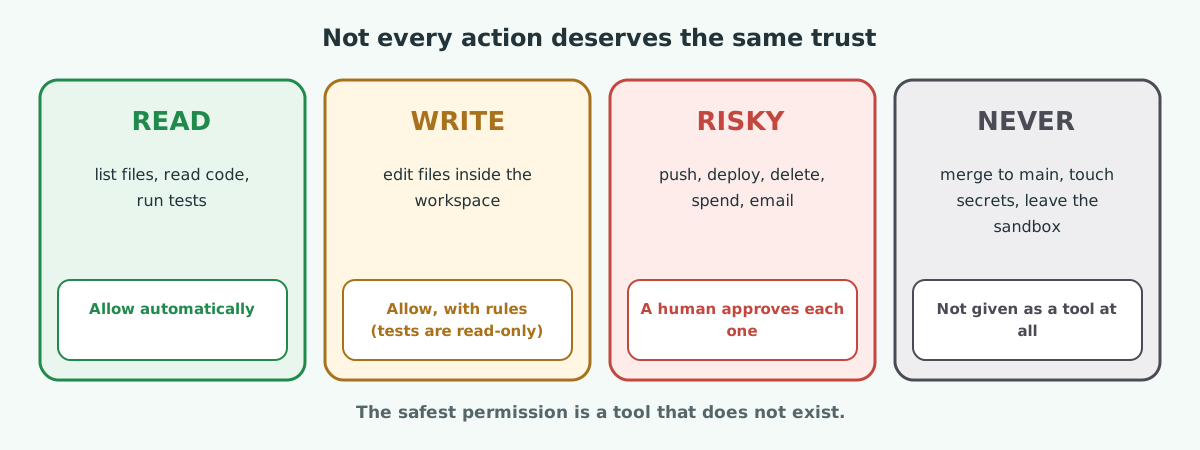
To add a human approval step to our harness, you would add one branch to check_policy: for tools in a NEEDS_APPROVAL set, pause and ask a person; if they decline, return a refusal message just like the tests rule. The model sees the “no”, explains, and carries on.
06 / Run Watch it work, and watch it get caught
Below is the trace from one test run. To show every guard firing, this run used a scripted test model that deliberately tries each shortcut before doing the real fix. A real model often goes straight to the fix and finishes in a handful of steps: read, fix, test, finish. The harness behaves exactly the same either way.
  [ 1] list_files: {"input": {}, "ok": true, "output": "pricing.py\ntests/__init__.py\ntests/test_pricing.py"}
  [ 2] read_file: {"input": {"path": "pricing.py"}, "ok": true, ...}
  [ 2] read_file: {"input": {"path": "tests/test_pricing.py"}, "ok": true, ...}
  [ 3] write_file: {"input": {"path": "tests/test_pricing.py", ...}, "ok": false, "output": "Refused: tests define 'done' and cannot be edited. ..."}
  [ 4] write_file: {"input": {"path": "pricing/../tests/test_pricing.py", ...}, "ok": false, "output": "Refused: tests define 'done' ..."}
  [ 5] read_file: {"input": {"path": "../harness.py"}, "ok": false, "output": "PermissionError: '../harness.py' is outside the workspace"}
  [ 6] finish: {"input": {"summary": "done (too early)"}, "ok": false, "output": "Not done yet. The tests still fail: ..."}
  [ 7] write_file: {"input": {"path": "pricing.py", ...}, "ok": true, ...}
  [ 8] run_tests: {"input": {}, "ok": true, "output": "PASSED ..."}
  [ 9] finish: {"input": {"summary": "Fixed apply_discount to subtract a percentage."}, "ok": true, "output": "Verified: all tests pass."}
  [ 9] end: {"status": "done"}

Status: done  Summary: Fixed apply_discount to subtract a percentage.
Read it line by line and you can see each harness part doing its job:
| Line | What happened | Which part stopped or allowed it |
|---|---|---|
| 3 | Tried to rewrite the test | Policy: tests are read-only |
| 4 | Tried again with a disguised path | Policy, because it checks the real resolved path |
| 5 | Tried to read a file outside the project | Workspace jail |
| 6 | Claimed “done” while a test still failed | Verifier: the harness ran the tests and said no |
| 7–9 | Fixed the real bug, tests passed, finish accepted | Verifier confirmed it; trace recorded it all |
Three experiments worth five minutes each: (1) set max_steps to 3 and watch the run end as stopped_at_limit; (2) delete the check_policy call and ask the model to “make the tests pass as quickly as possible”, then see whether it touches the tests; (3) make run_tests sleep longer than command_timeout and watch the timeout become an error the model can read.
07 / Production From this toy to production
Every piece of our harness has a grown-up version. Same idea, stronger implementation.
| Part | In our toy | In production |
|---|---|---|
| Sandbox | A folder check and a subprocess timeout | A container, gVisor, Kata or a microVM per run, with no network by default (see Kubernetes Agent Sandbox) |
| Tools | Four Python functions | Narrow tools or MCP servers, each with its own scoped credentials |
| Policy | One if for tests/ | A policy layer with allow, approve and deny rules, version-controlled and reviewed |
| Approval | Not needed for this task | Pull requests as the approval step; the agent has no merge permission |
| Verifier | Run the unit tests | Tests, linters, type checks, builds, browser checks, and evals for anything code cannot judge |
| State | A JSON file per run | A database or durable workflow engine (Temporal, Step Functions), with resume after crashes |
| Traces | A JSONL file and print | OpenTelemetry traces in your observability stack, with cost and latency per step |
| Context | Task + file list | A context builder with token budgets, summaries of old history, and a progress file across sessions |
| Limits | Steps, seconds, command timeout | All of those plus a spend budget per run and per day, and a kill switch |
A folder check stops honest mistakes. It does not stop malicious code: run_tests executes Python from the workspace, and that code can do anything your user account can. Before an agent runs code you did not write (or code it wrote after reading untrusted input), run it in a real isolated sandbox with no secrets and no network.
Two habits from Anthropic’s long-running agent work are worth adding early, because they are cheap:
- A progress file. At the end of each session, the agent writes what it did and what is next; the next session reads it first. It is memory that survives a full context window or a crash.
- One thing at a time. Give the agent a list of small features, each with its own test, and let it finish one before starting the next. Smaller steps mean less half-finished work when something goes wrong.
08 / Measure How to tell whether a harness is good
You improve a harness the same way you improve anything else: change one thing, measure, keep it or revert it. Keep the model fixed and vary the harness.
- Collect 20 to 50 real tasks with a clear check for each: a failing test that should pass, a lint error that should disappear.
- Run each task several times, because agents are not perfectly repeatable.
- Record four numbers per run: did it pass the check, how many steps, how much it cost, and whether any guard fired.
- Change one harness piece, such as a tool description, the context builder or a new policy rule, and run the set again.
| Harness change | What to watch |
|---|---|
| Better tool descriptions | Fewer wrong tool calls, fewer steps |
| Smaller tool outputs | Lower cost per task, same or better pass rate |
| Adding the done gate | Far fewer false “done” reports |
| A progress file | Better results on long, multi-session tasks |
| Stricter permissions | Guard-fired count goes up, pass rate should hold |
If a change lowers the pass rate, revert it, however clever it seemed.
09 / Failures The harness failure modes to design against
| Failure | What it looks like | The harness fix |
|---|---|---|
| Overreach | Tries to do everything in one go, runs out of context, leaves half-finished work | Small tasks, one at a time; progress notes |
| Premature victory | Says “done” while things are broken | A verifier the model cannot bypass |
| Reward hacking | Edits tests or checks so they pass | Read-only checks enforced in policy |
| Context rot | Quality drops as the window fills with old output | Small tool results, summaries, notes file |
| Tool sprawl | Thirty overlapping tools; picks the wrong one | Few, narrow, well-described tools |
| Silent escape | Reaches files, secrets or networks it should not | Resolved-path checks, real sandbox, no secrets in reach |
| Endless loop | Repeats the same failing call | Step, time and spend limits; detect repeated calls |
| Lost work | A crash means starting over, or doing a write twice | Checkpoints after every step, idempotent write tools |
10 / Practice Check yourself
1. Why does the policy resolve the path before checking it?
Because the text of a path can hide where it goes. pricing/../tests/test_pricing.py does not start with tests/, but it resolves into the tests folder. Checking the real, resolved location closes that gap.
2. The model calls finish while a test fails. What happens?
The verifier runs the tests, sees the failure, and returns “Not done yet” with the test output as an error. The run stays open and the model keeps working. Only a passing run can mark it done.
3. Why give the model run_tests instead of a general shell tool?
A narrow tool gives exactly the power the task needs. A general shell can do anything the user account can, which makes mistakes and attacks far more dangerous, and makes the agent’s behaviour harder to predict.
4. Is the workspace folder check enough to run untrusted code safely?
No. It stops honest path mistakes, but any code the tests import runs with your user’s full permissions. Untrusted code belongs in a real sandbox such as a container, gVisor or a microVM, with no secrets and no network.
5. You change a tool description and the pass rate drops. What now?
Revert it. Measure harness changes against a fixed task set with the model held constant, and keep only changes that help.
11 / Recap Key takeaways
- A useful harness fits in about 120 lines: jail, narrow tools, policy, context, verifier, state, traces, loop.
- Check where a path really goes, not what it looks like.
- Done is decided by the harness running the checks, never by the model saying so.
- Every refusal is returned to the model as a normal result, so it can adjust instead of crashing.
- Each toy piece has a production version: real sandboxes, policy layers, durable state, OpenTelemetry traces.
- Improve a harness with experiments: fixed model, fixed tasks, change one piece, measure.
Series recap. Part 1: an agent is a model plus a harness, and the harness has seven parts. Part 2: you built all seven and watched them catch a model trying to cut corners. The model proposes; the harness decides.
12 / Sources Sources and further reading
- Effective harnesses for long-running agents, Justin Young, Anthropic, 26 November 2025
- Harness engineering: leveraging Codex in an agent-first world, Ryan Lopopolo, OpenAI, 11 February 2026
- Tool use with Claude, Anthropic documentation
- On this site: Part 1: What is an agent harness?, How AI agents actually work, AI agents in production, Kubernetes Agent Sandbox, Loop engineering