Agent Runtimes · Part 2
What is Agent Substrate?Think of a shared office.
Your agent needs a place to work. Does it need to keep that place occupied while you're reading its answer?

Imagine you ask a coding assistant to fix a bug. It edits a file, runs the tests, and shows you the changes. You stop to read them. The assistant's environment is still there, holding your files and its working state. But there's no local work to do until you answer.
Now give that assistant to lots of people. Each person needs their own work kept separate. Reserving running environments for all those sessions can leave resources occupied while users are away.
I want to start with that ordinary pause. It's the easiest way to understand why Agent Substrate exists: software for sharing execution capacity across agent work environments, while keeping each environment's continuing identity and saved state. It runs on Kubernetes. [1]
01 / The work environment
Why does an AI agent need somewhere to work?
When a model suggests “run the tests,” something must actually run them. In our example, that's a work environment containing your project, a test runner, and the tools needed to change files. The model chooses an action; the environment carries it out and returns a result.
Suppose the assistant changes calculator.py and runs a test. The result says
one check still fails. It opens another file and investigates. Over several turns, the
environment accumulates useful work: modified files, installed dependencies, and
information inside running programs.
That last part is called process memory: the running program's in-memory working state. A value in memory and a value saved in a file aren't the same thing. Closing the program can lose the first even when the second remains on disk.
For the reader using the assistant, continuity matters. You don't want “please continue” to mean “start a new project and forget the changes.” Yet continuity doesn't necessarily require keeping the same execution resources occupied between turns.
A runtime is the software environment responsible for executing a workload. Agent Substrate addresses that execution layer. The project is designed to host workloads built with different agent frameworks, rather than define how an agent should reason or choose tools. [1]
- In the office
- Your project needs somewhere to be worked on.
- In the system
- The agent's tools need an execution environment.
02 / The resource problem
Why keep a desk reserved while nobody is using it?
Picture a shared office. Everyone has a project, but people come and go. Some work at a desk while others are away reviewing a document. If every member has a permanently reserved desk, the office needs space for people who aren't currently working there.
The alternative is to keep each person's work safely stored and make working space available when needed. Alice finishes a task, puts her work away, and leaves. Bob can use the freed capacity. Alice can return later and pick up her own work.
That's the central analogy for this article. The coding-assistant session is our imaginary example; its activity and the figures' numbers aren't measurements of a real deployment.
Agent workloads can have this stop-and-start shape. The project describes applications that spend time waiting between bursts of activity. Saving their state during suitable idle periods creates an opportunity to reuse execution resources. [2]
The word suitable matters. A user reading a finished answer is different from a program still waiting for an important response over a live connection. You need to know what's running before choosing to suspend it.
In the previous article's hotel analogy, the emphasis was giving an agent an isolated room. Here the question is what to do with execution capacity between periods of useful work. Isolation and efficient reuse are both needed.
- In the office
- Keep the project when its owner leaves the desk.
- In the system
- Separate continuing workload state from active execution capacity.
03 / The two important names
What are actors and workers?
Which part stays yours, and which part can be reused? Substrate gives those two things different names.
An actor is an individual workload instance. Think of Alice's coding session, with its own identity and references to its saved state. It can be suspended and resumed during its lifetime.
A worker supplies a place for actors to execute. Workers belong to a worker pool: a prepared collection of execution capacity. An actor's identity continues even when it later runs on another compatible worker. [3]
There is one place where the desk analogy is too small. A real worker can host several actors at once, each in its own sandbox, up to its capacity and actor limit. Think of a worker as an office area with room for several desks. [4]
So “Alice's actor” doesn't mean “a machine Alice owns forever.” And “Bob used the same worker” doesn't mean “Bob received Alice's project.” The point is to reuse resources while preserving separate environments.
You may also meet ActorTemplate. That's the starting blueprint for an actor: the workload's container images and state configuration. A container image packages the application and the files it needs to start. Different actors can begin from the same template and then develop their own state. [3]
- In the office
- Your project continues; the office area can change.
- In the system
- Actor identity and worker placement are separate.
04 / Saving enough to continue
What does a snapshot actually save?
If Alice leaves the office, what must go into storage so she can continue later? A list of previous conversations may be useful, but it won't recreate every running program or modified file.
A snapshot is a saved capture of selected environment state. In Substrate, the configured scope decides what it includes. In the v0.4.0 terminology used here, Full includes process memory, changes to the container filesystem, and durable data. Data keeps only the durable data; it doesn't preserve process memory or other filesystem changes. Today, durable data means the contents of durable directories: storage mounted into the environment that Substrate knows how to save and restore, and the only durable volume type it currently supports. [3]
Figure 1 / Choose what survives
The same session, two saving policies.
Full
Process memory, filesystem changes, durable directories.
Continue from captured running state.
Data
Durable-directory contents only.
Start programs afresh with that saved data.
Full selected: the in-memory counter and the durable-file counter can both continue from the saved state.
This distinction changes application behavior. If a program only keeps its progress in memory, a Data snapshot won't preserve that progress. If it stores progress in a durable directory, it can read that data when it starts again.
There are also two useful starting points. A golden snapshot is the initial checkpoint prepared from an actor template. A later snapshot belongs to an individual actor and contains that actor's subsequent work. Alice and Bob may share a starting blueprint; they need their own continuing state. [3]
- In the office
- Decide which parts of the project go into storage.
- In the system
- Snapshot scope determines which state survives.
05 / The lifecycle
What happens when you come back?
Suppose Alice's tests are finished and she's reviewing the changes. The application can request suspension: capture the selected state to durable snapshot storage and release the actor's execution resources. Resume restores a suspended actor onto a worker. [3]
Later, Alice asks for another change. A request sent through Substrate's actor-aware router can trigger the resume. A router is software that sends a request to the right destination. Here it also helps bring a suspended environment back before forwarding the request. [5]
Figure 2 / Follow Alice's session
Work, save, reuse, return.
- 1 · WorkAlice's actor runs on a worker.
- 2 · SaveThe application requests suspension.
- 3 · ReuseReleased capacity can serve Bob.
- 4 · ReturnAlice's saved actor resumes.
Alice's files and running programs belong to her actor. The worker supplies execution capacity.
Substrate has to restore the right actor, arrange execution capacity, and deliver the request to its current location. The user-facing session can stay the same while the physical placement changes.
Suspension isn't something to trigger after every tiny pause. Saving and restoring have a cost. Ongoing work and external connections also need coordination. Choose a meaningful idle boundary, such as after the local task has finished and the application is waiting for user input.
And a snapshot doesn't pause another company's service. After resuming, an application may need to reconnect to external services. A local saved state also can't undo an action that already happened elsewhere. [6]
- In the office
- The project waits in storage while the space is reused.
- In the system
- Suspend saves state; resume restores it onto available capacity.
06 / The infrastructure underneath
Where does Kubernetes fit?
Does Substrate replace Kubernetes? It builds on it. Kubernetes manages workloads across machines called nodes. A node can be a physical or virtual machine. Workloads run in units called pods, which contain one or more containers. [7] [8]
In this system, Kubernetes provides the worker pods. Substrate manages actor lifecycle and placement on that prepared capacity. The roles are different: maintaining the underlying fleet and responding to frequent actor activations. [2]
A prepared worker is often described as warm. It already exists and is ready to receive work. Resuming an actor onto that capacity avoids creating a new Kubernetes pod for each activation.
In our office, Kubernetes looks after the building and available work areas. Substrate coordinates which saved project comes back into which area. You'll still need enough machines, storage, and network capacity. The extra layer changes how those resources are used; it doesn't make them unlimited.
Keep the hierarchy straight when reading a diagram: the node is the machine, the worker pod runs there, and actor sandboxes execute within the worker. A worker and a node aren't interchangeable words.
- In the office
- Maintain the workplace, then coordinate people's use of it.
- In the system
- Kubernetes manages worker infrastructure; Substrate manages actors.
07 / The boundaries
Can sharing capacity expose someone else's work?
What stops Bob from opening Alice's project? Shared execution capacity needs enforced separation. A sandbox is a restricted environment in which code runs with controlled access to its surroundings. Substrate supports sandbox runtimes including gVisor and microVMs. [1]
Each actor runs in its own sandbox even when several actors share a worker. That is the boundary the runtime is responsible for maintaining. Returning to the office, sharing a work area shouldn't give someone access to another person's stored project. [3]
Still, don't treat the office analogy as a complete security design. You must control who may operate the platform, read snapshots, or reach services from inside an actor. Saving state creates stored data to protect. Access to that data deserves the same care as access to the running environment.
For the coding assistant, ask concrete questions. Which project may it open? Which network destinations does it need? Which actions require approval? Restricting those permissions is useful even when the sandbox boundary works correctly.
An isolated program can still cause harm through an authorized action. If the application gives it permission to change a production database, isolation alone won't tell it whether a particular change is a good idea. Keep execution isolation and permission to act as separate design decisions.
- In the office
- Shared space still needs separate access to each project.
- In the system
- Use sandbox boundaries and deliberate access policies.
08 / A small practical check
How can you see the idea working?
What would make “state survives” visible? Start with the official counter demonstration. It has two counters: one in process memory and another in a file in a durable directory. With its Full snapshot policy, both continue across suspend and resume. [9]
Start with that small example before moving an agent application onto the platform. It's easier to understand one saved counter than a failing toolchain, a network policy, and a model call all at once. Once you understand what survives, add your application's own state and connections.
The following commands come from the v0.4.0 demonstration. They assume you've completed
its setup in a disposable development cluster, installed its CLI, created
my-counter-1, and started the router's local port-forward. Use that cluster's
context; these are workload-changing commands, not installation instructions.
[9]
# Send a request through the actor-aware router.
curl -X POST \
  -H "ate-target-actor: ate-demo-counter/my-counter-1" \
  http://localhost:8000

# Inspect the actor's state.
kubectl ate get actor my-counter-1 -a ate-demo-counter

# Save its state and release its execution capacity.
kubectl ate suspend actor my-counter-1 -a ate-demo-counter
Send the same curl request again. The router resumes the actor, and the
counters should continue from their saved values. That is the observation to look for.
Don't substitute “the pod is running” for evidence that the expected state survived.
Then make the exercise your own: identify where your application's progress lives. Is it in memory, a durable directory, an external database, or several places? That answer determines which persistence behavior you need.
- In the office
- Check that the saved project is the one you get back.
- In the system
- Verify application state across a suspend/resume cycle.
09 / The decision
When is this worth using?
What if everyone comes back to the office together? You still need room for the work happening at the same time. A large membership count doesn't tell you how much working capacity to provide.
Figure 3 / Try a capacity limit
Six equal execution slots across a pool.
3 sessions fit; 3 slots remain available.
The useful fit is many separate environments whose execution needs come and go, and whose state matters between those active periods. The benefit is smaller when the environments stay continuously busy. If your application can simply write progress to a database and restart a small process later, evaluate that simpler design too.
Measure your workload before choosing a pool size. Look at concurrent activity, memory needs, snapshot size, and how long users wait for restoration. The configured worker resources form a shared capacity budget for its actors. An idle percentage alone doesn't determine how much simultaneous work will fit. [4]
The upstream project demonstrates approximately 250 actors sharing eight pods over time. That's a demonstration of reuse, not a promise that eight pods will execute 250 heavy jobs simultaneously. [1]
The version described here is v0.4.0. The project is pre-1.0 and doesn't guarantee backward compatibility. Pin the version you evaluate and check its documentation before adopting commands or configuration. [1]
- In the office
- Enough work areas for the people present at the same time.
- In the system
- Enough capacity for concurrent actors, with room for recovery.
Keep these names
A small glossary
- Actor
- An individual workload instance whose identity continues across suspension and restoration.
- Worker
- A place where actors execute, with capacity for one or more isolated actor sandboxes.
- Worker pool
- The collection of prepared workers.
- Snapshot
- A capture of state selected by the snapshot scope.
- Full / Data
- Full includes process memory and filesystem state; Data keeps only durable-directory contents.
- ActorTemplate
- The starting workload blueprint from which actors are created.
- Node / pod
- A node is a machine managed by Kubernetes; a pod is a unit of workloads running on a node.
- Sandbox
- A restricted environment that separates executing code from its surroundings.
Check the concept
Can you explain what happens next?
1. Alice resumes on a different worker. Is it a different actor?
No. Her actor's identity continues while its worker placement can change.
2. A program keeps progress only in RAM. Will Data scope preserve it?
No. Data scope keeps durable-directory contents, not process memory. Use a suitable Full snapshot or change how the application saves progress.
3. Can two actors run on the same worker?
Yes, in separate sandboxes, subject to the worker's actor and resource limits.
4. A session looks quiet. Should you immediately suspend it?
First find out whether background work or external connections still need the environment. Choose a coordinated idle boundary.
5. Does restoring memory undo a write already sent to another service?
No. Restoring local state doesn't rewind the external service. The application must handle reconnection and repeated operations deliberately.
Watch the follow-up
Now see AX run on top of Substrate.
 Watch the video · 1:45
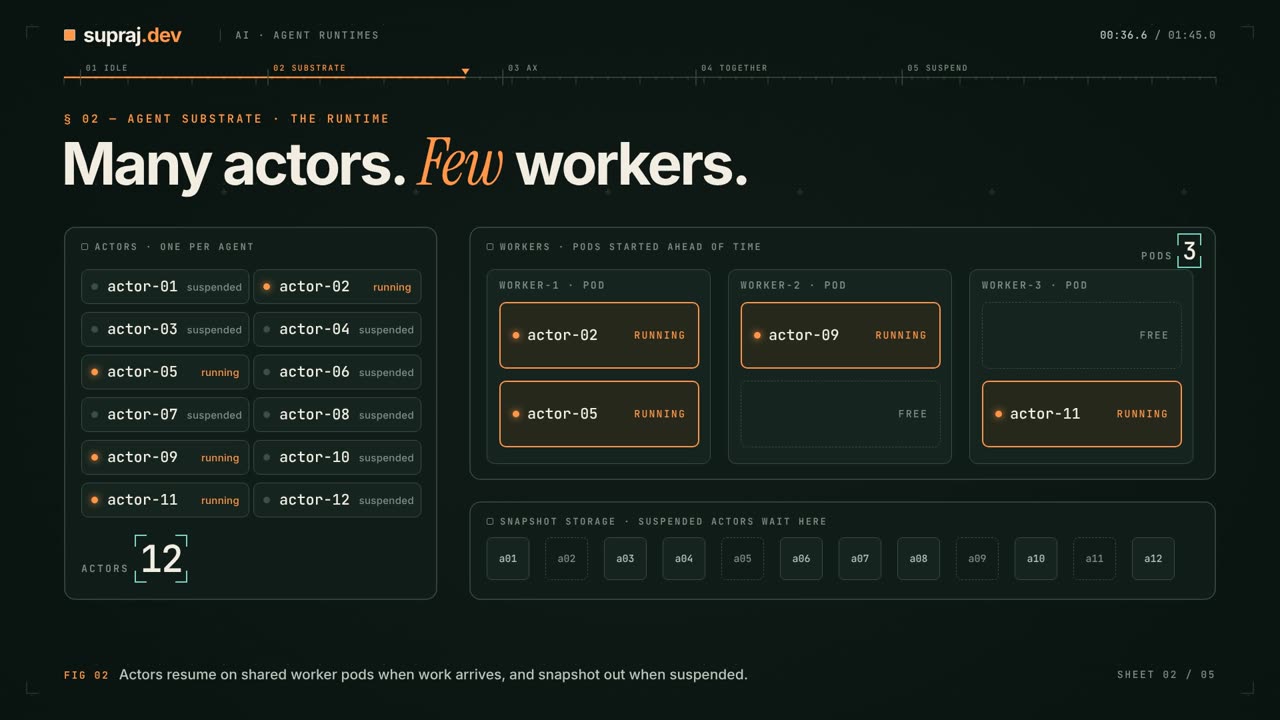
This short animated video continues the story: many actors share a few worker pods, then one AX Task goes through apply, resume, suspend and resume again. For the full walkthrough, read What is Google AX?
Continue the thread
The next question is who gets access.
The next planned Agent Runtimes article follows the security boundaries: what a sandbox protects, where secrets live, and what a compromised actor can still do.
Revisit Part 1: Kubernetes Agent SandboxRead further
Sources
Upstream references use v0.4.0, commit 756c2a5. Sources accessed 15 October
2026.
- Agent Substrate: overview, runtimes, demonstration, and release status.
- Architecture: the workload problem and relationship to Kubernetes.
- Official glossary: actors, workers, templates, lifecycle, and snapshot scopes.
- API guide: worker capacity and snapshot configuration.
- Counter demo: router-triggered restoration.
- Agent Substrate on GKE: external connection limitations.
- Kubernetes documentation: nodes.
- Kubernetes documentation: pods.
- Counter demonstration: memory and durable-file counters, setup, and commands.